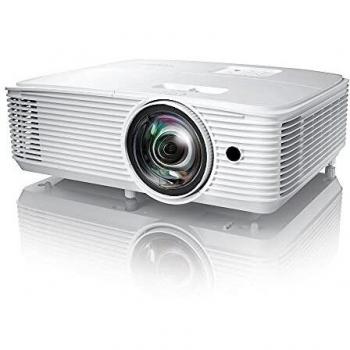
Optoma DH351 Projector FHD 3600Lm





Sponsored This site contains affiliate links for which we may receive compensation. More information
 kaicus.com
Proyector DH351 de Optoma 3600 Lúmenes HDMI | Kaicus España
3.51 CAD
Price updated on: 03-02-2025 11:58:45
3.51 CAD
Price updated on: 03-02-2025 11:58:45 Find other available options:

| Identifiers | |
|---|---|
| MPN | Optoma E1P0A3PBE1Z4 |
| Dimensions / Weight | |
| Key Features | |
|
3D Indicates whether the product has built‑in support for 3‑dimensional (3D) content or displays. A value of "Yes" means the device can render or display 3D images, videos, or games; a value of "No" means it does not have native 3D capability.
|
Yes |
|
AC input frequency The frequency of the alternating current supplied to a power supply or charger, expressed in hertz (Hz). It indicates the acceptable operating range for the electrical mains that powers the device, ensuring proper functionality and safety.
|
50/60 Hz |
|
AC input voltage The range of alternating current voltage that the product accepts from its power source, expressed in volts (V). It indicates the minimum and maximum supply voltages compatible with the device across different regions.
|
100 - 240 V |
|
Batteries included Indicates whether the product comes with batteries included in the package. A value of "Yes" means that batteries are supplied, while a value of "No" indicates that no batteries are provided and must be purchased separately.
|
Yes |
|
Built-in display Indicates whether the product includes a built‑in screen or display unit that can be used directly for viewing content, such as an integrated monitor on a laptop or a built-in display on appliances. A value of "Yes" means the device has such a display; a value of "No" means it does not.
|
No |
|
Built-in speakers Indicates whether the product includes built‑in speaker(s) that can produce sound without requiring external audio devices. A value of "Yes" means the device has one or more integrated speakers; a value of "No" means it does not.
|
Yes |
|
Builtin speakers The total number of integrated speaker units present in the product. This value indicates how many separate speaker elements are built into the device, helping users compare audio capabilities across models.
|
1 |
|
Cable Lock Slot Indicates whether the product includes a slot for inserting a cable lock, such as a Kensington or similar security device.
|
Yes |
|
Cable lock slot type Specifies the type of interface or mechanism used to secure a cable in its port, such as Kensington, Noble, IBM, or other standard lock slots. This attribute helps users identify compatibility and security features of the device.
|
Kensington |
|
Cables included A list of the cable types that are supplied with the product, such as USB, HDMI, VGA, DisplayPort, LAN (RJ‑45), SATA, audio or other relevant connectors.
|
AC |
|
Card reader integrated Indicates whether the device includes a built‑in card reader that can read removable memory cards such as SD, microSD, MMC or similar formats.
|
No |
|
Colour The colour or combination of colours that a product is available in, expressed as common names such as "Black", "Silver" or comma‑separated lists like "Black, White". It indicates the visual appearance of the item for consumers.
|
Black |
|
Contrast ratio The contrast ratio is the proportion between the brightest and darkest luminance a display can produce, expressed as a simple ratio such as 1000:1. It indicates how well a screen can differentiate light from dark areas, affecting image clarity and color depth.
|
22000:1 |
|
Focal length range The minimum and maximum focal lengths that a camera lens or optical system can cover, expressed in millimetres (mm). It indicates the zoom capability of the device and helps users understand the field‑of‑view range available.
|
15.59 - 17.14 mm |
|
Full HD Indicates whether the product is capable of displaying or transmitting video at Full HD resolution (1920 × 1080 pixels). A value of "Yes" means that Full HD functionality is supported, while a value of "No" indicates it is not available.
|
Yes |
|
HDMI version The specific version of the HDMI standard that a product supports, such as "2.0", "2.1" or "1.4b". This value indicates the capabilities and compatibility of the HDMI interfaces on the device.
|
1.4a |
|
Image size The measurement of a display’s diagonal, expressed in inches or centimeters. It indicates the overall visual area available for content and is commonly used to compare monitors, televisions, laptops, tablets, and other electronic devices.
|
28" ~ 301" diagonal |
| Keystone vertical correction | +/- 40° |
|
Lamp power The electrical power rating of a lamp or light source, expressed in watts (W). It indicates the amount of energy the lamp consumes during operation or the maximum output it can deliver to connected devices.
|
240 W |
|
Light source The main illumination source used by the product, such as LED, laser, CCFL, or other light-emitting technologies. It indicates whether the device uses a single light source or multiple sources and helps users understand the lighting characteristics of the item.
|
Lamp |
|
Manual Indicates whether a user manual—physical or digital—is provided with the product. A value of "Yes" means that a manual is included, while a value of "No" indicates that no manual is supplied.
|
Yes |
|
Market positioning A classification that indicates the target audience or use case for a product, such as Business, Gaming, Home & Office, Education, etc. It helps customers quickly identify which products are best suited to their needs.
|
Presentation |
|
Maximum power consumption The highest electrical power that a device can draw or consume during operation, expressed in watts (W). It represents the peak energy usage of the product and is useful for estimating maximum power requirements, comparing efficiency across similar devices, and ensuring compatibility with power supplies.
|
295 W |
|
Native aspect ratio The proportion between the width and height of a screen or image, expressed as two numbers separated by a colon (e.g., 16:9). It indicates whether content is designed for widescreen, square, or other aspect ratios and helps users match devices to their media formats.
|
16:9 |
| Noise Level | 26/28dB |
|
Number of OSD languages The total number of distinct languages that can be displayed on the screen‑on‑display (OSD) interface of a device, such as a monitor or TV. It indicates how many language options are available for menu navigation, subtitles, and other on‑screen text, allowing users to choose their preferred language when interacting with the product.
|
25 |
|
Offset The percentage by which a measurable attribute—such as brightness, contrast, or other performance metrics—deviates from its standard or reference value. It indicates how much the actual measurement is increased or decreased relative to the expected norm.
|
116% |
|
On screen display Indicates whether the product has a built‑in or integrated display that can be used to view content directly, such as on laptops, monitors, TVs, projectors, or other electronic devices.
|
Yes |
|
Operating altitude The range of altitudes (in meters) at which a product or component can operate reliably without performance degradation due to changes in atmospheric pressure, temperature, or other altitude‑related effects.
|
0 - 3000 m |
|
Operating relative humidity The range of relative humidity (in percentage) within which the product is designed to operate reliably. Values are expressed as a minimum–maximum interval such as "20 - 80 %" and indicate the acceptable environmental moisture level for optimal performance.
|
10 - 85% |
|
Operating temperature The range of temperatures in which a product can safely operate without risk of damage or performance degradation. Values are expressed in degrees Celsius (°C) and may represent a single temperature, a minimum–maximum interval, or an average operating point.
|
5 - 40 °C |
|
Password protection Indicates whether a product requires the entry of a password to access sensitive functions or data, providing an additional layer of security against unauthorized use.
|
Yes |
| Power consumption | 205 W |
|
Projection distance The minimum and maximum distances, expressed in metres, at which a projector can display an image on a screen while maintaining acceptable sharpness and brightness. The value is represented as a range (e.g., "1.2 - 10 m"). This attribute helps users determine whether the projector will fit their room size.
|
1 - 9.8 m |
|
Projection technology The optical method used by a projector to create an image, such as DLP, LCD, LED or 3LCD. It indicates the underlying light‑processing system that determines brightness, color accuracy and overall visual performance.
|
DLP |
|
Projector brightness The amount of light emitted by a projector, expressed in ANSI lumens. It indicates how bright the projected image will appear under typical viewing conditions and allows users to compare brightness levels across different projectors.
|
3600 ANSI lumens |
|
Projector native resolution The pixel dimensions that a projector can output, expressed as width by height (e.g., 1920x1080). It indicates the native resolution of the projected image and is used to determine compatibility with source content and display quality.
|
1080p (1920x1080) |
|
Remote control included Indicates whether a remote control is supplied with the product. A value of "Yes" means a remote is included, while "No" indicates that no remote control is provided and the user must obtain one separately.
|
Yes |
|
RMS rated power The root‑mean‑square (RMS) power rating of a device, expressed in watts (W). It represents the average electrical power that the product can deliver or consume under normal operating conditions.
|
5 W |
|
Screen size compatibility The diagonal measurement ranges of screens that the product can project or display, expressed in millimeters and/or inches. It indicates the minimum and maximum screen sizes that the device is designed to handle.
|
711.2 - 7645.4 mm (28 - 301") |
|
Service life of light source The total operating hours a light source can provide before it needs replacement, expressed in standard time units such as hours or days.
|
4000 h |
|
Service life of light source (economic mode) The total operating hours a lamp can provide before it needs replacement when running in an energy‑saving mode, expressed in units of time such as hours or days.
|
10000 h |
|
Supported aspect ratios The proportion between the width and height of a product’s display or image, expressed as two numbers separated by a colon (e.g., 16:9). It indicates whether the content is designed for widescreen, square, or other aspect ratios.
|
4:3,16:9 |
|
Throw ratio The proportion between the distance from a projector to its screen and the width of the projected image, expressed as a simple ratio such as 2:1 or 1.5:1. It indicates how far the projector must be placed to achieve a desired screen size and is useful for planning installation space.
|
1.47: 1 - 1.62: 1 |
|
TVI port Represents how many TVI (Television Interface) connectors are present on the product. The value is a simple integer indicating the total count of TVI ports, regardless of version or configuration.
|
No |
|
Zoom ratio The proportion between the distance from a projector to its screen and the width of the projected image, expressed as a simple ratio such as 2:1 or 1.5:1. It indicates how far the projector must be placed to achieve a desired screen size and is useful for planning installation space.
|
1.1:1 |
| Zoom Type | Manual |

Optoma is a brand of digital projectors and related products. It is a subsidiary of Optoma Technology, Inc., which is a wholly owned subsidiary of Delta Electronics, Inc.