ViewSonic Ultra Slim 32" VX3276 2K WQHD LED LCD




Sponsored This site contains affiliate links for which we may receive compensation. More information
 shoppurilite.ca
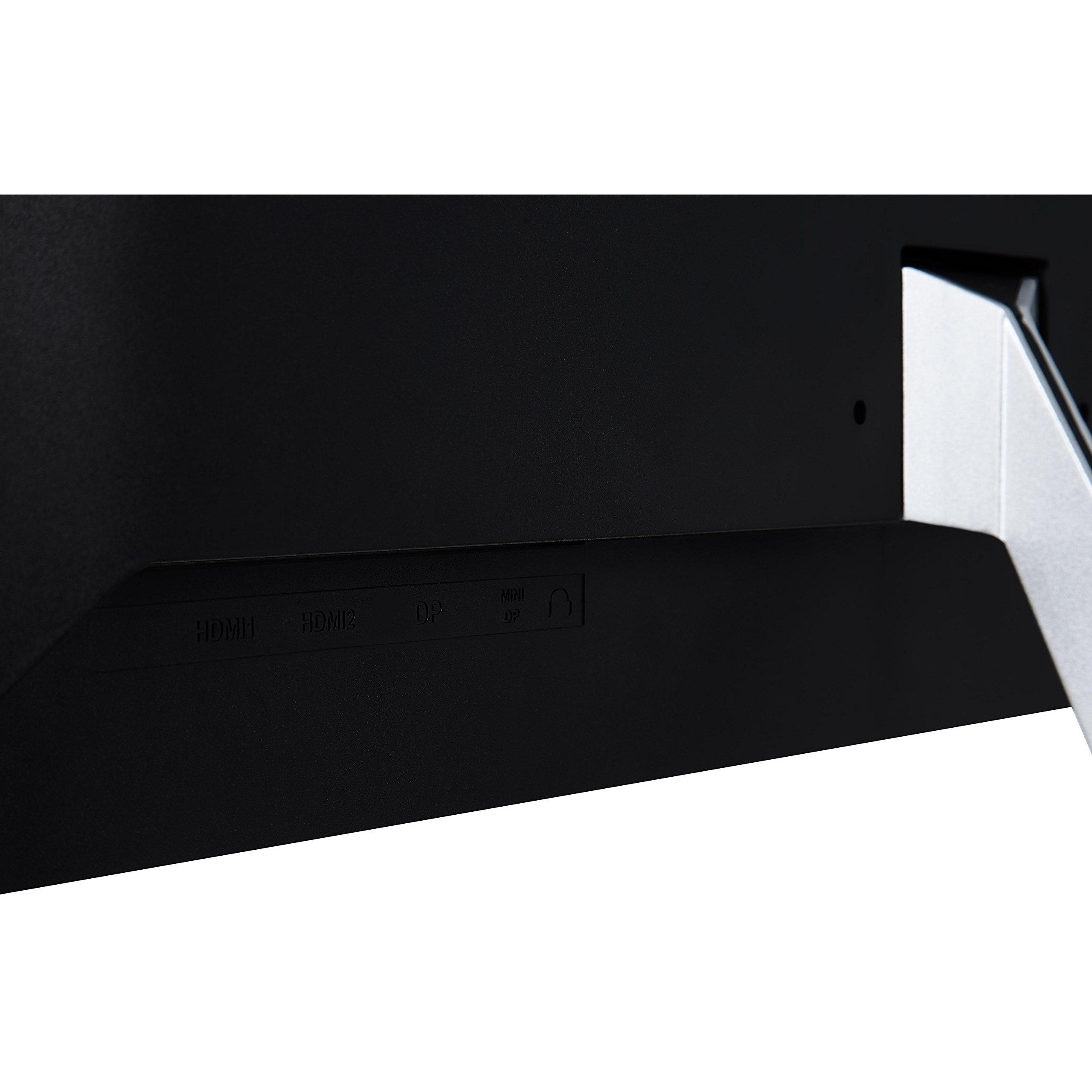
Viewsonic Ultra Slim VX3276-2K-MHD 32" WQHD LED LCD Monitor - 16:9 - Silver - 32" (812.80 mm) Class - 2560 x 1440 - 1.07 Billion Colors - 250 cd/m‚² - 4 ms - HDMI - DisplayPort - Speaker
54.10 CAD
Price updated on: 13-11-2025 16:45:13
54.10 CAD
Price updated on: 13-11-2025 16:45:13 Find other available options:

| Identifiers | |
|---|---|
| MPN | Viewsonic VX3276-2K-MHD |
| Model | Viewsonic VX3276-2K-MHD |
| Dimensions / Weight | |
| Key Features | |
|
120Hz Refresh Rate The number of times per second that a display updates its image, expressed in hertz (Hz). It indicates the smoothness and responsiveness of motion on the screen; higher rates generally provide a more fluid visual experience.
|
No |
|
144hz refresh rate The highest number of times per second that a display can update its image, expressed in hertz (Hz). It indicates the maximum visual smoothness and responsiveness achievable by the monitor under optimal conditions.
|
No |
|
165Hz Refresh Rate Indicates whether a display is capable of operating at a 165 Hz refresh rate, which can provide smoother motion for gaming and high‑motion content. The value is "Yes" if the monitor supports this frequency, otherwise "No".
|
No |
|
180Hz Refresh Rate The highest number of times per second that a monitor can update its image, expressed in hertz (Hz). It indicates the maximum smoothness and responsiveness achievable on the screen; higher values reduce motion blur and improve gaming or video playback quality.
|
No |
|
200hz refresh rate Indicates whether a display is capable of operating at a maximum refresh rate of 200 Hz. A value of "Yes" means the monitor can deliver 200 Hz, while "No" indicates it does not support that frequency. This attribute helps users identify high‑performance displays suitable for fast gaming or motion‑sensitive applications.
|
No |
|
240Hz Refresh Rate Indicates whether a display device can operate at a 240 Hz refresh rate, which provides very smooth motion for gaming and high‑speed video content. The value is "Yes" if the monitor supports this frequency, otherwise "No".
|
No |
|
3D ready Indicates whether a device is capable of displaying or supporting three‑dimensional content, such as 3D video playback, 3D graphics rendering, or compatibility with 3D display technologies. A value of "Yes" means the device can handle 3D formats and provide a stereoscopic viewing experience; "No" indicates it does not support 3D functionality.
|
No |
|
75hz refresh rate The number of times per second that a monitor updates its image, expressed in hertz (Hz). It indicates the smoothness and responsiveness of motion on the screen; higher rates generally provide a more fluid visual experience.
|
Yes |
|
AC input voltage The range of alternating current voltage that the product accepts from its power source, expressed in volts (V). It indicates the minimum and maximum supply voltages compatible with the device across different regions.
|
100 |
|
Aspect ratio The proportion between the width and height of a display, image or video, expressed as two numbers separated by a colon (e.g., 16:9). It indicates whether content is designed for widescreen, square, or other aspect ratios.
|
16:9 |
|
Backlight The illumination source used behind a display panel, such as LED, WLED, CCFL or LCD. It determines the brightness, energy efficiency and color accuracy of the screen.
|
LED |
|
BNC Connection Indicates whether the product includes a BNC (Bayonet Neill‑Concelman) connector for video or RF signals. A value of "Yes" means the device has a BNC port; "No" indicates it does not.
|
No |
|
Brightness The amount of light emitted by a display or projector, expressed in lumens (cd/m² for luminance). It indicates how bright the screen will appear under typical viewing conditions.
|
250 Lumens |
| Built-in USB Hub | No |
|
Cable lock slot type Specifies the type of interface or mechanism used to secure a cable in its port, such as Kensington, Noble, IBM, or other standard lock slots. This attribute helps users identify compatibility and security features of the device.
|
Kensington |
|
Cables included A list of the cable types that are supplied with the product, such as USB, HDMI, VGA, DisplayPort, LAN (RJ‑45), SATA, audio or other relevant connectors.
|
AC, HDMI |
|
Case colour The colour or combination of colours that a product’s outer shell or enclosure is available in, expressed as common names such as "Black", "Silver" or comma‑separated lists like "Black, White". It indicates the visual appearance of the case for consumers.
|
Grey |
|
Certifications A list of formal recognitions, compliance marks, or standards that a product meets. Each entry may be a single certification (e.g., "RoHS") or a group of related certifications separated by commas (e.g., "CE, FCC, RoHS"). The attribute captures all applicable regulatory, environmental, safety, and quality approvals for the item.
|
BSMI, RCM, GEMS, KC, BIS |
|
Colour The colour or combination of colours that a product is available in, expressed as common names such as "Black", "Silver" or comma‑separated lists like "Black, White". It indicates the visual appearance of the item for consumers.
|
Silver |
|
Colours A colour is a visual attribute that describes the hue or shade of an object or surface. It can be a single dominant colour, a combination of colours, or a range such as "Black, White". The value may be expressed in common names (e.g., Black, Silver) or descriptive terms (e.g., One Colour, Assorted).
|
1.07 Billion |
|
Contrast ratio The contrast ratio is the proportion between the brightest and darkest luminance a display can produce, expressed as a simple ratio such as 1000:1. It indicates how well a screen can differentiate light from dark areas, affecting image clarity and color depth.
|
200:1 |
|
Curved Display Indicates whether the product’s screen is curved or flat. A value of "Yes" means the display has a curved panel, while "No" indicates a flat panel.
|
No |
|
Depth The linear measurement of an object from front to back or top to bottom, expressed in a physical unit such as millimeters, centimeters, inches, etc. It indicates how deep the item is and can be used for fitting, compatibility, or spatial planning.
|
230 mm |
|
Depth without stand The linear measurement of an object from front to back or top to bottom, expressed in a physical unit such as millimeters, centimeters, inches, etc. It indicates how deep the item is and can be used for fitting, compatibility, or spatial planning.
|
3.82 cm |
|
Disk form factor The physical size or shape of a storage disk, indicating the dimensions and mounting format used in computers and other devices. Common values include standard sizes such as "3.5" in., "2.5" in., and form‑factor codes like "M.2 2280" or "mSATA". This attribute helps users identify which drives are compatible with a given enclosure, motherboard, or system.
|
3.5 |
|
Display model in showroom The specific model name or number of a display that is presented in the showroom for customers to view and compare. It identifies the exact product variant, allowing shoppers to recognize features such as size, resolution, panel type, and brand.
|
Yes |
|
Display resolution The pixel dimensions of a display or image, expressed as width by height (e.g., 1920x1080). It indicates how many pixels are used to render visual content and is commonly used for monitors, TVs, smartphones, cameras, and digital images.
|
2560x1440 |
|
Displayport connection Indicates whether the product includes at least one DisplayPort connector for high‑resolution video and audio transmission. A value of "Yes" means the device has a physical DisplayPort port; "No" indicates it does not.
|
Yes |
|
DisplayPort In The total count of physical DisplayPort input connectors available on the product. This value indicates how many separate DisplayPort interfaces can receive video and audio signals, allowing multiple external displays or devices to be connected simultaneously.
|
1 x DisplayPort 1.21 x Mini DisplayPort 1.2 |
|
DisplayPort version The specific version of the DisplayPort standard that a product supports, such as "1.4", "2.0" or "2.1b". This value indicates the capabilities and compatibility of the DisplayPort interfaces on the device.
|
1 |
|
DVI connection Indicates whether the product includes a DVI (Digital Visual Interface) port for video output. A value of "Yes" means the device has a DVI connector; "No" means it does not.
|
No |
|
Dynamic contrast ratio The dynamic contrast ratio is the proportion between the maximum and minimum luminance a display can produce while operating under normal conditions, expressed as a simple fraction such as 1200:1. It reflects how well a screen can differentiate light from dark areas during typical use, influencing perceived image quality.
|
000:1 |
|
Electrical Frequency The frequency of the alternating current supplied to a device, expressed in hertz (Hz). It indicates the acceptable operating range for the electrical mains that powers the product and ensures proper functionality and safety.
|
50 to 60 Hz |
|
Electrical Power Consumption The amount of electrical power that a device consumes during operation, expressed in watts (W). It represents the typical energy draw of the product while it is active and can be used to estimate operating costs or compare efficiency across similar devices.
|
43 W |
|
Energy consumption (SDR) per 1000 hours The total amount of electrical energy a product consumes during 1,000 operating hours, expressed in kilowatt‑hours (kWh). This metric allows comparison of energy efficiency across devices regardless of their typical usage patterns.
|
41 kWh |
|
Energy efficiency class (SDR) The energy efficiency class indicates the relative performance of a product, expressed with letters ranging from A+++ (most efficient) to G (least efficient). It allows consumers to compare expected operating costs and environmental impact across similar items.
|
G |
|
Form factor Specifies the physical configuration or design of a product, such as ATX, Micro‑ATX, Mini‑ITX, tower, case with cover, etc. It describes how the device is built and what mounting or expansion options it supports.
|
LCD Monitor |
|
FreeSync Indicates whether a monitor or graphics card supports AMD’s Adaptive Sync technology, FreeSync. A value of "Yes" means the device is compatible; "No" means it does not support the feature.
|
No |
|
G-Sync Indicates whether the product supports NVIDIA’s G‑Sync technology, which dynamically adjusts the display refresh rate to eliminate screen tearing and reduce input lag.
|
No |
|
Gaming Indicates whether the product is suitable or intended for use in gaming environments. A value of "Yes" means the item is designed to meet the performance, ergonomics, or compatibility requirements typical of gaming setups; a value of "No" indicates it is not specifically tailored for gaming.
|
No |
|
Hard Glass Coating Indicates whether the product’s surface is treated with a hard glass coating, such as Gorilla Glass or similar protective layers that enhance scratch resistance and durability.
|
No |
|
HDMI connection The total count of physical HDMI connectors available on the product for transmitting digital audio and video signals.
|
Yes |
| HDMI ports | 2 x HDMI 1.4 |
|
HDR Support Indicates whether a display or device supports High Dynamic Range (HDR) content, and if so which HDR formats are supported. The value can be "Yes" or "No", or a specific HDR standard such as "HDR10" or "DisplayHDR 400".
|
No |
|
Headphone ports Represents how many headphone or earphone connectors are physically present on the product. The value is a simple integer indicating the total count of headphone ports, regardless of type (e.g., 3.5 mm jack, USB‑C, Lightning) or whether they support audio output only or also input.
|
1 x 3.5mm Jack |
|
Height The vertical dimension of a product measured from its lowest to highest point. It is expressed in a physical unit such as millimetres, centimetres or inches and applies to any item where height is relevant, including books, electronics, furniture and other objects.
|
503.87 mm |
|
Height adjustable Indicates whether a product’s vertical dimension can be increased or decreased by the user, typically through mechanical or electronic means. The value is "Yes" if height adjustment is possible and "No" otherwise.
|
No |
|
Horizontal Frequency high The rate, expressed in hertz (Hz), at which a display or monitor processes horizontal scan lines or refreshes the image horizontally. It indicates how many horizontal cycles occur per second and helps users understand performance characteristics related to display refresh, signal processing, or scanning operations.
|
113 KHz |
|
Horizontal Frequency low The lowest horizontal scan or refresh frequency that a display or monitor can operate at, expressed in kilohertz (kHz). It indicates the minimum rate at which horizontal lines are refreshed or processed, affecting image stability and motion handling.
|
15 KHz |
|
Horizontal scan range The range of frequencies, expressed in kilohertz (kHz), over which a device can process or display horizontal signals or scan lines. It indicates the minimum and maximum operating frequencies for horizontal scanning operations.
|
24 |
|
LED backlight The illumination source used behind a display panel, such as LED, WLED, CCFL or LCD. It determines the brightness, energy efficiency and color accuracy of the screen.
|
Yes |
|
Market positioning A classification that indicates the target audience or use case for a product, such as Business, Gaming, Home & Office, Education, etc. It helps customers quickly identify which products are best suited to their needs.
|
Gaming |
|
NTSC coverage (typical) The percentage of the National Television System Committee (NTSC) color spectrum that a display or video device can reproduce, relative to the full NTSC standard. Values close to 100 % indicate that the product can render almost all colors defined by NTSC, providing accurate and vibrant visual output.
|
75% |
| Operating humidity | 20 to 90 % |
|
Panel mounting interface The pair of horizontal and vertical dimensions in millimetres that a product supports for VESA mounting (e.g., "100 × 100 mm"). This value indicates the exact hole spacing required by a mounting bracket to secure the device. It is used for monitors, TVs, projectors and other display equipment that can be wall‑mounted or attached to stands.
|
100x100 |
|
Panel technology The type of display panel used in a visual device, such as IPS, TN, VA, OLED, or other technologies that define how pixels are produced and how the screen responds to light and touch. It indicates the underlying technology that affects contrast, color accuracy, viewing angles, response time, and power consumption.
|
IPS |
|
Pivot rotation Indicates whether a product can pivot or rotate, and if so, the maximum angle of rotation in degrees. Values may be "Yes" or "No" to denote presence of a pivot mechanism, or a numeric value such as "90 Degrees" to specify the achievable rotation range.
|
No |
|
Pixel pitch Represents the physical dimensions of a single pixel on a display or imaging device, expressed as width and height in a length unit (e.g., millimeters). This attribute allows comparison of the physical resolution across screens, cameras, and other pixel‑based technologies.
|
0.273 mm |
|
Power consumption powersave The electrical power drawn by a device while it is in powersave mode, expressed in watts (W). It represents the minimal energy usage when the product is powered on but not actively performing tasks, and can be used to estimate idle consumption or compare efficiency across similar products.
|
36 W |
|
Power source The type of electrical supply that powers the device, such as mains electricity, batteries, USB power, or a combination of these options.
|
Mains Powered |
|
Resolution Type Native The pixel dimensions that a product’s screen can output or support, expressed as width by height (e.g., 1920x1080). It indicates how many pixels are used to render visual content and is commonly applied to monitors, TVs, projectors, and other display devices.
|
QHD |
|
Response time The time interval between a stimulus and the corresponding response of a device or system, expressed in units such as milliseconds (ms). It indicates how quickly the product reacts to input or processes data, which is critical for performance-sensitive applications like displays, gaming monitors, and interactive devices.
|
4 ms |
| Screen shape | Flat |
|
Screen size The diagonal measurement of a display screen expressed in units such as inches or centimeters. It indicates the overall visual area available for content and is commonly used to compare monitors, televisions, laptops, tablets, and other electronic devices.
|
32 in |
|
Screen Size Range The diagonal measurement of a display screen expressed in units such as inches or centimeters, presented as a range (e.g., "22 - 23 in") to indicate the typical size span for that product. It helps customers compare visual area across monitors, TVs, laptops and other devices.
|
Over 30 in |
|
Screen technology The display panel type used in a visual device, such as IPS, TN, VA, OLED, or other technologies that define how pixels are produced and how the screen responds to light and touch. It indicates the underlying technology that affects contrast, color accuracy, viewing angles, response time, and power consumption.
|
In-Plane Switching (IPS) |
|
Screen type The pixel dimensions of a display or image, expressed as width by height (e.g., 1920x1080). It indicates how many pixels are used to render the visual content and is commonly used for monitors, TVs, smartphones, cameras, and digital images.
|
WQHD (1440p) |
|
Screen width The horizontal measurement of a display screen expressed in a linear unit such as millimetres or inches. It indicates how wide the visual area is from one edge to the other and is used for sizing, fitting, and compatibility purposes.
|
698.11 mm |
| Specification | No |
|
Swivel The maximum angular range, measured in degrees, that a product can rotate or swivel around its vertical axis. It indicates how far the device can pivot from its reference position while maintaining functionality and usability.
|
No |
|
Thunderbolt Connection Indicates whether the product includes a Thunderbolt interface, allowing high‑speed data transfer, video output and power delivery in a single cable.
|
No |
|
Tilt Indicates whether the product includes a tilt function that allows the user to adjust the vertical angle of the device. A value of Yes means the product can be tilted up or down; No means it cannot.
|
Yes |
|
Tilt angle range The minimum and maximum angles, expressed in degrees, that a monitor can be tilted or adjusted vertically while maintaining acceptable performance or usability. It indicates the tilt limits for displays such as monitors, stands, or other adjustable equipment.
|
-4 - 15° |
|
Touchscreen Indicates whether a device has a touchscreen interface that can detect touch input. The value is "Yes" if the device includes a functional touchscreen, and "No" otherwise.
|
No |
|
TV Tuner Indicates whether a product includes a built‑in television tuner that can receive broadcast signals directly without requiring an external receiver. A value of "Yes" means the device has such a tuner; a value of "No" means it does not.
|
No |
|
Vertical scan range The range of vertical scan frequencies that a display device can support, expressed in hertz (Hz). It indicates the minimum and maximum refresh rates at which the screen updates vertically, affecting visual smoothness and stability.
|
50 - 75 Hz |
|
VESA Mountable Indicates whether a product can be mounted using the VESA standard, which defines the spacing of mounting holes on the back of displays or monitors. The value can be "Yes" or "No", and may also include specific dimensions such as "100 × 100 mm" to specify the exact pattern supported.
|
Yes |
|
VGA connection Indicates whether the product includes a VGA (Video Graphics Array) port for analog video output. A value of "Yes" means the device has a VGA connector; "No" indicates it does not.
|
No |
|
Viewable size horizontal The width of the display area that a user can see without distortion, measured in a physical unit such as centimeters or inches. It represents the actual horizontal span of the screen that is visible when looking straight at it.
|
69.8 cm |
|
Viewable size vertical The maximum vertical dimension of the visible area on a display screen, expressed as a linear measurement (e.g., centimeters or inches). It indicates how tall the portion of the screen that can be seen by a user is, which helps compare monitors and other visual devices.
|
39.3 cm |
|
Voltage The electrical potential difference that a device is designed to accept from its power source, expressed in volts (V). It indicates the nominal operating voltage for the product and helps users verify compatibility with local mains or battery supplies.
|
100 to 240 VAC |
|
Wall mountable Indicates whether the product can be securely mounted to a wall or other vertical surface using standard mounting hardware.
|
Yes |
|
Weight The mass of the product expressed in a standard unit such as grams or kilograms. It represents how heavy the item is and can be used for shipping calculations, handling instructions, or consumer information.
|
6.2 kg |
|
Width The horizontal measurement of a product, expressed in a linear unit such as millimetres or inches. It indicates how wide the item is from one side to the other and is used for sizing, fitting, and compatibility purposes.
|
712.89 mm |
|
Width without stand The horizontal measurement of a product excluding any attached stand or base, expressed in a linear unit such as millimetres or inches. It indicates how wide the item is from one side to the other and is used for sizing, fitting, and compatibility purposes.
|
71.3 cm |
|
Windows operating systems supported A list of Microsoft Windows operating system versions that the product is compatible with, including any relevant architecture or edition information.
|
Windows 10,Windows 7,Windows 8,Windows 8.1 |

Viewsonic is a brand of computer monitors, projectors, and other electronics. It was founded in 1987 and is now a subsidiary of TPV Technology.


