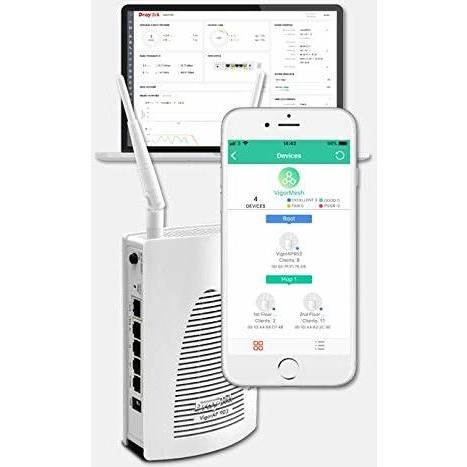
DrayTek VigorAP 903 White Power over Ethernet (PoE)




Sponsored This site contains affiliate links for which we may receive compensation. More information
Find other available options:

| Identifiers | |
|---|---|
| Model | DrayTek VAP903 |
| MPN | DrayTek VAP903 |
| Dimensions / Weight | |
| Key Features | |
|
5 ghz Indicates whether the device can operate on the 5 GHz frequency band of Wi‑Fi networks.
|
Yes |
|
AC input voltage The range of alternating current voltage that the product accepts from its power source, expressed in volts (V). It indicates the minimum and maximum supply voltages compatible with the device across different regions.
|
100 - 240 V |
|
Antenna connector type The specific type of antenna connector used on a device, such as SMA, RP‑SMA, N‑type, or U.FL. This attribute indicates the physical interface required to attach an external antenna and helps users match compatible antennas or cables.
|
SMA |
|
Antenna type The classification of an antenna used in a device, indicating its physical configuration or mounting style such as external, internal, integrated, directional, omnidirectional, or multi‑antenna setups (e.g., "2x2", "4 x External"). It helps buyers understand how the antenna is attached and what signal coverage it may provide.
|
External |
|
Colour The colour or combination of colours that a product is available in, expressed as common names such as "Black", "Silver" or comma‑separated lists like "Black, White". It indicates the visual appearance of the item for consumers.
|
White |
|
Compatible Internet Connections A list of the types of internet connections that a product can use to access network services. Each value describes a specific connection method or technology, such as wired broadband (e.g., cable modem, ADSL, VDSL), wireless local networks (e.g., existing Wi‑Fi), or cellular data links (e.g., 3G/4G via USB modem). The list helps users determine whether the device will work with their available internet infrastructure.
|
Cable-based Modems Existing WiFi Network |
|
Device type The general classification of a product, such as tablet, smartphone, router, or computer. It indicates the primary function or form factor that helps buyers quickly identify and compare similar items.
|
Wireless Access Point |
|
Dimensions The pixel dimensions of a display or image, expressed as width by height (e.g., 1920x1080). It indicates how many pixels are used to render the visual content and is commonly used for monitors, TVs, smartphones, cameras, and digital images.
|
107 x 305 x 45 mm (WxHxD) |
|
Firewall Indicates whether the device includes an integrated firewall that filters and protects network traffic.
|
No |
|
Form-Factor The physical configuration or shape of a device, such as Desktop or Rackmount. It indicates how the product is intended to be mounted or positioned in an environment.
|
Desktop |
|
Frequency The operating frequency of a device or component, expressed in hertz (Hz). It represents the number of cycles per second that the product’s internal circuits or wireless radios can run and is useful for comparing performance across similar products.
|
2.4 GHz 5 GHz |
|
Harmonized System HS code The Harmonized System (HS) code is a standardized numerical identifier used internationally to classify traded goods. It consists of up to six digits, where each pair of digits represents progressively more specific product categories. The HS code facilitates customs duties, trade statistics, and regulatory compliance by providing a common language for describing products across borders.
|
85176990 |
|
Maximum power consumption The highest electrical power that a device can draw or consume during operation, expressed in watts (W). It represents the peak energy usage of the product and is useful for estimating maximum power requirements, comparing efficiency across similar devices, and ensuring compatibility with power supplies.
|
12 W |
|
Mimo type The Multiple‑Input Multiple‑Output (MIMO) configuration of a wireless device, indicating how many spatial streams are supported and whether the system uses single‑user or multi‑user MIMO. Values typically include "Single User MIMO", "Multi User MIMO 2x2", "MU-MIMO 3x3", etc., describing the antenna arrangement and capability to transmit multiple data streams simultaneously.
|
Multi User MIMO |
|
Network Connectivity A comma‑separated list of the networking protocols and standards that a device can support or comply with, such as IEEE 802.11 variants for wireless, IEEE 802.3 for Ethernet, or other relevant network specifications. The values are typically separated by commas and may include both technical identifiers and consumer‑friendly labels.
|
10/100/1000 Wireless LAN |
|
Network Ports A list of the physical network connectors present on the device, such as RJ‑45 Ethernet ports or other wired interfaces. Each entry describes a port type and its capabilities (e.g., speed, duplex mode). The attribute captures all available network connection points that can be used for data transmission.
|
5 x RJ45 10/100/1000 (Gigabit) BaseT for LAN |
| Networking standards | IEEE 802.11a,IEEE 802.11ac,IEEE 802.11b,IEEE 802.11g,IEEE 802.11n |
|
Operating relative humidity The range of relative humidity (in percentage) within which the product is designed to operate reliably. Values are expressed as a minimum–maximum interval such as "20 - 80 %" and indicate the acceptable environmental moisture level for optimal performance.
|
10 - 90 % |
|
Operating temperature The range of temperatures in which a product can safely operate without risk of damage or performance degradation. Values are expressed in degrees Celsius (°C) and may represent a single temperature, a minimum–maximum interval, or an average operating point.
|
0 - 45 °C |
| Other Connectors | N/A |
|
Placement A list of the positions or mounting options where a product can be installed, such as indoor, outdoor, wall, desk, floor, ceiling, or universal. Each value represents a distinct placement scenario that the device supports.
|
Table, Wall |
|
Security algorithms A list of cryptographic and authentication methods that a device can use for secure communication or data protection. Each entry represents a distinct algorithm or protocol, such as encryption ciphers (e.g., AES, WEP), authentication mechanisms (e.g., RADIUS, WPA‑PSK), or network security protocols (e.g., HTTPS, SSL/TLS). The values are typically separated by commas and may include both technical identifiers and consumer‑friendly labels.
|
EAP-TLS,PEAP |
| Specification | No |
|
Total LAN Connections The count of physical Ethernet (LAN) ports available on a networking device, such as routers, switches, or access points. This value indicates how many wired network interfaces the product can provide for connecting computers, servers, or other devices.
|
5 |
|
USB 2.0 ports quantity Represents the count of external USB 2.0 (high‑speed) connectors available on a device. The value is an integer indicating how many USB 2.0 ports can be used for data transfer or power delivery from the outside of the product, regardless of internal placement or version.
|
1 |
|
Weight The mass of the product expressed in a standard unit such as grams or kilograms. It represents how heavy the item is and can be used for shipping calculations, handling instructions, or consumer information.
|
370 g |
|
Wireless Band The radio frequency band(s) that a wireless device supports, such as Dual‑Band (2.4 GHz and 5 GHz), Tri‑Band, or Single‑Band. It indicates the spectrum range available for Wi‑Fi connectivity.
|
Dual Band |
|
Wireless Speed The maximum data transfer rate that a device can achieve over its wireless interface, expressed in bits per second or common abbreviations such as Mbps or Gbps. This value indicates how quickly the device can send and receive information wirelessly.
|
1300 Mbps |
DrayTek
DrayTek is a Taiwanese networking company that produces a range of routers, firewalls and other networking hardware. The company is well-known for its high-quality, feature-rich products, which are popular among small and medium-sized businesses.
DrayTek is a Taiwanese networking company that produces a range of routers, firewalls and other networking hardware. The company is well-known for its high-quality, feature-rich products, which are popular among small and medium-sized businesses.


