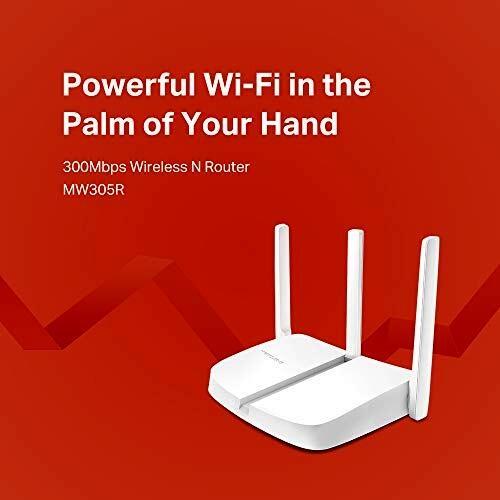
Mercusys MW305R Plug & Play 300Mbps Wireless N Router



Sponsored This site contains affiliate links for which we may receive compensation. More information
 The IT Store (IE)
Mercusys MW305R 300Mbps Wireless N Cable Router
18.26 EUR
Price updated on: 03-04-2024 02:37:35
18.26 EUR
Price updated on: 03-04-2024 02:37:35 Find other available options:

| Identifiers | |
|---|---|
| MPN | MERCUSYS MW305R |
| Dimensions / Weight | |
| Key Features | |
|
Antenna gain level maximum The highest directional signal amplification a device’s antenna can provide, expressed in decibels relative to an isotropic radiator (dBi). It indicates the maximum gain achievable by the antenna and helps users compare coverage or range potential across devices.
|
5 dBi |
|
Antenna type The classification of an antenna used in a device, indicating its physical configuration or mounting style such as external, internal, integrated, directional, omnidirectional, or multi‑antenna setups (e.g., "2x2", "4 x External"). It helps buyers understand how the antenna is attached and what signal coverage it may provide.
|
External |
|
Bands A comma‑separated list of the radio frequency bands that a device can receive or transmit, such as 2.4 GHz, 5 GHz, LTE Band 3, or 5G NR n78. The values are free text and may include band names, numeric frequencies, or both.
|
Single Band |
|
Dhcp A comma‑separated list of the DHCP roles and options a device can provide or use, such as server, client, relay, snooping, option 82 support, IPv6 variants, and other network management functions.
|
Server |
| DMZ support | Yes |
| Dynamic DNS | DynDns, NO-IP |
|
Ethernet LAN interface type Indica el tipo o estándar de la conexión Ethernet que posee un producto, como Gigabit Ethernet, 10 GbE, 2.5 GbE, Fast Ethernet, etc. Los valores suelen ser textos descriptivos sin unidades numéricas y pueden incluir varias opciones separadas por comas cuando el dispositivo soporta más de una velocidad.
|
Fast Ethernet |
| Interfaces | 3 x 10/100Mbps LAN ports1 x 10/100Mbps WAN port |
|
Management A list of the network interfaces and protocols that a device can use for configuration, monitoring and remote management, such as web‑based GUI (HTTP/HTTPS), command‑line interface (CLI) via Telnet or SSH, SNMP, or other standard protocols. Each entry represents one supported method, allowing users to understand how they can access the device remotely.
|
Parental ControlAccess controlLocal managementRemote management |
| Network Standard | 9.0 x 9.0 x 8.0 cm (WxDxH) |
|
Port forwarding Indicates whether the device supports configuring port forwarding rules to allow external traffic to reach specific internal services or devices. The value can be a simple yes/no, or a list of supported features such as Virtual Server, UPnP, DMZ, Port Triggering, ALG, etc.
|
Virtual Server, UPnP, DMZ |
|
Refresh rate The number of times per second that a display updates its image, expressed in hertz (Hz). It indicates the smoothness and responsiveness of motion on the screen; higher rates generally provide a more fluid visual experience.
|
60Hz 2Ms Response Time |
| Wireless functions | WDS bridge |
|
Wireless standard A list of the Wi‑Fi standards that a device supports, such as 802.11a, 802.11b, 802.11g, 802.11n, 802.11ac or 802.11ax. The values are typically separated by commas and may include both technical identifiers and consumer‑friendly labels.
|
802.11n |
|
Wireless standards A comma‑separated list of the wireless networking protocols and frequency bands that a device can connect to, such as IEEE 802.11a, IEEE 802.11b, IEEE 802.11g, Wi‑Fi 4 (802.11n), Wi‑Fi 5 (802.11ac) or Wi‑Fi 6 (802.11ax). The values may include both the technical name and a consumer‑friendly label, and they represent all standards that the product claims to support.
|
IEEE 802.11n, IEEE 802.11g, IEEE 802.11b |
MERCUSYS


