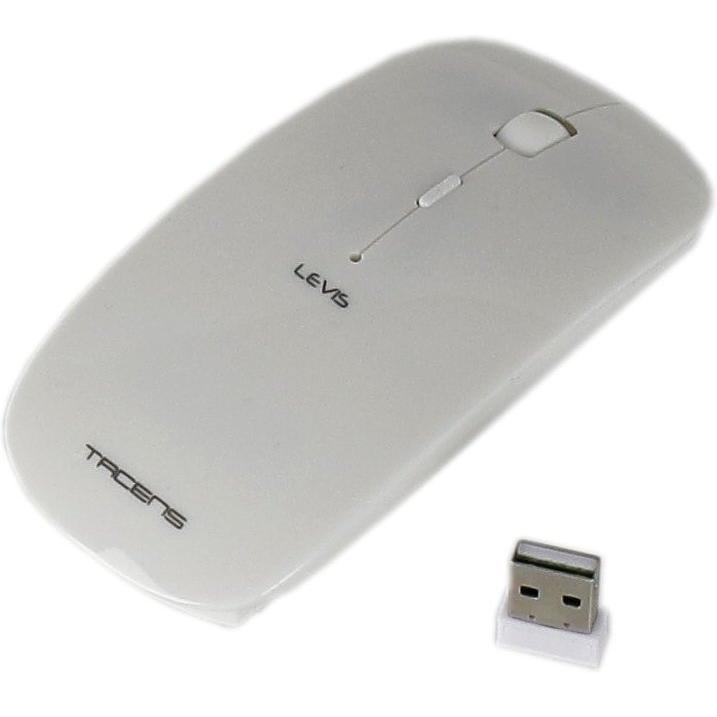
Tacens Levis Combo Radio Transfer Wireless Mouse for PC/Mac


Sponsored This site contains affiliate links for which we may receive compensation. More information
Find other available options:

| Identifiers | |
|---|---|
| MPN | Tacens 6LEVISCOMBOV2 |
| Model | Tacens Levis Combo |
| Dimensions / Weight | |
| Key Features | |
|
Batteries included Indicates whether the product comes with batteries included in the package. A value of "Yes" means that batteries are supplied, while a value of "No" indicates that no batteries are provided and must be purchased separately.
|
No |
|
Connectivity technology The network and data interface technologies supported by the product, such as Wired, Wireless, USB, Bluetooth, or combinations thereof. Each value represents a distinct technology that can be used for communication or power delivery.
|
Wireless |
|
Device interface List of physical or logical interfaces that a device can use to connect with other components, such as USB, PCI Express, SATA, Ethernet, Thunderbolt, DisplayPort, and similar technologies. Each value represents an interface standard supported by the device.
|
RF Wireless |
|
Frequency band The operating frequency range of a device expressed in hertz (Hz). It indicates the specific radio frequencies that the product can transmit or receive, whether as a single value (e.g., 2.4 GHz) or a range (e.g., 2.4–5 GHz). This attribute helps users understand the wireless capabilities and compatibility of the device with network standards.
|
2.4 GHz |
|
Internal Indicates whether the product is designed to be installed inside a computer system, such as an internal hard drive, SSD, or network card. A value of "Yes" means it can be mounted within the chassis; "No" indicates it is intended for external use.
|
No |
|
Keyboard form factor Represents the physical layout or size classification of a keyboard, such as full‑size, mini, tenkeyless (TKL), or other common form factors used in computer input devices.
|
Mini |
|
Keyboard style A concise description of the physical shape or layout style of a keyboard, such as "Straight", "Curved" or "Numeric". It indicates whether the keys are arranged in a flat, angled, or numeric‑only configuration and helps users identify the typing experience and ergonomics of the device.
|
Straight |
|
Keyboard weight The mass of a keyboard expressed in a standard unit such as grams or kilograms. It indicates how heavy the keyboard is and can be used for shipping calculations, handling instructions, or consumer information.
|
314 g |
|
Mac operating systems supported A list of macOS operating system versions that the product supports or is compatible with, such as "macOS 10.15 Catalina", "macOS 11 Big Sur" or newer releases. Each entry represents a distinct OS version that can run on or be supported by the device.
|
Yes |
|
Mouse battery type The chemical composition or classification of the battery used in a computer mouse, such as alkaline, lithium‑ion, NiMH, or other types. This attribute helps users determine compatibility with replacement batteries and understand power characteristics.
|
AAA |
|
Mouse included Indicates whether a mouse is supplied with the product as part of its standard package. A value of "Yes" means that a mouse is included and ready for use, while "No" means no mouse is provided and must be purchased separately.
|
Yes |
|
Mouse weight The mass of a mouse expressed in a standard unit such as grams or kilograms. It represents how heavy the device is and can be used for shipping calculations, handling instructions, or consumer information.
|
65 g |
|
Movement detection technology The type of technology used to detect movement in a device or system, such as optical sensors, laser tracking, infrared LEDs, or capacitive touch. It indicates how motion is sensed—by visual changes, light scattering, or electronic signals—and helps users understand the underlying mechanism for motion detection.
|
Optical |
|
Movement resolution The number of dots per inch that a device can detect or render when tracking movement. It indicates the spatial resolution of motion sensing or optical tracking, allowing users to understand how finely the device can capture or display motion details.
|
2000 DPI |
|
Number of scroll wheels The total number of scroll wheel mechanisms present on a pointing device such as a mouse or trackball. The value is an integer indicating how many separate scroll wheels the product includes, which can affect scrolling performance and ergonomics.
|
1 |
|
Power source type The type of electrical supply that powers the device, such as mains electricity, batteries, USB power, or a combination of these options.
|
Battery |
|
Purpose The purpose indicates the primary function or intended use of a product, such as "Notebook", "Gaming", or "Server". It helps customers quickly identify whether the item matches their needs and can be used for filtering or categorization across different product categories.
|
Universal |
|
Receiver included Indicates whether the product comes with a wireless receiver included in its package. A value of "Yes" means a receiver is supplied, while "No" indicates that no receiver is provided and must be purchased separately.
|
Yes |
|
Receiver type The type of wireless receiver that accompanies a keyboard or mouse, such as Nano, Micro, Unifying, Standard, or other specialized receivers. It indicates the form factor and compatibility with the device’s wireless protocol.
|
Nano receiver |
|
Scroll Indicates whether the device can perform vertical or horizontal scrolling actions, such as with a scroll wheel, touchpad gesture, or other mechanism. A value of Yes means the product includes built‑in scrolling functionality; No indicates no scrolling capability is present.
|
Yes |
|
Scroll type The type of input mechanism that allows a user to scroll or navigate within an application, such as a wheel, touch surface, buttons, ring, or trackball. It indicates how the device translates physical movement into scrolling actions on the screen.
|
Wheel |
|
Scrolling directions The direction(s) in which a device can scroll or navigate within an application, such as vertical, horizontal, or both.
|
Vertical |
|
Surface coloration Represents the visual appearance or pattern applied to a product’s surface, such as a single color (monotone), an image, or a repeating design. It indicates how the exterior of the item is finished and can be used to differentiate models or styles.
|
Monotone |
|
Windows operating systems supported A list of Microsoft Windows operating system versions that the product is compatible with, including any relevant architecture or edition information.
|
Yes |
|
Wireless range The maximum distance over which a device can maintain a reliable wireless connection to another device or network. It is expressed in linear units such as meters or feet and indicates the effective coverage area for Wi‑Fi, Bluetooth, RF, or other radio technologies.
|
10 m |
|
Wireless receiver interface List of physical or logical interfaces that a wireless receiver can use to connect with its host device, such as USB Type‑A, USB Type‑C, or audio jacks. The values are free‑text labels describing the connector type and any relevant version information.
|
USB |
|
Wrist rest Indicates whether the product includes a wrist rest or support feature that provides ergonomic cushioning for the user's wrists during use.
|
No |
Tacens


