ASUS ROG Strix XG32VC WQHD FreeSync Premium Pro Monitor




Sponsored This site contains affiliate links for which we may receive compensation. More information
Find other available options:

| Identifiers | |
|---|---|
| MPN | ASUS XG32VC |
| Dimensions / Weight | |
| Key Features | |
|
AMD FreeSync Indicates whether a monitor or graphics card supports AMD’s Adaptive Sync technology, FreeSync. A value of "Yes" means the device is compatible; "No" means it does not support the feature.
|
Yes |
|
AMD FreeSync type The specific variant of AMD’s Adaptive Sync technology supported by a display, such as FreeSync, FreeSync Premium or FreeSync Premium Pro. It indicates the level of performance and feature set available for variable‑refresh-rate gaming or smooth video playback.
|
FreeSync Premium Pro |
|
Aspect ratio The proportion between the width and height of a display, image or video, expressed as two numbers separated by a colon (e.g., 16:9). It indicates whether content is designed for widescreen, square, or other aspect ratios.
|
16:9 |
|
Audio input Indicates how many separate audio input connections are available on the product. Each port can accept a microphone, line‑level signal or other audio source and is typically identified by its connector type (e.g., 3.5 mm jack, XLR). The value is an integer that represents the total count of distinct input ports.
|
No |
|
Built-in camera Indicates whether the product includes a built‑in camera that can capture images or video directly, without requiring an external device. A value of "Yes" means the device has such a camera; "No" means it does not.
|
No |
| Built-in USB Hub | Yes |
|
Cable lock slot Indicates whether the product includes a slot for inserting a cable lock, such as a Kensington or similar security device.
|
Yes |
|
Cable lock slot type The specific type of cable lock interface that a device provides for securing cables, such as Kensington, Noble, IBM or other standard locking mechanisms.
|
Kensington |
|
Cables included A list of the cable types that are supplied with the product, such as USB, HDMI, VGA, DisplayPort, LAN (RJ‑45), SATA, audio or other relevant connectors.
|
AC, DisplayPort, HDMI, USB, USB Type-C |
|
Colour The colour or combination of colours that a product is available in, expressed as common names such as "Black", "Silver" or comma‑separated lists like "Black, White". It indicates the visual appearance of the item for consumers.
|
Black |
|
Contrast ratio The contrast ratio is the proportion between the brightest and darkest luminance a display can produce, expressed as a simple ratio such as 1000:1. It indicates how well a screen can differentiate light from dark areas, affecting image clarity and color depth.
|
3000:1 |
| DC-in jack | Yes |
|
Depth without stand The linear measurement of an object from front to back or top to bottom, expressed in a physical unit such as millimeters, centimeters, inches, etc. It indicates how deep the item is and can be used for fitting, compatibility, or spatial planning.
|
11.8 cm |
|
Digital horizontal frequency The horizontal digital frequency indicates the range of frequencies, expressed in kilohertz (kHz), over which a device can process or transmit horizontal digital signals. It is represented as a minimum–maximum interval and helps users understand the signal bandwidth supported by the product.
|
30 |
|
Digital vertical frequency The range of frequencies, in hertz (Hz), at which a display device can refresh its image vertically when operating in digital mode. It indicates the minimum and maximum vertical scan rates supported, helping users assess visual smoothness and compatibility with various content sources.
|
48 |
|
Display brightness typical The average luminance emitted by a display under normal viewing conditions, expressed in candela per square meter (cd/m²). It indicates how bright the screen will appear to users and is useful for comparing monitors, TVs, laptops and other visual devices.
|
400 cd/m² |
| Display Diagonal | 80 cm (31.5") |
|
Display number of colours The total count of distinct colours that a product’s display can reproduce. This value indicates the colour depth or gamut capability of the screen, helping users compare visual fidelity across devices.
|
1.073 billion colours |
|
Display resolution The pixel dimensions of a display or image, expressed as width by height (e.g., 1920x1080). It indicates how many pixels are used to render visual content and is commonly used for monitors, TVs, smartphones, cameras, and digital images.
|
2560x1440 |
|
Display technology The type of display panel used in a visual device, such as LED‑backlit LCD, IPS, TN, VA, OLED, or AMOLED. It indicates the underlying technology that determines image quality, color accuracy, viewing angles, response time and power consumption.
|
LED |
|
Displayport Version The specific version of the DisplayPort standard that a product supports, such as "1.4", "2.0" or "2.1b". This value indicates the capabilities and compatibility of the DisplayPort interfaces on the device.
|
1.2 |
|
DVI port Indicates how many DVI connectors are present on the product. The value is a simple integer representing the total count of DVI ports, regardless of type or version.
|
No |
|
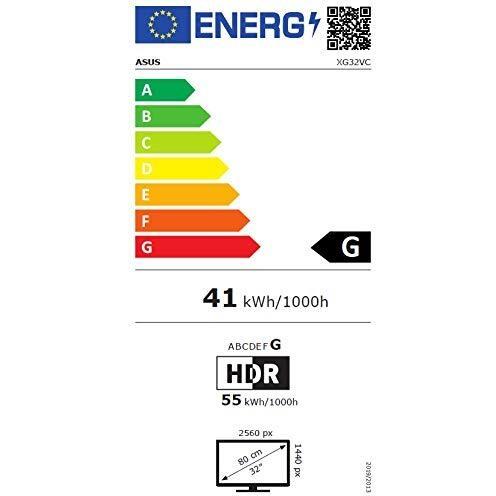
Energy consumption (HDR) per 1000 hours The total amount of electrical energy a product consumes over a period of 1 000 hours, expressed in kilowatt‑hours (kWh). This metric allows consumers to compare the long‑term energy usage of devices that operate for extended periods and estimate annual consumption based on typical usage patterns.
|
55 kWh |
|
Energy consumption (SDR) per 1000 hours The total amount of electrical energy a product consumes during 1,000 operating hours, expressed in kilowatt‑hours (kWh). This metric allows comparison of energy efficiency across devices regardless of their typical usage patterns.
|
41 kWh |
|
Energy efficiency class (HDR) The energy efficiency class indicates the relative performance of a product, expressed with letters ranging from A+++ (most efficient) to G (least efficient). It allows consumers to compare expected operating costs and environmental impact across similar items.
|
G |
|
Energy efficiency scale The energy efficiency scale indicates the relative performance of a product in terms of electricity consumption, expressed with letters ranging from A+++ (most efficient) to G (least efficient). It allows consumers to compare expected operating costs and environmental impact across similar items.
|
A to G |
|
Flicker-free technology Indicates whether the product incorporates a flicker‑free display technology that eliminates or reduces screen flickering, improving visual comfort and reducing eye strain.
|
Yes |
|
Frameless design Indicates whether a product has no visible frame or bezel around its display or main surface. A value of "Yes" means the device is designed without a surrounding border, while "No" indicates that a frame or bezel is present.
|
Yes |
|
HD type The pixel dimensions of a product’s screen, expressed as width by height (e.g., 1920x1080). It indicates the total number of pixels that compose the display and is used to assess image sharpness and clarity across devices such as monitors, TVs, laptops, and cameras.
|
1280x720 |
|
HDCP Indicates whether a device supports HDCP (High‑bandwidth Digital Content Protection), allowing it to play or display protected digital content on compatible screens and audio/video equipment.
|
Yes |
|
HDMI Cantidad total de conectores HDMI que el producto ofrece para la transmisión de audio y vídeo digital.
|
Yes |
|
HDMI version The specific version of the HDMI standard that a product supports, such as "2.0", "2.1" or "1.4b". This value indicates the capabilities and compatibility of the HDMI interfaces on the device.
|
2.0 |
|
Headphone connectivity Indicates the types of headphone or earphone connections available on a product, such as wired jacks (e.g., 3.5 mm), USB‑C, Lightning, or wireless Bluetooth. The value may list one or more connection types separated by commas.
|
3.5 mm |
| Headphone out | Yes |
|
Height (without stand) The vertical dimension of a product measured from its lowest to highest point, excluding any attached stand or base. It is expressed in a physical unit such as millimetres, centimetres or inches and applies to any item where height is relevant, including books, electronics, furniture and other objects.
|
42.6 cm |
|
Height adjustment The ability of a product to change its vertical dimension, typically measured in millimetres, centimetres or inches. It indicates whether the user can raise or lower the item and, if so, by how much. This attribute applies to monitors, desks, furniture, stands and other equipment that offer adjustable height.
|
Yes |
|
High Dynamic Range (HDR) supported Indicates whether a product can display or process high‑dynamic‑range content. A value of "Yes" means the device supports HDR formats and can render images with a wider contrast range, while "No" indicates it does not support HDR.
|
Yes |
|
In stock Indicates whether the product is a wire‑cut item (custom cut to size) or a stock item (pre‑cut to standard dimensions). This attribute helps buyers understand the manufacturing process and potential customization options.
|
Y |
|
Low blue light technology Indicates whether the display incorporates a low‑blue‑light feature that reduces eye strain by limiting blue light emission during use.
|
Yes |
|
Market positioning A classification that indicates the target audience or use case for a product, such as Business, Gaming, Home & Office, Education, etc. It helps customers quickly identify which products are best suited to their needs.
|
Gaming |
|
Maximum refresh rate The highest number of times per second that a display can update its image, expressed in hertz (Hz). It indicates the maximum refresh capability of the device and is useful for comparing visual performance across monitors, TVs, laptops, and other screen‑based products.
|
170 Hz |
|
Package depth The linear measurement from front to back or top to bottom of a product’s packaging, expressed in a physical unit such as millimeters, centimeters, inches, etc. It indicates how deep the packaged item is and can be used for fitting, compatibility, or spatial planning.
|
280 mm |
|
Package Height The vertical dimension of a product’s packaging measured from its lowest to highest point. It is expressed in a physical unit such as millimetres, centimetres or inches and helps customers assess how tall the package will be when stored or shipped.
|
626 mm |
|
Package type The form of packaging used for a product, such as box, blister pack, bag, or pallet. It indicates how the item is contained and protected during shipping and storage.
|
Box |
|
Package weight The mass of the product’s packaging expressed in a standard unit such as grams or kilograms. It indicates how heavy the package is and can be used for shipping calculations, handling instructions, or consumer information.
|
13.6 kg |
|
Package width The horizontal measurement of a product’s packaging, expressed in a linear unit such as millimetres or inches. It indicates how wide the package is from one side to the other and helps customers assess fit for storage, shipping, or display.
|
800 mm |
|
Panel mounting interface The pair of horizontal and vertical dimensions in millimetres that a product supports for VESA mounting (e.g., "100 × 100 mm"). This value indicates the exact hole spacing required by a mounting bracket to secure the device. It is used for monitors, TVs, projectors and other display equipment that can be wall‑mounted or attached to stands.
|
100x100 |
|
Panel type The underlying display panel technology used in a visual device, such as IPS, TN, VA, OLED, AMOLED, or other variants. It indicates the type of liquid crystal arrangement or organic light‑emitting structure that determines image quality, color accuracy, viewing angles and power consumption.
|
VA |
|
Pixel pitch Represents the physical size of a single pixel on a display, expressed as width and height in a length unit (e.g., millimeters). This attribute allows comparison of the physical resolution of screens or imaging devices that use metric units to describe the smallest visible point.
|
0.277 x 0.277 mm |
|
Power adapter included Indicates whether the product comes with an AC power adapter included in the package. A value of "Yes" means a charger is supplied, while "No" indicates that no charger is provided and the user must obtain one separately.
|
Yes |
| Power consumption | 45 W |
| Power consumption (off) | 0.2 W |
|
Power consumption powersave The electrical power drawn by a device while it is in powersave mode, expressed in watts (W). It represents the minimal energy usage when the product is powered on but not actively performing tasks, and can be used to estimate idle consumption or compare efficiency across similar products.
|
0.5 W |
|
Quick start guide Indicates whether a quick‑start guide is provided with the product. A value of "Yes" means that a brief, introductory manual or overview is included to help users get started quickly; "No" indicates that no such guide is supplied.
|
Yes |
|
RGB colour space El nombre del espacio de color RGB que utiliza el producto, como "sRGB", "NTSC" o "DCI‑P3". Este atributo indica la gama de colores que el dispositivo puede representar y es útil para comparar pantallas, impresoras u otros dispositivos visuales.
|
sRGB |
| Screen shape | Curved |
|
sRGB coverage typical The proportion of the standard sRGB color space that a display can reproduce, expressed as a percentage. Values close to 100 % indicate that the screen can render almost all colors defined by the sRGB standard, providing accurate and consistent visual output for images, videos, and design work.
|
125 % |
|
Stand included Indicates whether a product comes with an attached stand or base included in the package. A value of "Yes" means the stand is supplied, while "No" indicates that no stand is provided and the user must obtain one separately.
|
Yes |
|
Swivel angle range The maximum angular range a device can rotate or tilt, expressed as a numeric interval in degrees (e.g., "-45 to 45°"). It indicates how far the product can pivot left/right or up/down from its neutral position.
|
-25 - 25° |
|
Swivelling Indicates whether a product, such as a monitor or other device, can rotate around its vertical axis to adjust viewing angle. A value of "Yes" means the item supports swiveling; "No" means it does not.
|
Yes |
|
Tilt angle range The range of angles, expressed in degrees, that a product can be tilted or adjusted vertically while maintaining acceptable performance or usability. It indicates the minimum and maximum tilt limits for devices such as monitors, stands, or other adjustable equipment.
|
-5 - 20° |
|
Tiltable Indicates whether the product can be tilted or adjusted in angle to improve viewing comfort or ergonomics.
|
Yes |
|
USB Hub Version The specific USB standard version supported by the hub, expressed as a generation and revision (e.g., "3.2 Gen 1" or "3.0"). This indicates the maximum data transfer rate and compatibility with connected devices.
|
3.2 Gen |
|
USB Type-A The standard USB Type‑A connector is the rectangular plug used on many devices for data transfer and power delivery. It defines the physical shape, pin layout, and electrical characteristics that allow a device to communicate with or charge from another USB port.
|
2 |
|
USB upstream port type The total number of USB connectors available on the product, regardless of type or version. This value is a simple integer that indicates how many USB ports the device provides for connecting peripherals such as keyboards, mice, storage devices, and other accessories.
|
USB Type-B |
|
VESA Adaptive Sync support Indicates whether a display or monitor supports adaptive sync technology, which synchronizes the refresh rate of the screen with the graphics card to reduce tearing and stuttering during video playback or gaming.
|
Yes |
|
VESA mounting Indicates whether a product supports the VESA mounting standard, which defines the size and placement of mounting holes on displays or monitors. The value can be "Yes" or "No", or it may specify one or more VESA patterns such as "100 × 100 mm" to indicate the exact dimensions supported.
|
Yes |
|
Viewable size diagonal The overall visual area of a monitor’s display measured along its diagonal, expressed in inches or centimeters. It indicates how large the screen appears to the user and is commonly used to compare monitors, televisions, laptops, tablets, and other electronic devices.
|
80.1 cm |
|
Viewable size horizontal The width of the display area that a user can see without distortion, measured in a physical unit such as centimeters or inches. It represents the actual horizontal span of the screen that is visible when looking straight at it.
|
69.7 cm |
|
Viewable size vertical The maximum vertical dimension of the visible area on a display screen, expressed as a linear measurement (e.g., centimeters or inches). It indicates how tall the portion of the screen that can be seen by a user is, which helps compare monitors and other visual devices.
|
39.2 cm |
|
Weight with stand The total mass of a product including any attached stand or base, expressed in a standard unit such as grams or kilograms. This measurement is useful for shipping calculations, handling instructions, and consumer information.
|
9.3 kg |
|
Weight without stand The mass of a product measured from its lowest to highest point, excluding any attached stand or base. It is expressed in a standard unit such as grams or kilograms and can be used for shipping calculations, handling instructions, or consumer information.
|
5.8 kg |
|
Width without stand The horizontal measurement of a product excluding any attached stand or base, expressed in a linear unit such as millimetres or inches. It indicates how wide the item is from one side to the other and is used for sizing, fitting, and compatibility purposes.
|
71.3 cm |

Asus is a Taiwanese electronics company that produces a wide range of products, including laptops, desktops, mobile phones, tablets, and servers. Asus is best known for its laptops, which are often praised for their quality, features, and design.


