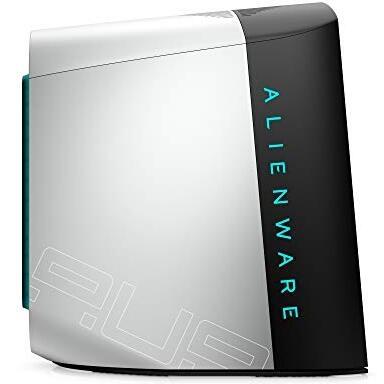
Alienware Aurora R12 Gaming Desktop with Intel Core i7-11700F Processor, NVIDIA GeForce GTX 1660 Ti GPU, 8GB HyperX FURY DDR4 RAM, 512GB NVMe SSD + 1TB HDD Storage, and Windows 10 Home operating system



Sponsored This site contains affiliate links for which we may receive compensation. More information
Find other available options:

| Identifiers | |
|---|---|
| MPN | Alienware Aurora R12 |
| Dimensions / Weight | |
| Key Features | |
|
Audio chip The model of the audio processing chip integrated into a device, indicating the specific hardware responsible for sound generation and decoding.
|
Realtek ALC3861 |
|
Audio output channels Indicates the total number of independent audio channels that a product can produce or process, including sub‑channels such as those used in surround sound configurations (e.g., 5.1, 7.2). The value may be an integer or a decimal to represent fractional channel groups.
|
7.1 channels |
|
Audio system Specifies the audio system installed or supported by the product, such as Dolby Audio, SonicMaster, MaxxAudio Pro, or other proprietary audio processing technologies. The value is a free‑text string that identifies the main audio engine or brand used for sound playback and processing.
|
High Definition Audio |
|
Bluetooth version The specific version of the Bluetooth standard supported by a product, expressed as a numeric value (e.g., 4.2, 5.0) or with additional descriptors such as "+HS" or feature lists. This attribute indicates the capabilities and compatibility for wireless communication.
|
5 |
|
Cable lock slot type Specifies the type of interface or mechanism used to secure a cable in its port, such as Kensington, Noble, IBM, or other standard lock slots. This attribute helps users identify compatibility and security features of the device.
|
Kensington |
|
Cables included A list of the cable types that are supplied with the product, such as USB, HDMI, VGA, DisplayPort, LAN (RJ‑45), SATA, audio or other relevant connectors.
|
AC |
|
Chassis type The physical form factor of a computer chassis, indicating its size and layout such as Tower, Desktop, Mini‑PC, or rack units (e.g., 1U, 2U). This attribute helps users identify the footprint, mounting options, and compatibility with other hardware.
|
Desktop |
|
Colour The colour or combination of colours that a product is available in, expressed as common names such as "Black", "Silver" or comma‑separated lists like "Black, White". It indicates the visual appearance of the item for consumers.
|
White |
|
Discrete GPU manufacturer The brand or company that produces the dedicated graphics processing unit (GPU) installed in a device, such as a laptop, desktop, or standalone video card. This value helps users identify the source of the GPU technology, assess compatibility, support options, and performance expectations.
|
NVIDIA |
|
Discrete graphics adapter memory The amount of dedicated video memory (VRAM) available on a discrete graphics adapter, expressed as a data size such as megabytes (MB) or gigabytes (GB). It indicates how much graphical data can be stored for textures, frame buffers, and other GPU tasks, affecting performance in gaming, rendering, and high‑resolution displays.
|
6144 MB |
| Discrete graphics adapter model | NVIDIA® GeForce® GTX 1660 Ti |
| Discrete graphics memory type | GDDR6 |
|
Ethernet LAN ports Represents the total count of Ethernet LAN (RJ‑45) interfaces available on a product. The value is an integer indicating how many physical Ethernet ports are present, regardless of speed or generation.
|
1 |
|
HDD Capacity The total amount of digital storage that an internal hard drive can hold, expressed as a numeric value with an appropriate unit such as GB, MB, or TB. This attribute helps users understand how much data the device’s built‑in hard drive can store and compare storage options across products.
|
1024000 MB |
|
HDD interface List of the physical interface(s) used by a hard drive together with the number of bays it occupies, such as "2 x SATA (2 x Bay)" or "1 x M.2 PCIe". This attribute helps users determine both the connection type and how many drives can be installed in an enclosure or system.
|
SATA |
|
Internal memory The total amount of internal memory available in a device, expressed as a data size such as megabytes (MB) or gigabytes (GB). It indicates how much information the component can hold for active processes and affects multitasking performance.
|
8192 MB |
|
Internal memory type The type of memory physically installed inside a device, such as DDR4 SDRAM, LPDDR3, or other RAM variants. It indicates the architecture and generation of the internal memory modules that the product uses or supports.
|
DDR4-SDRAM |
|
Market positioning A classification that indicates the target audience or use case for a product, such as Business, Gaming, Home & Office, Education, etc. It helps customers quickly identify which products are best suited to their needs.
|
Gaming |
|
Maximum internal memory The largest amount of internal random‑access memory that a device can support, expressed as a data size such as megabytes or gigabytes. It indicates the maximum capacity for active processes and multitasking performance.
|
131072 MB |
|
Motherboard chipset The model of the motherboard’s chipset, indicating the family of supported processors and integrated features such as I/O interfaces, memory support, and peripheral connectivity.
|
Intel Z490 |
|
Non-operating altitude The altitude interval (in meters) at which a product or component ceases to function correctly due to environmental factors such as reduced atmospheric pressure, temperature changes, or other elevation‑related effects. The value is expressed as a minimum–maximum range and applies to any device that has documented limits for operation above or below certain heights.
|
-15.2 - 10668 m |
|
Operating altitude The range of altitudes (in meters) at which a product or component can operate reliably without performance degradation due to changes in atmospheric pressure, temperature, or other altitude‑related effects.
|
-15.2 - 3048 m |
|
Operating relative humidity The range of relative humidity (in percentage) within which the product is designed to operate reliably. Values are expressed as a minimum–maximum interval such as "20 - 80 %" and indicate the acceptable environmental moisture level for optimal performance.
|
20 - 90 % |
|
Operating temperature The range of temperatures in which a product can safely operate without risk of damage or performance degradation. Values are expressed in degrees Celsius (°C) and may represent a single temperature, a minimum–maximum interval, or an average operating point.
|
10 - 35 °C |
|
Placement supported A list of the positions or mounting options where a product can be installed, such as indoor, outdoor, wall, desk, floor, ceiling, or universal. Each value represents a distinct placement scenario that the device supports.
|
Vertical |
|
Power supply input frequency The frequency of the alternating current supplied to a device, expressed in hertz (Hz). It indicates the acceptable operating range for the electrical mains that powers the product.
|
47 |
|
Power supply input voltage The range of alternating current voltage that the product accepts from its power source, expressed in volts (V). It indicates the minimum and maximum supply voltages compatible with the device.
|
90 |
|
Processor boost frequency The highest clock speed a processor can reach when its turbo or boost feature is active, expressed in hertz (Hz). This value indicates the peak performance capability of the CPU under load and helps users compare how fast a processor can run beyond its base clock speed.
|
4.9 GHz |
|
Processor cache The amount of internal memory reserved for a processor’s cache, expressed in units such as megabytes (MB) or gigabytes (GB). This value indicates how much data the CPU can store locally to accelerate access and improve performance.
|
16 MB |
|
Processor family The processor family identifies the group or series of CPU models that share a common architecture, design, and performance characteristics. It helps users compare processors across brands and generations by indicating the underlying technology used in the chip.
|
Intel Core i7 |
| SSD Capacity | 524288 MB |
|
SSD interface List of physical or logical interfaces that a solid‑state drive can use to connect with other components, such as PCI Express (PCIe), Serial ATA (SATA), NVMe, U.2 or other standard connections.
|
NVMe,PCI Express |
|
Storage drives installed The total count of individual storage devices (hard disk drives or solid‑state drives) that are physically present in the product. It indicates how many separate drives are installed, regardless of capacity or interface type.
|
2 |
|
Storage media The type of storage medium used in the product, such as SSD, HDD, eMMC, Flash, or hybrid combinations. It indicates whether the device uses solid‑state, magnetic, or other forms of memory and helps users understand the underlying technology.
|
HDD+SSD |
|
Storage relative humidity The range of relative humidity (expressed as a percentage) within which the storage device is designed to operate reliably. Values are given as a minimum–maximum interval such as "10 - 90 %" and indicate the acceptable environmental moisture level for optimal performance.
|
5 - 95 % |
|
Storage temperature The range of temperatures in which a device can safely operate without risk of damage or performance degradation. Values are expressed in degrees Celsius (°C) and may represent a single temperature, a minimum–maximum interval, or an average operating point.
|
-40 - 65 °C |
|
Total storage capacity The overall amount of digital storage that can be held by the device, including all built‑in and removable options. The value is expressed as a numeric quantity followed by an appropriate unit such as GB, MB, or TB.
|
1548288 MB |
| WLAN controller manufacturer | Killer |
Alienware


