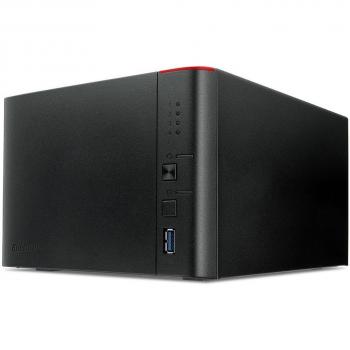
BUFFALO Terastation 1400 - Nas Server - Rack-Mountable


Sponsored This site contains affiliate links for which we may receive compensation. More information

BUFFALO Terastation 1400 - Nas Server - 8 Tb - Rack-Mountable - Sata 3Gb/S - Hdd 2 Tb X 4 - Raid 0
720.99 GBP
Price updated on: 06-10-2025 06:16:17
720.99 GBP
Price updated on: 06-10-2025 06:16:17 Find other available options:

| Identifiers | |
|---|---|
| Model | Buffalo TS1400R0804-EU |
| MPN | Buffalo TS1400R0804-EU |
| Dimensions / Weight | |
| Key Features | |
|
AC input frequency The frequency of the alternating current supplied to the device, expressed in hertz (Hz). It indicates the acceptable operating range for the electrical mains that powers the product.
|
50 - 60 Hz |
|
AC input voltage The alternating current voltage range that the product accepts from its power source, expressed in volts (V). It indicates the minimum and maximum supply voltages compatible with the device.
|
100-240 V |
|
Backup function Indicates whether a device has the capability to create backups of its data or settings, allowing restoration in case of loss, failure, or interruption.
|
Yes |
|
Card reader integrated Indicates whether the device includes a built‑in card reader that can read removable memory cards such as SD, microSD, MMC or similar formats.
|
No |
|
Colour The colour or combination of colours that a product is available in, expressed as common names such as "Black", "Silver" or comma‑separated lists like "Black, White". It indicates the visual appearance of the item for consumers.
|
Black,Silver |
|
Component for Specifies the type of device or system that the product is intended to be used with, such as a PC, server, notebook, surveillance system, or other electronic equipment. The value represents a single category and can be used to filter or group products by their target platform.
|
PC/notebook |
|
Cooling type The method used to dissipate heat from a component or system, such as active cooling (fans or liquid loops), passive heat sinks, or no active cooling. It indicates whether the product relies on airflow, conduction, or other mechanisms to maintain safe operating temperatures.
|
Active |
|
Data link protocols A comma‑separated list of network communication protocols that a device can use or support at the data link layer, such as Ethernet variants (Fast, Gigabit), Fibre Channel, and other link‑level standards. Each protocol is represented by its standard name and may be separated by commas or slashes in the source data.
|
CIFS/SMB, AFP, NFS, HTTP/HTTPS, FTP, SFTP |
|
Data transfer rate The highest theoretical speed at which a device can send or receive data, expressed in bits per second (bps) or its multiples such as kbps, mbps, gbps, etc. It represents the upper bound of throughput under optimal conditions and is useful for comparing performance across devices and interfaces.
|
6 Gbit/s |
|
Depth The linear measurement of an object from front to back or top to bottom, expressed in a physical unit such as millimeters, centimeters, inches, etc. It indicates how deep the item is and can be used for fitting, compatibility, or spatial planning.
|
420 mm |
|
DHCP Client Indicates whether the device supports the DHCP client function, meaning it can automatically request an IP address and related network settings from a DHCP server.
|
No |
|
DHCP server Indicates whether the device supports acting as a DHCP server, allowing it to assign IP addresses and network configuration settings to clients on the network.
|
No |
|
Ethernet LAN Indicates whether the product includes an Ethernet LAN interface for wired network connectivity, allowing data transmission over RJ‑45 or compatible cables.
|
Yes |
|
Ethernet LAN data rates Maximum theoretical speed at which a device can send or receive data over its Ethernet LAN interface, expressed in megabits per second (Mbps) or gigabits per second (Gbps). It represents the upper bound of throughput under optimal conditions and is useful for comparing network performance between devices with wired connectivity.
|
10,100,1000 Mbit/s |
|
Ethernet LAN ports Represents the total count of Ethernet LAN (RJ‑45) interfaces available on a product. The value is an integer indicating how many physical Ethernet ports are present, regardless of speed or generation.
|
1 |
|
Height The vertical dimension of a product measured from its lowest to highest point. It is expressed in a physical unit such as millimetres, centimetres or inches and applies to any item where height is relevant, including books, electronics, furniture and other objects.
|
44.3 mm |
|
Hot-swap drive bays Indicates whether the product’s drive bays support hot‑swap, meaning drives can be inserted or removed while the device is powered on without shutting down or rebooting.
|
Yes |
| Installed storage drive type | HDD |
|
Interface The physical or logical interface used by a device to connect with other components, such as USB, PCI Express, SATA, Ethernet, Thunderbolt, DisplayPort, or similar standards. It indicates the technology that enables data transfer and power delivery between the product and its peripherals.
|
Serial ATA III |
|
Internal memory The total amount of internal memory available in a device, expressed as a data size such as megabytes (MB) or gigabytes (GB). It indicates how much information the component can hold for active processes and affects multitasking performance.
|
512 MB |
|
Internal memory type The type of memory physically installed inside a device, such as DDR4 SDRAM, LPDDR3, or other RAM variants. It indicates the architecture and generation of the internal memory modules that the product uses or supports.
|
DDR3 |
|
LED indicators A list of the functions or statuses that an LED indicator on a device can display, such as power status, activity, link, and other operational signals.
|
LAN,Power,Y |
|
Linux operating systems supported List of Linux operating systems that the product can run or support, including specific versions and architectures when relevant. Each value represents a distinct Linux distribution or kernel version supported by the hardware or software.
|
Yes |
|
Management protocols A list of network protocols that a device can use for configuration, monitoring and remote management, such as SNMP, HTTP/HTTPS, Telnet, SSH or other standard interfaces. Each protocol is represented by its common name and may be separated by commas or slashes in the source data.
|
HTTP/HTTPS |
|
Maximum power consumption The highest electrical power that a device can draw or consume during operation, expressed in watts (W). It represents the peak energy usage of the product and is useful for estimating maximum power requirements, comparing efficiency across similar devices, and ensuring compatibility with power supplies.
|
140 W |
|
Maximum supported storage capacity The largest amount of digital storage that a product can accommodate, expressed as a numeric value with an appropriate unit such as GB, MB, or TB. This attribute indicates the upper limit of data capacity for the device and helps users compare how much information it can hold.
|
16777216 MB |
|
Number of fans The total count of fan units included in the product. This value indicates how many separate fans are present, which can affect cooling performance and noise levels.
|
2 fan(s) |
|
Number of storage drives supported The total count of individual storage drives that a product can accommodate or support. This includes internal and external hard disks, solid‑state drives, or other removable media devices. The value is an integer representing how many separate drive units the system can host, install, or connect.
|
4 |
| NVM Express NVMe supported | No |
|
Operating relative humidity The range of relative humidity (in percentage) within which the product is designed to operate reliably. Values are expressed as a minimum–maximum interval such as "20 - 80 %" and indicate the acceptable environmental moisture level for optimal performance.
|
20 - 80 % |
|
Operating system installed The operating system that is installed on the device, indicating the software platform that manages hardware resources and provides services for applications. It can be a commercial OS such as Windows or macOS, an open‑source distribution like Linux, or a proprietary firmware used in embedded devices.
|
Linux |
|
Operating temperature The range of temperatures in which a product can safely operate without risk of damage or performance degradation. Values are expressed in degrees Celsius (°C) and may represent a single temperature, a minimum–maximum interval, or an average operating point.
|
5 - 35 °C |
| Power consumption | 30 W |
|
Power supply location The physical position where the power supply unit is installed or mounted within a device, such as top, bottom, rear, side, front, or built‑in. This attribute helps users understand where to find the power source and plan cable routing or ventilation.
|
External |
|
Processor family The processor family identifies the group or series of CPU models that share a common architecture, design, and performance characteristics. It helps users compare processors across brands and generations by indicating the underlying technology used in the chip.
|
ARM |
|
Processor frequency The fundamental operating frequency of a processor, expressed in hertz (Hz). It indicates the speed at which the CPU runs under normal conditions and is typically reported in gigahertz (GHz) or megahertz (MHz). This value helps users compare performance potential across different models.
|
1.2 GHz |
|
Processor model Identifies the exact model of the central processing unit used in a device, including brand and numeric designation such as "Intel Core i5-8250U" or "AMD Ryzen 7 3700X". This value allows users to distinguish between different processor families, generations, and performance levels.
|
Armada 370 |
|
RAID levels A comma‑separated list that specifies the RAID configurations supported by a storage controller or device. Each entry can be a numeric level (e.g., 0, 1, 5, 10) or a special label such as JBOD. This attribute indicates which disk arrangements the system can manage.
|
0,1,5,6,10,JBOD |
|
RAID support A comma‑separated list of RAID levels that a storage device or controller can support, such as 0, 1, 5, 10, JBOD, and other proprietary configurations. Each value represents a distinct RAID mode the system is capable of creating or managing.
|
Yes |
| SSD Capacity | 32 GB |
|
Storage Drive Capacity The total amount of data that a storage drive can hold, expressed as a numeric value with an appropriate unit such as GB, MB, or TB. This attribute helps users understand how much information the drive can store and compare storage options across devices.
|
2048000 MB |
|
Storage drive interface List of physical or logical interfaces that allow communication between a hard drive and other devices, such as SATA, M.2 PCIe, U.2, SAS, NVMe, or other standard connections.
|
Serial ATA II,Serial ATA III |
|
Storage drives installed The total count of individual storage devices (hard disk drives or solid‑state drives) that are physically present in the product. It indicates how many separate drives are installed, regardless of capacity or interface type.
|
Yes |
|
Supported network protocols A list of network communication protocols that a device can use or support, such as TCP/IP, HTTP, HTTPS, FTP, DHCP, DNS, and various wireless standards. Each protocol is represented by its standard name and may be separated by commas or slashes in the source data.
|
TCP/IP |
|
Total installed storage capacity The total amount of digital storage that a device or component can hold, expressed with an appropriate unit such as GB, MB, TB, or a descriptive label indicating whether the storage is built‑in or external. This value represents the maximum capacity available for storing data, applications, and media.
|
8388608 MB |
|
Type The general category or style of the product, such as laptop, printer cartridge, or cooling fan. It helps buyers quickly identify the nature of the item and compare similar products.
|
NAS |
|
Web-based management Indicates whether the product can be configured and monitored through a web interface accessible via a browser, allowing remote administration over a local or internet connection.
|
Yes |
|
Weight The mass of the product expressed in a standard unit such as grams or kilograms. It represents how heavy the item is and can be used for shipping calculations, handling instructions, or consumer information.
|
9 kg |
|
Wi-Fi Indicates whether the product has built‑in Wi‑Fi capability, allowing it to connect to wireless networks without requiring external adapters or dongles.
|
No |
|
Width The horizontal measurement of a product, expressed in a linear unit such as millimetres or inches. It indicates how wide the item is from one side to the other and is used for sizing, fitting, and compatibility purposes.
|
430 mm |
Buffalo
Buffalo is a brand that produces a range of shoes, bags and accessories. The company is known for its stylish and contemporary designs, as well as its high quality materials and construction. Buffalo products are popular with fashion-conscious consumers who appreciate good design and value for money.
Buffalo is a brand that produces a range of shoes, bags and accessories. The company is known for its stylish and contemporary designs, as well as its high quality materials and construction. Buffalo products are popular with fashion-conscious consumers who appreciate good design and value for money.