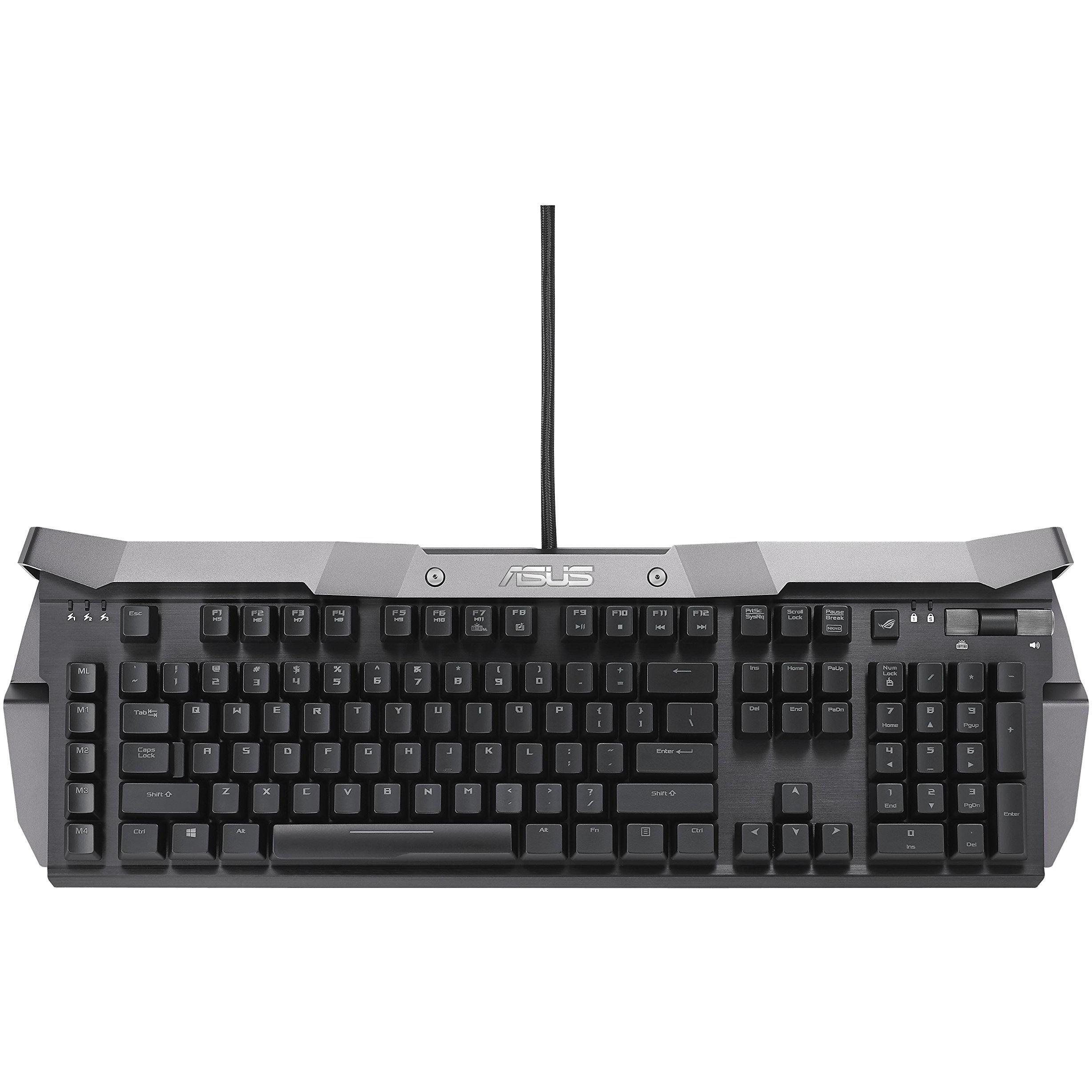
Horus X-90 Mechanical Gaming Keypad


Sponsored This site contains affiliate links for which we may receive compensation. More information
Find other available options:

| Identifiers | |
|---|---|
| Model | ASUS 90XB01HN-BKB020 |
| MPN | ASUS 90XB01HN-BKB020 |
| Dimensions / Weight | |
| Key Features | |
| Backlight | Yes |
|
Backlight colour The colour(s) of the illumination used on a keyboard’s backlighting system, such as RGB combinations (e.g., "Red/Green/Blue"), single‑colour options (e.g., "White", "Blue") or generic terms like "Multi". This attribute helps users identify the visual appearance and lighting capabilities of the keyboard.
|
Various |
|
Backlight type The illumination source used behind a display panel, such as LED, WLED, CCFL or LCD. It determines the brightness uniformity, power consumption and color performance of the screen.
|
RGB LED |
|
Built-in memory Indicates whether the product includes built‑in memory for data storage, such as an internal hard drive or solid‑state drive. A value of "Yes" means the device has such a memory component; a value of "No" means it does not.
|
Yes |
|
Device interface List of physical or logical interfaces that a device can use to connect with other components, such as USB, PCI Express, SATA, Ethernet, Thunderbolt, DisplayPort, and similar technologies. Each value represents an interface standard supported by the device.
|
USB |
|
Hot Keys Indicates whether a keyboard or input device includes programmable hot keys that can be customized for shortcuts, media control, gaming macros, or other functions.
|
Yes |
|
Keyboard form factor Represents the physical layout or size classification of a keyboard, such as full‑size, mini, tenkeyless (TKL), or other common form factors used in computer input devices.
|
Standard |
|
Keyboard key switch The mechanical or non‑mechanical mechanism that activates each key on a keyboard, such as mechanical, membrane, scissor, opto‑mechanical, or semi‑mechanical. It indicates how the key registers input and affects typing feel, durability, and noise level.
|
Mechanical |
|
Keyboard language The natural language that the keyboard layout is designed for, indicating which regional or linguistic variant of key labels and input methods are available on the device.
|
English |
|
Keyboard layout The arrangement of keys on a keyboard, indicating the language or region it supports (e.g., QWERTY, UK QWERTZ, AZERTY). This attribute helps users identify which typing layout is available for the device.
|
QWERTY |
|
Keyboard number of keys The total count of individual key switches or buttons present on a keyboard device, including alphanumeric keys, function keys, navigation keys, and any additional special keys such as media controls or macro keys.
|
110 |
|
Keyboard style A concise description of the physical shape or layout style of a keyboard, such as "Straight", "Curved" or "Numeric". It indicates whether the keys are arranged in a flat, angled, or numeric‑only configuration and helps users identify the typing experience and ergonomics of the device.
|
Straight |
|
Keyboard weight The mass of a keyboard expressed in a standard unit such as grams or kilograms. It indicates how heavy the keyboard is and can be used for shipping calculations, handling instructions, or consumer information.
|
1.7 kg |
|
LED indicators A list of the functions or statuses that an LED indicator on a device can display, such as power status, activity, link, and other operational signals.
|
Yes |
|
Mouse included Indicates whether a mouse is supplied as part of the product’s standard package or bundle. A value of "Yes" means a mouse is included and ready for use; a value of "No" means no mouse is provided and must be purchased separately.
|
No |
|
Number of products included The total count of individual items that are part of the product package or bundle. It indicates how many separate units, components, or accessories are supplied together in a single purchase, regardless of type or function. The value is expressed as an integer without any unit of measure.
|
1 pc(s) |
|
Numeric keypad Indicates whether the product includes a numeric keypad area on its keyboard, typically found in full-size or laptop keyboards with an integrated numeric section.
|
Yes |
|
Pointing device The type of pointing device integrated into or used with the product, such as a touchpad, clickpad, trackpoint, or mouse. The value is a free‑text label that identifies the specific form factor or mechanism the user interacts with to move the cursor or select items.
|
No |
|
Recommended usage A brief statement of the intended or most suitable use cases for a product, such as the type of environment (indoor, outdoor), activity (gaming, office work, music listening) or general application category. It helps customers quickly determine whether the item fits their needs.
|
Gaming |
|
Surface coloration Represents the visual appearance or pattern applied to a product’s surface, such as a single color (monotone), an image, or a repeating design. It indicates how the exterior of the item is finished and can be used to differentiate models or styles.
|
Monotone |
|
USB 2.0 ports quantity Represents the count of external USB 2.0 (high‑speed) connectors available on a device. The value is an integer indicating how many USB 2.0 ports can be used for data transfer or power delivery from the outside of the product, regardless of internal placement or version.
|
2 |
|
Windows keys The total count of individual key switches present on a keyboard or similar input device, including all standard, function, and special keys. This value indicates how many separate keys are available for typing, gaming, shortcuts, or other functions, regardless of layout or branding.
|
Yes |
|
Wrist rest Indicates whether the product includes a wrist rest or support feature that provides ergonomic cushioning for the user's wrists during use.
|
Yes |

Asus is a Taiwanese electronics company that produces a wide range of products, including laptops, desktops, mobile phones, tablets, and servers. Asus is best known for its laptops, which are often praised for their quality, features, and design.