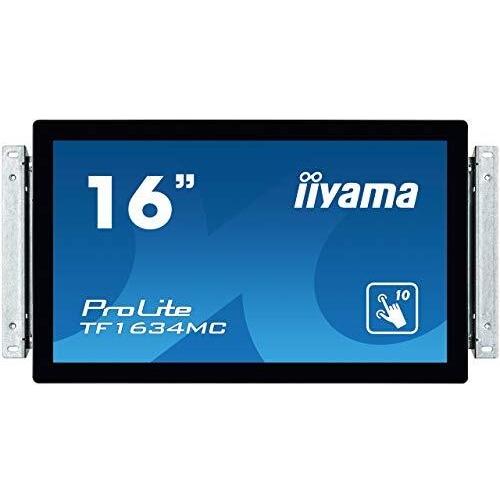
Iiyama ProLite TF1634MC-B6X 16" Black




Sponsored This site contains affiliate links for which we may receive compensation. More information
 Quzo
Quzo
Sponsored iiyama ProLite TF1634MC-B6X computer monitor 39.6 cm (15.6") 1366 x 768 pixels LED Touchscreen Black
443.07 GBP
Price updated on: 24-10-2024 11:57:51
443.07 GBP
Price updated on: 24-10-2024 11:57:51 | Identifiers | |
|---|---|
| MPN | iiyama TF1634MC-B6X |
| Dimensions / Weight | |
| Key Features | |
|
AC adapter included Indicates whether the product comes with an AC power adapter included in the package. A value of "Yes" means a charger is supplied, while "No" indicates that no charger is provided and the user must obtain one separately.
|
Yes |
|
AC adapter output voltage The electrical potential difference supplied by the AC adapter to a device, expressed in volts (V). It indicates the nominal voltage that the charger outputs and is used to match the adapter with compatible equipment.
|
12 V |
|
Aspect ratio The proportion between the width and height of a display, image or video, expressed as two numbers separated by a colon (e.g., 16:9). It indicates whether content is designed for widescreen, square, or other aspect ratios.
|
16:9 |
|
Built-in camera Indicates whether the product includes a built‑in camera that can capture images or video directly, without requiring an external device. A value of "Yes" means the device has such a camera; "No" means it does not.
|
No |
|
Built-in microphone Indicates whether the product includes at least one built‑in microphone. A value of "Yes" means that the device has an integrated microphone, while "No" indicates it does not.
|
No |
|
Cables included A list of the cable types that are supplied with the product, such as USB, HDMI, VGA, DisplayPort, LAN (RJ‑45), SATA, audio or other relevant connectors.
|
AC,DisplayPort,HDMI,USB |
|
Certification A list of official certifications or compliance marks that the product has received from regulatory bodies, safety organizations, or industry standards groups. Each entry represents a distinct certification such as CE, FCC, RoHS, UL, or WEEE, and may include additional details like version numbers or specific test reports.
|
CE, TÜV, CU, cULus, VCCI |
|
DDC/CI Indicates whether the product includes a power‑saving feature that reduces energy consumption when the device is idle or in low‑activity states.
|
Yes |
|
Depth The linear measurement of an object from front to back or top to bottom, expressed in a physical unit such as millimeters, centimeters, inches, etc. It indicates how deep the item is and can be used for fitting, compatibility, or spatial planning.
|
230.5 mm |
|
Display brightness The intensity of light emitted per unit area from a display surface, measured in candela per square meter (cd/m²). It indicates how bright the screen will appear under typical viewing conditions.
|
400 cd/m² |
|
Display Diagonal The measurement of a display’s diagonal, expressed in inches or centimeters. It represents the overall visual area available for content and is commonly used to compare monitors, televisions, laptops, tablets, and other electronic devices.
|
39.6 cm (15.6") |
|
Display number of colours The total count of distinct colours that a product’s display can reproduce. This value indicates the colour depth or gamut capability of the screen, helping users compare visual fidelity across devices.
|
16.78 million colors |
|
Display resolution The pixel dimensions of a display or image, expressed as width by height (e.g., 1920x1080). It indicates how many pixels are used to render visual content and is commonly used for monitors, TVs, smartphones, cameras, and digital images.
|
1366 x 768 pixels |
|
Display surface The visual appearance or texture of a product’s display surface, such as matte, glossy, or satin. It indicates how light reflects off the screen and can affect glare, visibility, and aesthetic preference for users.
|
Matt |
|
Display technology The type of display panel used in a visual device, such as LED‑backlit LCD, IPS, TN, VA, OLED, or AMOLED. It indicates the underlying technology that determines image quality, color accuracy, viewing angles, response time and power consumption.
|
TN |
|
Display type The visual display technology used by the product, such as LED, LCD, OLED, IPS, AMOLED, or other panel types. It indicates the underlying screen technology that determines image quality, color reproduction and power consumption.
|
LED |
|
DisplayPorts quantity The total count of physical or virtual display output connections available on a device, such as HDMI, DisplayPort, DVI, VGA, or USB‑C ports that support video output.
|
1 |
|
Glass thickness The measured distance between the two opposite surfaces of a glass pane or panel, expressed in a linear unit such as millimeters (mm), centimeters (cm), or inches (in). This attribute helps users assess the durability, weight, and suitability of the glass for various applications.
|
2.4 mm |
|
HDCP Indicates whether a device supports HDCP (High‑bandwidth Digital Content Protection), allowing it to play or display protected digital content on compatible screens and audio/video equipment.
|
Yes |
|
HDMI A list of the HDMI ports available on the product, each entry indicating the number of ports and their specific HDMI version or additional features (e.g., "2 x HDMI 2.0b", "1 x HDMI 1.4 with CEC"). This attribute helps users understand both the quantity and capabilities of the HDMI connections.
|
Yes |
|
Height The vertical dimension of a product measured from its lowest to highest point. It is expressed in a physical unit such as millimetres, centimetres or inches and applies to any item where height is relevant, including books, electronics, furniture and other objects.
|
46 mm |
|
Horizontal scan range The range of frequencies, expressed in kilohertz (kHz), over which a device can process or display horizontal signals or scan lines. It indicates the minimum and maximum operating frequencies for horizontal scanning operations.
|
31.4 - 60.3 kHz |
|
International Protection IP code The IP (Ingress Protection) code indicates a product’s resistance to solids and liquids. It follows the standard two‑digit format (e.g., IP20, IP67), where the first digit represents protection against solid particles and the second against liquids. The code may include an ‘X’ to denote unknown protection for that category or multiple codes separated by commas for products offering different levels of protection in various configurations.
|
IP65 |
|
LED indicators A list of the functions or statuses that an LED indicator on a device can display, such as power status, activity, link, and other operational signals.
|
Yes |
|
Linux operating systems supported List of Linux operating systems that the product can run or support, including specific versions and architectures when relevant. Each value represents a distinct Linux distribution or kernel version supported by the hardware or software.
|
Yes |
|
Number of OSD languages The total number of distinct languages that can be displayed on the screen‑on‑display (OSD) interface of a device, such as a monitor or TV. It indicates how many language options are available for menu navigation, subtitles, and other on‑screen text, allowing users to choose their preferred language when interacting with the product.
|
7 |
|
Number of simultaneous touchpoints The total count of independent touch points that can be detected on a device at the same time. It indicates how many distinct finger or stylus contacts the screen can recognize simultaneously, which affects multitouch gestures and user interaction capabilities.
|
10 |
|
Panel mounting interface The pair of horizontal and vertical dimensions in millimetres that a product supports for VESA mounting (e.g., "100 × 100 mm"). This value indicates the exact hole spacing required by a mounting bracket to secure the device. It is used for monitors, TVs, projectors and other display equipment that can be wall‑mounted or attached to stands.
|
100x100 |
|
Pixel pitch Represents the physical size of a single pixel on a display, expressed as width and height in a length unit (e.g., millimeters). This attribute allows comparison of the physical resolution of screens or imaging devices that use metric units to describe the smallest visible point.
|
0.252 x 0.252 mm |
|
Plug and play Indicates whether the product can be used immediately after installation without requiring additional configuration or drivers.
|
Yes |
| Power consumption (off) | 2 W |
|
Power supply type The type of electrical supply that powers the device, such as mains AC, DC, USB, battery, or a combination of these options.
|
AC |
|
Quick start guide Indicates whether a quick‑start guide is provided with the product. A value of "Yes" means that a brief, introductory manual or overview is included to help users get started quickly; "No" indicates that no such guide is supplied.
|
Yes |
|
Response time The time interval between a stimulus and the corresponding response of a device or system, expressed in units such as milliseconds (ms). It indicates how quickly the product reacts to input or processes data, which is critical for performance-sensitive applications like displays, gaming monitors, and interactive devices.
|
8 ms |
|
Touch Technology Indicates whether a device’s display can detect multiple simultaneous touch points, enabling gestures such as pinch‑to‑zoom or multi‑finger scrolling. The value is "Yes" if the screen supports multi‑touch input and "No" otherwise.
|
Multi-touch |
|
Touchscreen technology The technology used by a device’s touch-sensitive display to detect user input. Common types include capacitive, resistive, infrared, and surface acoustic wave. This attribute helps users understand the interaction method, durability, and sensitivity of the touchscreen.
|
Projected capacitive system |
|
Vertical scan range The range of vertical scan frequencies (in hertz) that a display device can support. It indicates the minimum and maximum refresh rates at which the screen updates vertically, affecting visual smoothness and stability.
|
56 - 75 Hz |
|
VESA mounting Indicates whether a product supports the VESA mounting standard, which defines the size and placement of mounting holes on displays or monitors. The value can be "Yes" or "No", or it may specify one or more VESA patterns such as "100 × 100 mm" to indicate the exact dimensions supported.
|
Yes |
|
Viewable size horizontal The width of the display area that a user can see without distortion, measured in a physical unit such as centimeters or inches. It represents the actual horizontal span of the screen that is visible when looking straight at it.
|
34.4 cm |
|
Viewable size vertical The maximum vertical dimension of the visible area on a display screen, expressed as a linear measurement (e.g., centimeters or inches). It indicates how tall the portion of the screen that can be seen by a user is, which helps compare monitors and other visual devices.
|
19.4 cm |
|
Wall mountable Indicates whether the product can be securely mounted to a wall or other vertical surface using standard mounting hardware.
|
Yes |
|
Weight The mass of the product expressed in a standard unit such as grams or kilograms. It represents how heavy the item is and can be used for shipping calculations, handling instructions, or consumer information.
|
3.5 kg |
|
Width The horizontal measurement of a product, expressed in a linear unit such as millimetres or inches. It indicates how wide the item is from one side to the other and is used for sizing, fitting, and compatibility purposes.
|
381 mm |
|
Windows operating systems supported A list of Microsoft Windows operating system versions that the product is compatible with, including any relevant architecture or edition information.
|
Yes |

iiyama is a Japanese electronics company that produces a wide range of products, including monitors, laptops, and televisions. The company has a strong reputation for quality and innovation, and its products are popular among consumers and businesses alike.


