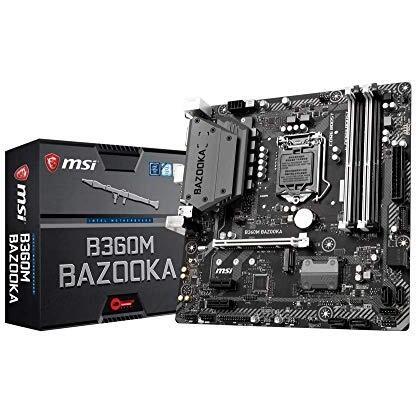
MSI B360M Bazooka Motherboard


Sponsored This site contains affiliate links for which we may receive compensation. More information
Find other available options:

| Identifiers | |
|---|---|
| Model | MSI B360M BAZOOKA |
| MPN | MSI B360M BAZOOKA |
| Dimensions / Weight | |
| Key Features | |
|
Audio output channels Indicates the total number of independent audio channels that a product can produce or process, including sub‑channels such as those used in surround sound configurations (e.g., 5.1, 7.2). The value may be an integer or a decimal to represent fractional channel groups.
|
7.1 channels |
|
BIOS type The firmware interface used by a computer system to initialize hardware and load the operating system, such as UEFI or legacy BIOS. It indicates whether the motherboard supports modern features like secure boot, fast startup, or compatibility with older operating systems.
|
UEFI AMI |
|
Cables included A list of the cable types that are supplied with the product, such as USB, HDMI, VGA, DisplayPort, LAN (RJ‑45), SATA, audio or other relevant connectors.
|
SATA |
|
Chassis intrusion connector Indicates whether a computer chassis includes a dedicated intrusion connector, which allows the attachment of security or monitoring devices to detect unauthorized access. A value of "Yes" means the connector is present; "No" means it is absent.
|
Yes |
|
Clear CMOS jumper Indicates whether the product includes a clear‑CMOS jumper, a small connector that allows resetting the CMOS memory to factory defaults. A value of "Yes" means the jumper is present and can be used for troubleshooting or configuration reset; "No" indicates it is absent.
|
Yes |
|
Component for Specifies the type of device or system that the product is intended to be used with, such as a PC, server, notebook, surveillance system, or other electronic equipment. The value represents a single category and can be used to filter or group products by their target platform.
|
PC |
| CPU fan connector | Yes |
|
Depth The linear measurement of an object from front to back or top to bottom, expressed in a physical unit such as millimeters, centimeters, inches, etc. It indicates how deep the item is and can be used for fitting, compatibility, or spatial planning.
|
244 mm |
|
Drivers included Indicates whether the product comes with drivers included in the package or available for download. A value of "Yes" means that drivers are supplied, while a value of "No" indicates they are not provided and must be obtained separately.
|
Yes |
|
DVI-D ports quantity Represents how many DVI‑D connectors are present on the product. The value is a simple integer indicating the total count of DVI‑D ports, regardless of version or internal/external placement.
|
1 |
|
Ethernet LAN Indicates whether the product has an Ethernet interface for wired network connectivity, allowing data transmission over RJ‑45 or compatible cables.
|
Yes |
|
Front panel audio connector Indicates whether the product has an audio connector on its front panel. The value is "Yes" if a front‑panel audio jack or similar input is present, and "No" otherwise.
|
Yes |
|
Front panel connector Indicates whether the product includes a connector on its front panel. The value can be "Yes" or "No", representing the presence or absence of this port.
|
Yes |
|
LAN controller The specific model or designation of the LAN (network) controller integrated into a device, such as "Intel I219-V" or "Realtek RTL8111H." This value identifies the exact network interface hardware used for Ethernet connectivity, enabling users to compare performance, compatibility, and support across products.
|
Realtek 8111H |
|
Linux operating systems supported List of Linux operating systems that the product can run or support, including specific versions and architectures when relevant. Each value represents a distinct Linux distribution or kernel version supported by the hardware or software.
|
Yes |
|
Manual Indicates whether a user manual—physical or digital—is provided with the product. A value of "Yes" means that a manual is included, while a value of "No" indicates that no manual is supplied.
|
Yes |
|
Maximum internal memory The largest amount of internal random‑access memory that a device can support, expressed as a data size such as megabytes or gigabytes. It indicates the maximum capacity for active processes and multitasking performance.
|
64 GB |
|
Memory channels The configuration of memory channels supported by a device, indicating how many independent memory paths the system can use for data transfer (e.g., Dual‑channel, Quad‑channel). This attribute helps users understand the potential bandwidth and performance characteristics of the memory subsystem.
|
Dual-channel |
|
Memory slots type The form factor of the memory module that a product can accept, such as DIMM or SO‑DIMM. It indicates whether the device uses standard desktop RAM modules (DIMM) or smaller laptop‑style modules (SO‑DIMM).
|
DIMM |
|
Microphone in Indicates whether the product includes at least one built‑in microphone. A value of "Yes" means that the device has an integrated microphone, while "No" indicates it does not.
|
Yes |
|
Motherboard chipset The model of the motherboard’s chipset, indicating the family of supported processors and integrated features such as I/O interfaces, memory support, and peripheral connectivity.
|
Intel® B360 |
|
Motherboard chipset family The chipset family identifies the group of integrated circuits that manage communication between a computer’s CPU, memory, and peripheral devices on a motherboard. It indicates the supported processor families, available I/O interfaces, and overall system capabilities, helping users assess compatibility and feature sets for motherboards or other hardware components.
|
Intel |
|
Motherboard form factor The physical layout and size classification of a motherboard, such as ATX, Micro‑ATX, Mini‑ITX, or other standardized formats. It indicates the dimensions, mounting points, and expansion capabilities that determine compatibility with computer cases and components.
|
Micro ATX |
|
Non-ECC Indicates whether the memory module does not support error‑correcting code (ECC). A value of Yes means the module lacks ECC protection, while No means it includes ECC functionality.
|
Yes |
|
Number of chassis fan connectors The total count of electrical connectors on a computer chassis that accept cooling fans. This value indicates how many separate fan units can be attached to the case for airflow management, allowing users to assess cooling capacity and compatibility with their system.
|
2 |
|
Number of memory slots The count of physical memory slots available on a device for installing RAM modules. It indicates how many separate DIMM sticks can be installed or upgraded, regardless of size or speed.
|
4 |
|
Number of SATA III connectors The total count of physical SATA III (Serial ATA Revision 3) ports available on a product. It indicates how many internal connections can be used to attach storage devices such as hard drives or solid‑state drives that support the SATA III interface.
|
6 |
|
Power source type The type of electrical supply that powers the device, such as mains electricity, batteries, USB power, or a combination of these options.
|
ATX |
|
Processor socket The physical connector used by a processor to attach to a motherboard or other compatible platform. Common examples include LGA 1151, BGA 1440, Socket AM4, and LGA 1200. This attribute indicates the exact socket designation required for proper CPU installation and compatibility.
|
LGA 1151 (Socket H4) |
|
Quick installation guide Indicates whether a quick‑installation guide is provided with the product. A value of "Yes" means that a brief, step‑by‑step manual or overview is included to help users set up the device quickly; "No" indicates that no such guide is supplied.
|
Yes |
|
Supported memory clock speeds The operating frequencies that a processor or memory module can run at, expressed in megahertz (MHz) or gigahertz (GHz). This attribute lists all supported clock rates, allowing users to understand the performance range of the component.
|
2133,2400,2666 MHz |
|
Supported storage drive types A list of the types of storage drives that a product can accommodate or use, such as HDD, SSD, or hybrid configurations. Each entry indicates a distinct drive type that is supported by the device’s bays, slots, or external interfaces.
|
HDD,SSD |
|
TPM connector Indicates whether the product includes a physical port that can accept a Trusted Platform Module (TPM) chip, enabling hardware‑based security features such as secure boot and encrypted storage.
|
Yes |
|
Windows operating systems supported A list of Microsoft Windows operating system versions that the product is compatible with, including any relevant architecture or edition information.
|
Yes |

MSI is a Taiwanese computer hardware company that produces motherboards, graphics cards, laptops, and PCs. The company is well-known for its gaming laptops and gaming motherboards.

