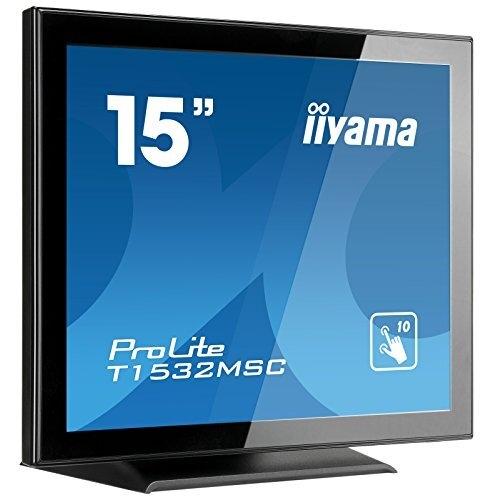
ProLite T1532MSC Black 15" Touchscreen Display




Sponsored This site contains affiliate links for which we may receive compensation. More information
 clove.co.uk
Sponsored iiyama ProLite T1532MSC-B5AG Computer Monitor 38.1 cm (15") 1024 x 768 pixels LED Touchscreen Black
443.69 GBP
Price updated on: 17-11-2024 01:51:52
443.69 GBP
Price updated on: 17-11-2024 01:51:52 | Identifiers | |
|---|---|
| Model | iiyama T1532MSC-B5AG |
| MPN | iiyama T1532MSC-B5AG |
| Dimensions / Weight | |
| Key Features | |
|
3D Support Indicates whether the product can display or render three‑dimensional (3‑D) images, videos or games. A value of "Yes" means the device has native 3‑D capability; a value of "No" means it does not support 3‑D playback.
|
No |
|
AC input frequency The frequency of the alternating current supplied to the device, expressed in hertz (Hz). It indicates the acceptable operating range for the electrical mains that powers the product.
|
50 - 60 Hz |
|
AC input voltage The alternating current voltage range that the product accepts from its power source, expressed in volts (V). It indicates the minimum and maximum supply voltages compatible with the device.
|
100 - 240 V |
|
Adaptive Frame-rate Technology The adaptive synchronization technology used by a display to match its refresh rate with the output of a graphics source, reducing screen tearing and stuttering during variable‑frame‑rate content.
|
N/A |
|
Anti-Theft Features Indicates whether a product includes an anti-theft feature, such as a Kensington lock or similar security mechanism. The value is typically a short text describing the specific type of protection available.
|
Kensington-lock Ready |
|
Aspect ratio The proportion between the width and height of a display, image or video, expressed as two numbers separated by a colon (e.g., 16:9). It indicates whether content is designed for widescreen, square, or other aspect ratios.
|
4:3 |
|
Audio input Indicates whether the product includes a dedicated audio input port (e.g., 3.5 mm jack, RCA, optical). A value of "Yes" means an audio input is present; "No" means it is absent.
|
3.5mm |
|
Backlight The illumination source used behind a display panel, such as LED, WLED, CCFL or LCD. It determines the brightness, energy efficiency and color accuracy of the screen.
|
LED |
|
Cable lock slot Indicates whether the product includes a slot for inserting a cable lock, such as a Kensington or similar security device.
|
Yes |
|
Cable lock slot type The specific type of cable lock interface that a device provides for securing cables, such as Kensington, Noble, IBM or other standard locking mechanisms.
|
Kensington |
|
Certification A list of official certifications or compliance marks that the product has received from regulatory bodies, safety organizations, or industry standards groups. Each entry represents a distinct certification such as CE, FCC, RoHS, UL, or WEEE, and may include additional details like version numbers or specific test reports.
|
CB, CE, TÜV, CU, cULus, VCCI |
|
Color Bit Depth The number of bits used to represent each pixel’s color on a display, expressed as an integer followed by the total number of colors it can render (e.g., "8‑Bit (16.7M Colours)"). This metric indicates the depth of color reproduction and determines how smoothly gradients and subtle hues are displayed.
|
6-Bit + Hi-FRC (16.7M Colours) |
| Connectors | 1 x DisplayPort 1 x HDMI 1 x USB 1 x VGA In |
|
Depth The linear measurement of an object from front to back or top to bottom, expressed in a physical unit such as millimeters, centimeters, inches, etc. It indicates how deep the item is and can be used for fitting, compatibility, or spatial planning.
|
202 mm |
|
Display brightness The intensity of light emitted per unit area from a display surface, measured in candela per square meter (cd/m²). It indicates how bright the screen will appear under typical viewing conditions.
|
370 cd/m² |
| Display Diagonal | 38.1 cm (15") |
|
Display number of colours The total count of distinct colours that a product’s display can reproduce. This value indicates the colour depth or gamut capability of the screen, helping users compare visual fidelity across devices.
|
16.2 million colors |
|
Display resolution The pixel dimensions of a display or image, expressed as width by height (e.g., 1920x1080). It indicates how many pixels are used to render visual content and is commonly used for monitors, TVs, smartphones, cameras, and digital images.
|
1024 x 768 pixels |
|
Display technology The type of display panel used in a visual device, such as LED‑backlit LCD, IPS, TN, VA, OLED, or AMOLED. It indicates the underlying technology that determines image quality, color accuracy, viewing angles, response time and power consumption.
|
TN |
|
Display viewable area The maximum width and height of a display that can be viewed or used at one time, expressed as two dimensions separated by an ‘x’ (e.g., 527.04 x 296.46 mm). It indicates the usable visual space on the screen for content or interaction.
|
304.1 x 228.1 mm |
|
DisplayPorts quantity The total count of physical or virtual display output connections available on a device, such as HDMI, DisplayPort, DVI, VGA, or USB‑C ports that support video output.
|
1 |
|
Dynamic contrast ratio The dynamic contrast ratio is the proportion between the maximum and minimum luminance a display can produce while operating under normal conditions, expressed as a simple fraction such as 1200:1. It reflects how well a screen can differentiate light from dark areas during typical use, influencing perceived image quality.
|
700:1 |
|
Edition A brief statement indicating the edition or version of a product, such as "Reprint", "New Edition", or a numeric edition number like "2nd edition". It identifies which specific release of the item is being referenced.
|
T1532MSC-B5AG |
|
Energy consumption (SDR) per 1000 hours The total amount of electrical energy a product consumes during 1,000 operating hours, expressed in kilowatt‑hours (kWh). This metric allows comparison of energy efficiency across devices regardless of their typical usage patterns.
|
10 kWh |
|
Energy efficiency class The energy efficiency class indicates the relative energy performance of a product, expressed with letters ranging from A+++ (most efficient) to G (least efficient). It allows consumers to compare expected operating costs and environmental impact across similar items.
|
B |
|
Energy efficiency class (SDR) The energy efficiency class indicates the relative performance of a product, expressed with letters ranging from A+++ (most efficient) to G (least efficient). It allows consumers to compare expected operating costs and environmental impact across similar items.
|
E |
|
Energy efficiency scale The energy efficiency scale indicates the relative performance of a product, expressed with letters ranging from A+++ (most efficient) to G (least efficient). It allows consumers to compare expected operating costs and environmental impact across similar items.
|
A to G |
|
HDCP Indicates whether a device supports HDCP (High‑bandwidth Digital Content Protection), allowing it to play or display protected digital content on compatible screens and audio/video equipment.
|
Yes |
|
HDMI A list of the HDMI ports available on the product, each entry indicating the number of ports and their specific HDMI version or additional features (e.g., "2 x HDMI 2.0b", "1 x HDMI 1.4 with CEC"). This attribute helps users understand both the quantity and capabilities of the HDMI connections.
|
Yes |
|
HDR Support Indicates whether a display or device supports High Dynamic Range (HDR) content, and if so which HDR formats are supported. The value can be "Yes" or "No", or a specific HDR standard such as "HDR10" or "DisplayHDR 400".
|
No |
|
Height The vertical dimension of a product measured from its lowest to highest point. It is expressed in a physical unit such as millimetres, centimetres or inches and applies to any item where height is relevant, including books, electronics, furniture and other objects.
|
306.5 mm |
|
Horizontal scan range The range of frequencies, expressed in kilohertz (kHz), over which a device can process or display horizontal signals or scan lines. It indicates the minimum and maximum operating frequencies for horizontal scanning operations.
|
31.4 - 60 kHz |
|
International Protection IP code The IP (Ingress Protection) code indicates a product’s resistance to solids and liquids. It follows the standard two‑digit format (e.g., IP20, IP67), where the first digit represents protection against solid particles and the second against liquids. The code may include an ‘X’ to denote unknown protection for that category or multiple codes separated by commas for products offering different levels of protection in various configurations.
|
IP54 |
|
Linux operating systems supported List of Linux operating systems that the product can run or support, including specific versions and architectures when relevant. Each value represents a distinct Linux distribution or kernel version supported by the hardware or software.
|
Yes |
|
Monitor Colour The colour or combination of colours that a monitor is available in, expressed as common names such as "Black", "Silver" or comma‑separated lists like "Black, White". It indicates the visual appearance of the display for consumers.
|
Black |
|
Number of OSD languages The total number of distinct languages that can be displayed on the screen‑on‑display (OSD) interface of a device, such as a monitor or TV. It indicates how many language options are available for menu navigation, subtitles, and other on‑screen text, allowing users to choose their preferred language when interacting with the product.
|
7 |
|
Panel Coating The protective or optical treatment applied to a display surface, such as anti‑glare coatings, hard coatings of various hardness levels (e.g., 3H, 7H), matte finishes, or low haze treatments. It indicates how the screen resists glare, fingerprints, scratches, and other environmental factors.
|
Anti-Glare |
|
Panel Finish The visual appearance or texture of a product’s display surface, such as matte, glossy, satin, or anti‑reflective. It indicates how light reflects off the screen and can affect glare, visibility, and aesthetic preference for users.
|
Matte |
|
Panel mounting interface The pair of horizontal and vertical dimensions in millimetres that a product supports for VESA mounting (e.g., "100 × 100 mm"). This value indicates the exact hole spacing required by a mounting bracket to secure the device. It is used for monitors, TVs, projectors and other display equipment that can be wall‑mounted or attached to stands.
|
100x100 |
|
Pitch Size The distance between the centers of two adjacent pixels on a display, expressed in a linear unit such as millimeters or inches. It indicates how densely pixels are packed; smaller values mean higher pixel density and sharper images.
|
0.297mm |
|
Pixel pitch Represents the physical size of a single pixel on a display, expressed as width and height in a length unit (e.g., millimeters). This attribute allows comparison of the physical resolution of screens or imaging devices that use metric units to describe the smallest visible point.
|
0.297 x 0.297 mm |
|
Plug and play Indicates whether the product can be used immediately after installation without requiring additional configuration or drivers.
|
Yes |
| Power consumption (StandBy) | 2 W |
|
Power management Indicates whether the device supports power‑management features such as automatic sleep, wake‑on‑LAN, or energy‑saving modes. A value of "Yes" means the product can enter low‑power states or be remotely controlled to conserve energy; "No" indicates it lacks these capabilities.
|
Yes |
|
Power supply type The type of electrical supply that powers the device, such as mains AC, DC, USB, battery, or a combination of these options.
|
AC |
|
Power Usage Switched on The amount of electrical power the product draws while it is switched on and in operation, expressed in watts (W). This value represents the typical energy consumption during normal use and can be used to estimate operating costs or compare efficiency across similar devices.
|
16 W |
|
Quick start guide Indicates whether a quick‑start guide is provided with the product. A value of "Yes" means that a brief, introductory manual or overview is included to help users get started quickly; "No" indicates that no such guide is supplied.
|
Yes |
|
Response time The time interval between a stimulus and the corresponding response of a device or system, expressed in units such as milliseconds (ms). It indicates how quickly the product reacts to input or processes data, which is critical for performance-sensitive applications like displays, gaming monitors, and interactive devices.
|
8 ms |
|
Separate H/V sync Indicates whether the product supports separate horizontal and vertical synchronization signals, allowing independent control of timing for each scan line.
|
Yes |
|
Speaker configuration Describes the arrangement and characteristics of built-in speakers in a product, including the number of speakers, their power rating per unit, and any audio mode such as stereo or mono. The value is typically a comma-separated list where each entry specifies the power (e.g., "2W"), quantity (e.g., "x2"), and optional mode (e.g., "Stereo").
|
2W x2 |
|
Supported Graphics Resolutions The pixel dimensions that a device can output or support, expressed as width by height (e.g., 1920x1080). It indicates the maximum resolution available for display content on the product.
|
640 x 480 (VGA),800 x 600 (SVGA),1024 x 768 (XGA),1280 x 1024 (SXGA) |
|
Tilt adjustment Indicates whether a product can be tilted or adjusted vertically, allowing the user to change its viewing angle. A value of "Yes" means the device supports tilt; "No" means it does not.
|
Yes |
|
Tilt angle range The range of angles, expressed in degrees, that a product can be tilted or adjusted vertically while maintaining acceptable performance or usability. It indicates the minimum and maximum tilt limits for devices such as monitors, stands, or other adjustable equipment.
|
-5 - 90° |
|
Touchscreen technology The technology used by a device’s touch-sensitive display to detect user input. Common types include capacitive, resistive, infrared, and surface acoustic wave. This attribute helps users understand the interaction method, durability, and sensitivity of the touchscreen.
|
Projected capacitive system |
|
Vertical scan range The range of vertical scan frequencies (in hertz) that a display device can support. It indicates the minimum and maximum refresh rates at which the screen updates vertically, affecting visual smoothness and stability.
|
56 - 75 Hz |
|
VESA mounting Indicates whether a product supports the VESA mounting standard, which defines the size and placement of mounting holes on displays or monitors. The value can be "Yes" or "No", or it may specify one or more VESA patterns such as "100 × 100 mm" to indicate the exact dimensions supported.
|
Yes |
|
Wall mountable Indicates whether the product can be securely mounted to a wall or other vertical surface using standard mounting hardware.
|
Yes |
|
Web Camera Indicates whether the product includes a built‑in webcam that captures video and/or still images for computer applications such as video conferencing, streaming or surveillance.
|
No |
|
Weight The mass of the product expressed in a standard unit such as grams or kilograms. It represents how heavy the item is and can be used for shipping calculations, handling instructions, or consumer information.
|
4.5 kg |
|
Width The horizontal measurement of a product, expressed in a linear unit such as millimetres or inches. It indicates how wide the item is from one side to the other and is used for sizing, fitting, and compatibility purposes.
|
351 mm |
|
Windows operating systems supported A list of Microsoft Windows operating system versions that the product is compatible with, including any relevant architecture or edition information.
|
Yes |

iiyama is a Japanese electronics company that produces a wide range of products, including monitors, laptops, and televisions. The company has a strong reputation for quality and innovation, and its products are popular among consumers and businesses alike.

