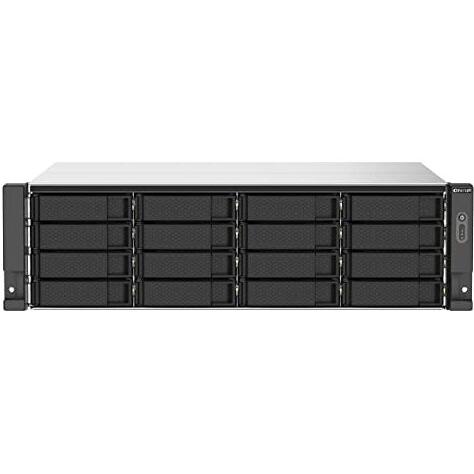
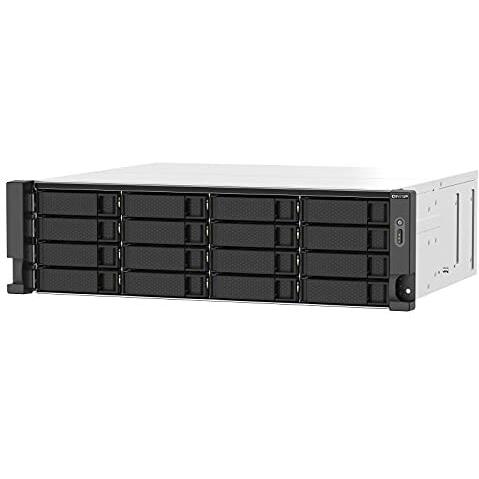
QNAP TS-1673AU-RP-16G NAS/storage server Rack (3U) Ethernet LAN



Sponsored This site contains affiliate links for which we may receive compensation. More information
 GamingKit
Sponsored QNAP TS-1673AU-RP-16G NAS/storage server Rack (3U) Ryzen Embedded V150
3503.92 GBP
Price updated on: 24-08-2026 04:50:18
3503.92 GBP
Price updated on: 24-08-2026 04:50:18 | Identifiers | |
|---|---|
| MPN | QNAP TS-1673AU-RP-16G |
| Dimensions / Weight | |
| Key Features | |
|
AC input frequency The frequency of the alternating current supplied to a power supply or charger, expressed in hertz (Hz). It indicates the acceptable operating range for the electrical mains that powers the device, ensuring proper functionality and safety.
|
50 - 60 Hz |
|
AC input voltage The range of alternating current voltage that the product accepts from its power source, expressed in volts (V). It indicates the minimum and maximum supply voltages compatible with the device across different regions.
|
100 - 240 V |
|
Access Control List ACL Indicates whether the product supports an Access Control List (ACL) feature, allowing administrators to define rules that permit or deny network traffic based on criteria such as IP address, port number, or protocol.
|
Yes |
| Backup features | Cloud, iSCSI LUN |
|
Browser supported A list of web browsers that the product can run or support, typically including major desktop and mobile browsers such as Chrome, Firefox, Safari, Edge, Internet Explorer, Opera, and others. Each value represents a distinct browser name or version range that has been verified to work with the device.
|
Apple Safari 7+, Google Chrome, Microsoft Internet Explorer 10+, Mozilla Firefox |
|
Cables included A list of the cable types that are supplied with the product, such as USB, HDMI, VGA, DisplayPort, LAN (RJ‑45), SATA, audio or other relevant connectors.
|
AC, LAN (RJ-45) |
|
Chassis type The physical form factor of a computer chassis, indicating its size and layout such as Tower, Desktop, Mini‑PC, or rack units (e.g., 1U, 2U). This attribute helps users identify the footprint, mounting options, and compatibility with other hardware.
|
Rack (3U) |
|
Colour The colour or combination of colours that a product is available in, expressed as common names such as "Black", "Silver" or comma‑separated lists like "Black, White". It indicates the visual appearance of the item for consumers.
|
Black, Grey |
|
Cooling type The method or mechanism used to dissipate heat from a component such as a processor, graphics card, or other electronic part. It indicates whether the device relies on active cooling (fans or liquid pumps), passive heat sinks, or hybrid solutions, and helps users assess thermal performance and noise levels.
|
Active |
|
Depth The linear measurement of an object from front to back or top to bottom, expressed in a physical unit such as millimeters, centimeters, inches, etc. It indicates how deep the item is and can be used for fitting, compatibility, or spatial planning.
|
425 mm |
|
Device class A free‑text label that identifies the general category or type of a device, such as "NAS", "Server", "Router", "Storage Enclosure" or any other descriptive class used by manufacturers to classify their products. The value is intended to help users quickly understand the primary function or form factor of the item.
|
Small & Medium Business |
|
Ethernet LAN data rates Maximum theoretical speed at which a device can send or receive data over its Ethernet LAN interface, expressed in megabits per second (Mbps) or gigabits per second (Gbps). It represents the upper bound of throughput under optimal conditions and is useful for comparing network performance between devices with wired connectivity.
|
10,100,1000,2500 Mbit/s |
|
Ethernet LAN ports Represents the total count of Ethernet LAN (RJ‑45) interfaces available on a product. The value is an integer indicating how many physical Ethernet ports are present, regardless of speed or generation.
|
2 |
|
Fan diameter The linear measurement across the widest part of a fan, expressed in units such as millimeters (mm), centimeters (cm) or inches (in). It represents the overall width of the fan and is useful for determining fit, compatibility with cases, and airflow characteristics.
|
8 cm |
|
Fan voltage The electrical potential difference supplied to a fan, expressed in volts (V). It indicates the nominal operating voltage required for the fan to run correctly and helps users match power supplies or adapters with compatible fans.
|
12 V |
|
Flash memory The total amount of internal flash memory available in a device, expressed as a data size (e.g., megabytes or gigabytes). This attribute indicates how much data can be stored on the device’s built‑in flash storage and is useful for comparing storage capacity across products.
|
5000 MB |
|
Harmonized System HS code The Harmonized System (HS) code is a standardized numerical identifier used internationally to classify traded goods. It consists of up to six digits, where each pair of digits represents progressively more specific product categories. The HS code facilitates customs duties, trade statistics, and regulatory compliance by providing a common language for describing products across borders.
|
84714100 |
|
Height The vertical dimension of a product measured from its lowest to highest point. It is expressed in a physical unit such as millimetres, centimetres or inches and applies to any item where height is relevant, including books, electronics, furniture and other objects.
|
132 mm |
|
In stock Indicates whether the product is a wire‑cut item (custom cut to size) or a stock item (pre‑cut to standard dimensions). This attribute helps buyers understand the manufacturing process and potential customization options.
|
Y |
| Installed storage drive type | No |
|
Internal memory The total amount of internal memory available in a device, expressed as a data size such as megabytes (MB) or gigabytes (GB). It indicates how much information the component can hold for active processes and affects multitasking performance.
|
16 GB |
|
Internal memory type The type of memory physically installed inside a device, such as DDR4 SDRAM, LPDDR3, or other RAM variants. It indicates the architecture and generation of the internal memory modules that the product uses or supports.
|
DDR4 |
|
LED indicators A list of the functions or statuses that an LED indicator on a device can display, such as power status, activity, link, and other operational signals.
|
HDD, LAN, Power, Status, USB |
|
Maximum RAM supported The largest amount of internal random‑access memory (RAM) that a network attached storage (NAS) device can accommodate, expressed as a data size such as megabytes or gigabytes. It indicates the upper limit for active processes and multitasking performance on the NAS.
|
32 GB |
|
Memory form factor The physical configuration or size classification of a memory module, such as SO‑DIMM, UDIMM, RDIMM, or on‑board. It indicates the form factor that determines compatibility with motherboards and other hardware components.
|
UDIMM |
|
Number of screws The total count of individual screws included with a product or component. It indicates how many separate screw units are provided for assembly, mounting, or securing parts, regardless of size or type.
|
64 |
|
Operating relative humidity The range of relative humidity (in percentage) within which the product is designed to operate reliably. Values are expressed as a minimum–maximum interval such as "20 - 80 %" and indicate the acceptable environmental moisture level for optimal performance.
|
5 - 95% |
|
Operating system installed The operating system that is installed on the device, indicating the software platform that manages hardware resources and provides services for applications. It can be a commercial OS such as Windows or macOS, an open‑source distribution like Linux, or a proprietary firmware used in embedded devices.
|
QNAP QTS |
|
Operating system version The specific version of the operating system that a product supports or runs, expressed as a numeric revision (e.g., 10, 11) or a descriptive name (e.g., Nougat). This attribute helps users determine compatibility with software and updates.
|
5.0.0 |
|
Operating temperature The range of temperatures in which a product can safely operate without risk of damage or performance degradation. Values are expressed in degrees Celsius (°C) and may represent a single temperature, a minimum–maximum interval, or an average operating point.
|
0 - 40 °C |
|
Other operating systems supported A list of operating system names and versions that the product can run or support beyond its primary OS, including both commercial and open‑source distributions. Each value represents a distinct OS that is compatible with the hardware or software.
|
Solaris 10 |
| Power consumption | 97.34 W |
| Power consumption sleep | 47.75 W |
|
Power supply location The physical position where the power supply unit is installed or mounted within a device, such as top, bottom, rear, side, front, or built‑in. This attribute helps users understand where to find the power source and plan cable routing or ventilation.
|
Built-in |
|
Power supply unit PSU capacity The electrical power rating of a power supply unit (PSU), expressed in watts (W). It indicates the maximum output power that the PSU can deliver to connected components, helping users assess compatibility and energy requirements for their system.
|
550 W |
|
Processor family The processor family identifies the group or series of CPU models that share a common architecture, design, and performance characteristics. It helps users compare processors across brands and generations by indicating the underlying technology used in the chip.
|
Ryzen Embedded |
|
Processor frequency The fundamental operating frequency of a processor, expressed in hertz (Hz). It indicates the speed at which the CPU runs under normal conditions and is typically reported in gigahertz (GHz) or megahertz (MHz). This value helps users compare performance potential across different models.
|
2.2 GHz |
|
Processor model Identifies the exact model of the central processing unit used in a device, including brand and numeric designation such as "Intel Core i5-8250U" or "AMD Ryzen 7 3700X". This value allows users to distinguish between different processor families, generations, and performance levels.
|
V1500B |
|
RAID levels A comma‑separated list that specifies the RAID configurations supported by a storage controller or device. Each entry can be a numeric level (e.g., 0, 1, 5, 10) or a special label such as JBOD. This attribute indicates which disk arrangements the system can manage.
|
0, 1, 5, 6, 10, 50, 60, JBOD |
|
Security algorithms A list of cryptographic and authentication methods that a device can use for secure communication or data protection. Each entry represents a distinct algorithm or protocol, such as encryption ciphers (e.g., AES, WEP), authentication mechanisms (e.g., RADIUS, WPA‑PSK), or network security protocols (e.g., HTTPS, SSL/TLS). The values are typically separated by commas and may include both technical identifiers and consumer‑friendly labels.
|
256-bit AES, FIPS 140-2, HTTPS, SNMPv3, SSH, SSL/TLS |
|
Share folder A list of network file‑sharing protocols that the device can use to expose shared folders or drives. Common values include CIFS/SMB, AFP, NFS, FTP, and WebDAV. The attribute helps users understand which remote access methods are available for mounting or accessing storage on the device.
|
CIFS/SMB |
|
Storage drive sizes supported A list of the physical sizes and types of storage drives that a product can accommodate, such as 2.5‑inch, 3.5‑inch, or M.2. The values are typically separated by commas and may include additional descriptors like "M.2" to indicate an internal solid‑state drive interface.
|
2.5,3.5" |
|
Storage temperature The range of temperatures in which a device can safely operate without risk of damage or performance degradation. Values are expressed in degrees Celsius (°C) and may represent a single temperature, a minimum–maximum interval, or an average operating point.
|
-20 - 70 °C |
|
Supported file systems A comma‑separated list of file system formats that the product can read or write, such as FAT32, NTFS, ext4, exFAT, HFS+, and others. Each value represents a distinct storage format supported by the device’s firmware or operating system.
|
FAT32, HFS+, NTFS, ext3, ext4 |
|
Supported storage drive interfaces List of physical or logical interfaces that allow an internal storage drive to communicate with the system, such as SATA, M.2 PCIe, U.2, SAS, NVMe, or other standard connections.
|
Serial ATA II, Serial ATA III |
|
Supported storage drive types A list of the types of storage drives that a product can use, such as HDD or SSD. Each entry indicates a distinct drive type supported by the device, allowing users to understand which internal or external storage media are compatible.
|
HDD & SSD |
|
Type The general category or style of the product, such as laptop, printer cartridge, or cooling fan. It helps buyers quickly identify the nature of the item and compare similar products.
|
NAS |
|
USB 3.2 Gen 1 The total count of USB 3.2 Gen 1 (also known as USB 3.1 Gen 1 or SuperSpeed) ports available on the device, indicating how many peripherals can be connected simultaneously via this interface.
|
1 |
|
Width The horizontal measurement of a product, expressed in a linear unit such as millimetres or inches. It indicates how wide the item is from one side to the other and is used for sizing, fitting, and compatibility purposes.
|
482 mm |
|
Windows operating systems supported A list of Microsoft Windows operating system versions that the product is compatible with, including any relevant architecture or edition information.
|
Windows 10, Windows 7, Windows 8 |

QNAP is a Taiwanese technology company that produces network-attached storage (NAS) devices. The company was founded in 2004 and is headquartered in Taipei. QNAP's products are used by consumers, small businesses, and enterprises, and include NAS devices, surveillance solutions, and cloud storage services.


