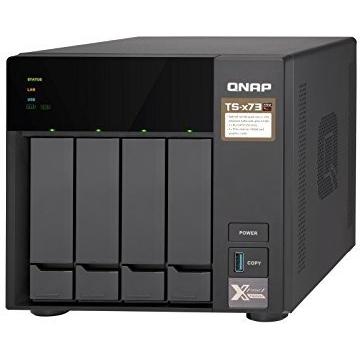
QNAP TS-473 Tower NAS with 8GB RAM




Sponsored This site contains affiliate links for which we may receive compensation. More information
 Quzo
Quzo
Sponsored QNAP TS-473 NAS Tower Ethernet LAN Black RX-421ND
1602.69 GBP
Price updated on: 02-08-2024 14:05:51
1602.69 GBP
Price updated on: 02-08-2024 14:05:51 | Identifiers | |
|---|---|
| Model | QNAP 201574 |
| MPN | QNAP 201574 |
| Dimensions / Weight | |
| Key Features | |
|
AC input frequency The frequency of the alternating current supplied to the device, expressed in hertz (Hz). It indicates the acceptable operating range for the electrical mains that powers the product.
|
50 - 60 Hz |
|
AC input voltage The alternating current voltage range that the product accepts from its power source, expressed in volts (V). It indicates the minimum and maximum supply voltages compatible with the device.
|
100 - 240 V |
| Backup features | Cloud,USB drive,iSCSI LUN |
|
Backup function Indicates whether a device has the capability to create backups of its data or settings, allowing restoration in case of loss, failure, or interruption.
|
Yes |
|
Bays The total number of drive bays available in a storage enclosure or similar device, indicating how many individual drives can be installed.
|
4 Bay |
|
Browser supported A list of web browsers that the product can run or support, typically including major desktop and mobile browsers such as Chrome, Firefox, Safari, Edge, Internet Explorer, Opera, and others. Each value represents a distinct browser name or version range that has been verified to work with the device.
|
Internet Explorer 10, Firefox 8, Safari 4, Google Chrome |
|
Built-in display Indicates whether the product includes a built‑in screen or display unit that can be used directly for viewing content, such as an integrated monitor on a laptop or a built-in display on appliances. A value of "Yes" means the device has such a display; a value of "No" means it does not.
|
Yes |
|
Built-in FTP server Indicates whether the product includes a built‑in FTP server that allows file transfer and management over the network without requiring an external device.
|
Yes |
| Built-in iTunes server | Yes |
|
Cable lock slot Indicates whether the product includes a slot for inserting a cable lock, such as a Kensington or similar security device.
|
Yes |
|
Cable lock slot type The specific type of cable lock interface that a device provides for securing cables, such as Kensington, Noble, IBM or other standard locking mechanisms.
|
Kensington |
|
Cables included A list of the cable types that are supplied with the product, such as USB, HDMI, VGA, DisplayPort, LAN (RJ‑45), SATA, audio or other relevant connectors.
|
AC,LAN (RJ-45) |
|
Cache Drive Interface List of physical or logical interfaces that a cache drive uses to connect with other components, such as SATA, SAS, NVMe, PCI Express, or M.2. This attribute lists the supported interface standards for the cache drive.
|
mSATA |
|
Chassis type The physical configuration or shape of a computer chassis, such as tower, rack‑mount (e.g., 1U, 2U), desktop, mini‑PC, or other compact designs. It indicates the overall size and mounting style that determines compatibility with motherboards, power supplies, and case accessories.
|
Tower |
|
Cooling The type of cooling mechanism used by a product, such as active fan‑based cooling, passive heat sinks, liquid cooling, or no active cooling. It indicates whether the device relies on airflow, conduction, or other methods to dissipate heat and helps users assess thermal performance and noise levels.
|
Fan |
|
Cooling type The method used to dissipate heat from a component or system, such as active cooling (fans or liquid loops), passive heat sinks, or no active cooling. It indicates whether the product relies on airflow, conduction, or other mechanisms to maintain safe operating temperatures.
|
Active |
|
CPU Cores The total count of physical processing units (cores) present in a central processing unit (CPU). This integer value indicates how many independent execution threads the CPU can handle simultaneously, influencing multitasking performance and computational throughput.
|
Quad Core |
|
CPU Model The complete name or part number of the central processing unit used in a device, such as "Intel Core i7-10700K" or "AMD Ryzen 5 5600X". This value allows users to distinguish between different processor families, generations, and performance levels.
|
R-Series RX-421ND |
|
CPU Speed The maximum operating frequency of a central processing unit (CPU), expressed in hertz (Hz). This value indicates how many cycles per second the CPU can execute under normal conditions and is useful for comparing performance potential across different models.
|
2.1 GHz |
|
CPU Type The specific name or designation of the central processing unit installed in a device, such as "Intel Core i5-11400" or "AMD Ryzen 7 5800X." It identifies the exact processor variant and helps users compare performance, compatibility, and features across products.
|
AMD |
|
Depth The linear measurement of an object from front to back or top to bottom, expressed in a physical unit such as millimeters, centimeters, inches, etc. It indicates how deep the item is and can be used for fitting, compatibility, or spatial planning.
|
279.6 mm |
|
Device class A free‑text label that identifies the general category or type of a device, such as "NAS", "Server", "Router", "Storage Enclosure" or any other descriptive class used by manufacturers to classify their products. The value is intended to help users quickly understand the primary function or form factor of the item.
|
Home & Home Office |
|
DHCP Client Indicates whether the device supports the DHCP client function, meaning it can automatically request an IP address and related network settings from a DHCP server.
|
Yes |
|
DHCP server Indicates whether the device supports acting as a DHCP server, allowing it to assign IP addresses and network configuration settings to clients on the network.
|
Yes |
|
Dimensions The pixel dimensions of a display or image, expressed as width by height (e.g., 1920x1080). It indicates how many pixels are used to render the visual content and is commonly used for monitors, TVs, smartphones, cameras, and digital images.
|
199.3x188.2x279.6 (WxHxD mm) |
|
DOM Capacity The total amount of digital storage available inside a Network‑Attached Storage (NAS) device for holding files and data, expressed as a numeric value with an appropriate unit such as MB, GB, or TB. This attribute helps users understand how much information the NAS can store internally and compare it to other storage solutions.
|
512MB |
|
DOM Module Indicates whether the product includes a Digital Optical Monitoring (DOM) module that provides optical power, temperature, and other diagnostics for fiber‑optic connections.
|
Yes |
|
Drive Form Factor Support A specification of the physical drive sizes and configurations that a storage device can accommodate. Each value lists one or more drive dimensions (e.g., "12 x 2.5"/3.5") indicating the number of bays and the supported platter or SSD form factor. This attribute helps users determine whether their existing drives fit the enclosure or server.
|
4 x 2.5"/3.5" 2 x M.2 (2260/2280) |
|
Drive Interface Support A list of the physical or logical interfaces that a storage device uses to connect with other components, such as SATA, SAS, M.2 PCIe, U.2, NVMe, eSATA, USB, or Ethernet. The values are typically separated by commas and may include both technical names and consumer‑friendly labels.
|
4 x LAN 10/100/1000 2 x M.2 4 x USB 3.0 |
|
Ethernet LAN Indicates whether the product includes an Ethernet LAN interface for wired network connectivity, allowing data transmission over RJ‑45 or compatible cables.
|
Yes |
|
Ethernet LAN data rates Maximum theoretical speed at which a device can send or receive data over its Ethernet LAN interface, expressed in megabits per second (Mbps) or gigabits per second (Gbps). It represents the upper bound of throughput under optimal conditions and is useful for comparing network performance between devices with wired connectivity.
|
10,100,1000 Mbit/s |
|
Expansion slots The total count of physical expansion slots available on a device for installing additional modules or peripherals such as PCI‑Express cards, M.2 drives, USB adapters, or other expansion hardware. It indicates how many separate slots can be used simultaneously or swapped between the product and other devices.
|
2 x M.2, 22-60/80, SATA 2 x PCIe 3.0 x4 |
|
External Connectivity A comma‑separated list of the physical connector types that are available on the exterior of a product, such as USB (various versions), HDMI, DisplayPort, Ethernet (RJ‑45), Thunderbolt, SATA, eSATA, SD card reader, audio jacks, and other common interfaces. The list helps users identify which ports they can use for data transfer, video output, power delivery or expansion.
|
1 x 3.5mm Line Out 2 x 3.5mm Stereo Mic/Line In 4 x LAN (10/100/1000) 4 x USB 3.0 |
|
Fan diameter The linear measurement across the widest part of a fan, expressed in units such as millimeters (mm), centimeters (cm) or inches (in). It represents the overall width of the fan and is useful for determining fit, compatibility with cases, and airflow characteristics.
|
12 cm |
|
Height The vertical dimension of a product measured from its lowest to highest point. It is expressed in a physical unit such as millimetres, centimetres or inches and applies to any item where height is relevant, including books, electronics, furniture and other objects.
|
188.2 mm |
|
Hot spare Indicates whether the device includes an active backup unit (hot spare) that can automatically replace a failed drive without service interruption.
|
Yes |
|
Hot-swap drive bays Indicates whether the product’s drive bays support hot‑swap, meaning drives can be inserted or removed while the device is powered on without shutting down or rebooting.
|
Yes |
| Installed storage drive type | No |
|
Internal Flash Memory Indicates whether the product contains an internal flash memory component that can be used for storage or firmware. A value of "Yes" means a built‑in flash module is present; "No" indicates it is absent.
|
Yes |
|
Internal memory The total amount of internal memory available in a device, expressed as a data size such as megabytes (MB) or gigabytes (GB). It indicates how much information the component can hold for active processes and affects multitasking performance.
|
8 GB |
| iSCSI support | Yes |
| Jumbo frames support | Yes |
|
LED indicators A list of the functions or statuses that an LED indicator on a device can display, such as power status, activity, link, and other operational signals.
|
Yes |
|
Linux operating systems supported List of Linux operating systems that the product can run or support, including specific versions and architectures when relevant. Each value represents a distinct Linux distribution or kernel version supported by the hardware or software.
|
Yes |
|
Mac operating systems supported A list of macOS operating system versions that the product supports or is compatible with, such as "macOS 10.15 Catalina", "macOS 11 Big Sur" or newer releases. Each entry represents a distinct OS version that can run on or be supported by the device.
|
Yes |
|
Maximum power consumption The highest electrical power that a device can draw or consume during operation, expressed in watts (W). It represents the peak energy usage of the product and is useful for estimating maximum power requirements, comparing efficiency across similar devices, and ensuring compatibility with power supplies.
|
56.23 W |
|
Maximum RAM Memory Supported The largest amount of random‑access memory (RAM) that a device or component can support, expressed as a data size such as megabytes or gigabytes. It indicates the upper limit of memory capacity for active processes and multitasking performance.
|
64GB (4x16GB) |
|
Maximum RAM supported The largest amount of internal random‑access memory (RAM) that a network attached storage (NAS) device can accommodate, expressed as a data size such as megabytes or gigabytes. It indicates the upper limit for active processes and multitasking performance on the NAS.
|
64 GB |
|
Maximum storage capacity The largest amount of digital storage that a product can hold or provide, expressed as a numeric value with an appropriate unit such as GB, MB, TB, or a descriptive label indicating the type of media (e.g., SSD, HDD). This attribute helps users understand how much data can be stored on the device and compare storage options across products.
|
48 TB |
|
Memory slots The count of physical memory slots available on a device for installing RAM modules. It indicates how many separate memory sticks can be installed or upgraded.
|
4 x SO-DIMM DDR4 |
|
Microphone in Indicates whether the product includes at least one built‑in microphone. A value of "Yes" means that the device has an integrated microphone, while "No" indicates it does not.
|
Yes |
|
Multilingual support Indicates whether a product supports multiple languages for its user interface, documentation or help resources. A value of "Yes" means the device offers language options beyond the default; "No" indicates it is limited to a single language.
|
Yes |
|
NAS Form Factor Represents the physical size and mounting configuration of a Network Attached Storage device, such as 1U, 2U, or desktop tower. The value indicates how many rack units the enclosure occupies or whether it is a standalone tower, allowing users to match the NAS with available server racks or workstations.
|
Desktop |
|
Noise level The sound intensity produced by a product, expressed in decibels (dB) or sones. It indicates how loud the device is during operation and helps users assess suitability for quiet environments.
|
21.7 dB |
|
Number of fans The total count of fan units included in the product. This value indicates how many separate fans are present, which can affect cooling performance and noise levels.
|
2 fan(s) |
|
Number of power supply units The total count of individual power supply units included in or required by the product. It indicates how many separate power supplies are present, whether for redundancy, multi‑voltage operation, or modular design. The value is a whole number and can be used to assess power architecture, backup capability, and installation requirements.
|
1 |
|
Number of screws The total count of individual screws included with a product or component. It indicates how many separate screw units are provided for assembly, mounting, or securing parts, regardless of size or type.
|
14 |
|
On/off switch Indicates whether the product includes an on/off switch that allows the user to power it on or off manually.
|
Yes |
|
Operating system installed The operating system that is installed on the device, indicating the software platform that manages hardware resources and provides services for applications. It can be a commercial OS such as Windows or macOS, an open‑source distribution like Linux, or a proprietary firmware used in embedded devices.
|
QNAP Turbo System |
|
Operating system version The specific version of the operating system that a product supports or runs, expressed as a numeric revision (e.g., 10, 11) or a descriptive name (e.g., Nougat). This attribute helps users determine compatibility with software and updates.
|
4.3.4 |
|
Power management Indicates whether the device supports power‑management features such as automatic sleep, wake‑on‑LAN, or energy‑saving modes. A value of "Yes" means the product can enter low‑power states or be remotely controlled to conserve energy; "No" indicates it lacks these capabilities.
|
Yes |
|
Power supply location The physical position where the power supply unit is installed or mounted within a device, such as top, bottom, rear, side, front, or built‑in. This attribute helps users understand where to find the power source and plan cable routing or ventilation.
|
Built-in |
|
Processor boost frequency The maximum operating frequency that a processor can reach when its turbo or boost feature is active, expressed in hertz (Hz). This value indicates the peak performance capability of the CPU under load and helps users compare how fast a processor can run beyond its base clock speed.
|
3.4 GHz |
|
Processor family The processor family identifies the group or series of CPU models that share a common architecture, design, and performance characteristics. It helps users compare processors across brands and generations by indicating the underlying technology used in the chip.
|
AMD Embedded R-Series SoC |
|
PSU Type The form factor or mounting style of a power supply unit, such as ATX, SFX, or other standardized sizes. It indicates the physical dimensions and connector layout that determine compatibility with computer cases and motherboards.
|
ATX |
|
PSU Wattage The average electrical power drawn by a device during normal operation, expressed in watts (W). It represents the typical energy usage of the product under standard load conditions and helps users estimate power requirements and efficiency.
|
250 W |
|
Quick installation guide Indicates whether a quick‑installation guide is provided with the product. A value of "Yes" means that a brief, step‑by‑step manual or overview is included to help users set up the device quickly; "No" indicates that no such guide is supplied.
|
Yes |
|
RAID levels A comma‑separated list that specifies the RAID configurations supported by a storage controller or device. Each entry can be a numeric level (e.g., 0, 1, 5, 10) or a special label such as JBOD. This attribute indicates which disk arrangements the system can manage.
|
0,1,5,6,10,JBOD |
|
RAID support A comma‑separated list of RAID levels that a storage device or controller can support, such as 0, 1, 5, 10, JBOD, and other proprietary configurations. Each value represents a distinct RAID mode the system is capable of creating or managing.
|
Yes |
|
RAM Memory Included The amount of random‑access memory that is physically present in a device, expressed as a data size such as megabytes or gigabytes. It indicates how much information the system can hold for active processes and affects multitasking performance.
|
8GB (2x4GB) |
|
Reset button Indicates whether the device has a physical reset button that restores factory settings or original configuration when pressed.
|
Yes |
|
S.M.A.R.T. support Indicates whether the product supports Self‑Monitoring, Analysis and Reporting Technology (S.M.A.R.T.), a feature that monitors drive health and predicts failures.
|
Yes |
|
Security algorithms Una lista de los algoritmos criptográficos y protocolos de seguridad que el producto soporta, como cifrado (AES, WEP), autenticación (WPA2-PSK, EAP-TLS) o protocolos de red (HTTPS, SSH). Cada elemento describe un algoritmo individual; la lista puede contener varios valores separados por comas.
|
256-bit AES,FIPS 140-2,HTTPS,SNMP,SSH,SSL/TLS |
|
Share folder A list of network file‑sharing protocols that the device can use to expose shared folders or drives. Common values include CIFS/SMB, AFP, NFS, FTP, and WebDAV. The attribute helps users understand which remote access methods are available for mounting or accessing storage on the device.
|
CIFS/SMB |
|
Share folder access right management Indicates whether the product allows users to manage access rights for shared folders. A value of "Yes" means that the device or service provides a mechanism to assign, modify, or revoke permissions on shared directories, enabling controlled sharing among multiple users.
|
Yes |
|
Storage drive interface List of physical or logical interfaces that allow communication between a hard drive and other devices, such as SATA, M.2 PCIe, U.2, SAS, NVMe, or other standard connections.
|
Serial ATA III |
|
Storage drive size A list of the physical drive sizes that are compatible with the product, such as "2.5"", "3.5"", and "M.2". This attribute helps users determine which external or internal drives can be used with the device.
|
2.5/3.5" |
|
Storage drives installed The total count of individual storage devices (hard disk drives or solid‑state drives) that are physically present in the product. It indicates how many separate drives are installed, regardless of capacity or interface type.
|
No |
|
Supported file systems A comma‑separated list of file system formats that the product can read or write, such as FAT32, NTFS, ext4, exFAT, HFS+, and others. Each value represents a distinct storage format supported by the device’s firmware or operating system.
|
FAT32,HFS+,NTFS,exFAT,ext3,ext4 |
|
Supported network protocols A list of network communication protocols that a device can use or support, such as TCP/IP, HTTP, HTTPS, FTP, DHCP, DNS, and various wireless standards. Each protocol is represented by its standard name and may be separated by commas or slashes in the source data.
|
IPv4, IPv6, MB2/SMB3, NFS v3/NFS v4, FTP, FTPS, TFTP, HTTP, HTTPS, SSH, iSCSI, SNMP, SMTP, SMSC |
|
Supported storage drive types A list of the types of storage drives that a product can accommodate or use, such as HDD, SSD, or hybrid configurations. Each entry indicates a distinct drive type that is supported by the device’s bays, slots, or external interfaces.
|
HDD,SSD |
|
System log Indicates whether the product includes a system log feature that records events, errors, or status updates for troubleshooting and monitoring purposes. The value is a simple yes/no answer.
|
Yes |
|
Total Storage Included Cantidad total de datos que puede almacenar un producto cuando se incluye la unidad de almacenamiento interna o externa que viene con el dispositivo, expresada con su unidad habitual (por ejemplo GB, MB o TB). Este valor representa la capacidad de almacenamiento disponible para el usuario sin necesidad de añadir componentes adicionales.
|
N/A |
|
Type The general category or style of the product, such as laptop, printer cartridge, or cooling fan. It helps buyers quickly identify the nature of the item and compare similar products.
|
NAS |
|
USB port Indicates the presence and quantity of USB connectors on a product. The value is typically an integer representing how many USB ports are available, regardless of type or version.
|
Yes |
|
Wake-on-LAN ready Indicates whether the device can be powered on remotely via Wake‑on‑LAN, allowing a network administrator or user to start it from sleep or off state using a network packet.
|
Yes |
|
Web-based management Indicates whether the product can be configured and monitored through a web interface accessible via a browser, allowing remote administration over a local or internet connection.
|
Yes |
|
Weight The mass of the product expressed in a standard unit such as grams or kilograms. It represents how heavy the item is and can be used for shipping calculations, handling instructions, or consumer information.
|
4.84 kg |
|
Wi-Fi Indicates whether the product has built‑in Wi‑Fi capability, allowing it to connect to wireless networks without requiring external adapters or dongles.
|
No |
|
Width The horizontal measurement of a product, expressed in a linear unit such as millimetres or inches. It indicates how wide the item is from one side to the other and is used for sizing, fitting, and compatibility purposes.
|
199.3 mm |
|
Windows operating systems supported A list of Microsoft Windows operating system versions that the product is compatible with, including any relevant architecture or edition information.
|
Windows 10,Windows 7,Windows 8 |

QNAP is a Taiwanese technology company that produces network-attached storage (NAS) devices. The company was founded in 2004 and is headquartered in Taipei. QNAP's products are used by consumers, small businesses, and enterprises, and include NAS devices, surveillance solutions, and cloud storage services.
