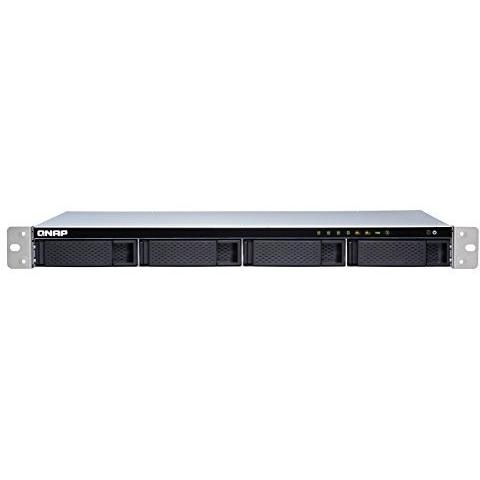
QNAP TS‑431XeU‑2G 4‑Bay 16TB Storage Solution


Sponsored This site contains affiliate links for which we may receive compensation. More information
Find other available options:

| Identifiers | |
|---|---|
| MPN | QNAP TS-431XEU-2G/16TB-REDPRO |
| Dimensions / Weight | |
| Key Features | |
|
AC input frequency The frequency of the alternating current supplied to the device, expressed in hertz (Hz). It indicates the acceptable operating range for the electrical mains that powers the product.
|
50 - 60 Hz |
|
AC input voltage The alternating current voltage range that the product accepts from its power source, expressed in volts (V). It indicates the minimum and maximum supply voltages compatible with the device.
|
100 - 240 V |
| Backup features | Cloud,iSCSI LUN |
|
Backup function Indicates whether a device has the capability to create backups of its data or settings, allowing restoration in case of loss, failure, or interruption.
|
Yes |
|
Bad block scan Indicates whether the device performs a bad block scan to detect and mark defective storage sectors. A value of Yes means the feature is available, while No means it is not.
|
Yes |
|
Browser supported A list of web browsers that the product can run or support, typically including major desktop and mobile browsers such as Chrome, Firefox, Safari, Edge, Internet Explorer, Opera, and others. Each value represents a distinct browser name or version range that has been verified to work with the device.
|
Apple Safari 7+, Google Chrome, Microsoft Internet Explorer 10+, Mozilla Firefox |
|
Built-in FTP server Indicates whether the product includes a built‑in FTP server that allows file transfer and management over the network without requiring an external device.
|
Yes |
| Built-in iTunes server | Yes |
| Buzzer | Yes |
|
Cable lock slot Indicates whether the product includes a slot for inserting a cable lock, such as a Kensington or similar security device.
|
Yes |
|
Cable lock slot type The specific type of cable lock interface that a device provides for securing cables, such as Kensington, Noble, IBM or other standard locking mechanisms.
|
Kensington |
|
Cables included A list of the cable types that are supplied with the product, such as USB, HDMI, VGA, DisplayPort, LAN (RJ‑45), SATA, audio or other relevant connectors.
|
AC,LAN (RJ-45) |
|
Chassis type The physical configuration or shape of a computer chassis, such as tower, rack‑mount (e.g., 1U, 2U), desktop, mini‑PC, or other compact designs. It indicates the overall size and mounting style that determines compatibility with motherboards, power supplies, and case accessories.
|
Rack (1U) |
|
Cooling type The method used to dissipate heat from a component or system, such as active cooling (fans or liquid loops), passive heat sinks, or no active cooling. It indicates whether the product relies on airflow, conduction, or other mechanisms to maintain safe operating temperatures.
|
Active |
|
Depth The linear measurement of an object from front to back or top to bottom, expressed in a physical unit such as millimeters, centimeters, inches, etc. It indicates how deep the item is and can be used for fitting, compatibility, or spatial planning.
|
291 mm |
|
Device class A free‑text label that identifies the general category or type of a device, such as "NAS", "Server", "Router", "Storage Enclosure" or any other descriptive class used by manufacturers to classify their products. The value is intended to help users quickly understand the primary function or form factor of the item.
|
Small & Medium Business |
|
DHCP Client Indicates whether the device supports the DHCP client function, meaning it can automatically request an IP address and related network settings from a DHCP server.
|
Yes |
|
DHCP server Indicates whether the device supports acting as a DHCP server, allowing it to assign IP addresses and network configuration settings to clients on the network.
|
Yes |
|
Ethernet LAN Indicates whether the product includes an Ethernet LAN interface for wired network connectivity, allowing data transmission over RJ‑45 or compatible cables.
|
Yes |
|
Ethernet LAN data rates Maximum theoretical speed at which a device can send or receive data over its Ethernet LAN interface, expressed in megabits per second (Mbps) or gigabits per second (Gbps). It represents the upper bound of throughput under optimal conditions and is useful for comparing network performance between devices with wired connectivity.
|
10,100,1000 Mbit/s |
|
Fan diameter The linear measurement across the widest part of a fan, expressed in units such as millimeters (mm), centimeters (cm) or inches (in). It represents the overall width of the fan and is useful for determining fit, compatibility with cases, and airflow characteristics.
|
4 cm |
| Fiber optic connector | SFP+ |
|
Flash memory The total amount of internal flash memory available in a device, expressed as a data size (e.g., megabytes or gigabytes). This attribute indicates how much data can be stored on the device’s built‑in flash storage.
|
512 MB |
|
Height The vertical dimension of a product measured from its lowest to highest point. It is expressed in a physical unit such as millimetres, centimetres or inches and applies to any item where height is relevant, including books, electronics, furniture and other objects.
|
44 mm |
|
Hot spare Indicates whether the device includes an active backup unit (hot spare) that can automatically replace a failed drive without service interruption.
|
Yes |
|
Hot-swap drive bays Indicates whether the product’s drive bays support hot‑swap, meaning drives can be inserted or removed while the device is powered on without shutting down or rebooting.
|
Yes |
| Installed storage drive type | HDD |
|
Internal memory The total amount of internal memory available in a device, expressed as a data size such as megabytes (MB) or gigabytes (GB). It indicates how much information the component can hold for active processes and affects multitasking performance.
|
2 GB |
|
Internal memory type The type of memory physically installed inside a device, such as DDR4 SDRAM, LPDDR3, or other RAM variants. It indicates the architecture and generation of the internal memory modules that the product uses or supports.
|
DDR3 |
| iSCSI support | Yes |
| Jumbo frames support | Yes |
|
LED indicators A list of the functions or statuses that an LED indicator on a device can display, such as power status, activity, link, and other operational signals.
|
HDD,LAN,Status,USB |
|
Link aggregation Indicates whether the device can combine multiple network connections into a single logical link to increase bandwidth or provide redundancy.
|
Yes |
|
Linux operating systems supported List of Linux operating systems that the product can run or support, including specific versions and architectures when relevant. Each value represents a distinct Linux distribution or kernel version supported by the hardware or software.
|
Yes |
|
Mac operating systems supported A list of macOS operating system versions that the product supports or is compatible with, such as "macOS 10.15 Catalina", "macOS 11 Big Sur" or newer releases. Each entry represents a distinct OS version that can run on or be supported by the device.
|
Mac OS X 10.7 Lion,Mac OS X 10.8 Mountain Lion,Mac OS X 10.9 Mavericks |
|
Management protocols A list of network protocols that a device can use for configuration, monitoring and remote management, such as SNMP, HTTP/HTTPS, Telnet, SSH or other standard interfaces. Each protocol is represented by its common name and may be separated by commas or slashes in the source data.
|
SNMP |
|
Maximum RAM supported The largest amount of internal random‑access memory (RAM) that a network attached storage (NAS) device can accommodate, expressed as a data size such as megabytes or gigabytes. It indicates the upper limit for active processes and multitasking performance on the NAS.
|
8 GB |
|
Memory clock speed The maximum operating frequency of a memory module, expressed in hertz (Hz). It indicates how many cycles per second the RAM can perform and is typically reported as MHz or GHz. This value helps users compare performance potential across different memory types and system configurations.
|
1600 MHz |
|
Noise level The sound intensity produced by a product, expressed in decibels (dB) or sones. It indicates how loud the device is during operation and helps users assess suitability for quiet environments.
|
20.3 dB |
|
Number of Users The total number of individual users that can be supported or accessed by the product or service. It represents a count of distinct user accounts, connections, or licenses and is expressed as an integer value.
|
4096 user(s) |
|
On/off switch Indicates whether the product includes an on/off switch that allows the user to power it on or off manually.
|
Yes |
|
Online RAID expansion Indicates whether the product can expand its storage capacity by adding additional drives or modules that are managed through a RAID configuration. A value of "Yes" means the device supports such expansion, while "No" indicates it does not.
|
Yes |
|
Online RAID migration Indicates whether the product supports migrating data from an external RAID system to its internal storage without downtime or additional hardware. A value of "Yes" means the device can perform this operation, while "No" indicates the feature is not available.
|
Yes |
|
Operating system installed The operating system that is installed on the device, indicating the software platform that manages hardware resources and provides services for applications. It can be a commercial OS such as Windows or macOS, an open‑source distribution like Linux, or a proprietary firmware used in embedded devices.
|
QNAP Turbo System |
|
Operating system version The specific version of the operating system that a product supports or runs, expressed as a numeric revision (e.g., 10, 11) or a descriptive name (e.g., Nougat). This attribute helps users determine compatibility with software and updates.
|
4.3 |
|
Output current The electrical current drawn by a device from its power source, expressed in amperes (A). It indicates how much current the product consumes during normal operation and helps determine compatibility with power supplies or USB ports.
|
3.5 A |
|
Power supply location The physical position where the power supply unit is installed or mounted within a device, such as top, bottom, rear, side, front, or built‑in. This attribute helps users understand where to find the power source and plan cable routing or ventilation.
|
Built-in |
|
Processor family The processor family identifies the group or series of CPU models that share a common architecture, design, and performance characteristics. It helps users compare processors across brands and generations by indicating the underlying technology used in the chip.
|
Annapurna Labs |
|
Processor frequency The fundamental operating frequency of a processor, expressed in hertz (Hz). It indicates the speed at which the CPU runs under normal conditions and is typically reported in gigahertz (GHz) or megahertz (MHz). This value helps users compare performance potential across different models.
|
1.7 GHz |
|
Processor model Identifies the exact model of the central processing unit used in a device, including brand and numeric designation such as "Intel Core i5-8250U" or "AMD Ryzen 7 3700X". This value allows users to distinguish between different processor families, generations, and performance levels.
|
Alpine AL-314 |
|
Quick installation guide Indicates whether a quick‑installation guide is provided with the product. A value of "Yes" means that a brief, step‑by‑step manual or overview is included to help users set up the device quickly; "No" indicates that no such guide is supplied.
|
Yes |
|
RAID levels A comma‑separated list that specifies the RAID configurations supported by a storage controller or device. Each entry can be a numeric level (e.g., 0, 1, 5, 10) or a special label such as JBOD. This attribute indicates which disk arrangements the system can manage.
|
0,1,5+HS,5,6,10,JBOD |
|
RAID support A comma‑separated list of RAID levels that a storage device or controller can support, such as 0, 1, 5, 10, JBOD, and other proprietary configurations. Each value represents a distinct RAID mode the system is capable of creating or managing.
|
Yes |
|
Reset button Indicates whether the device has a physical reset button that restores factory settings or original configuration when pressed.
|
Yes |
|
S.M.A.R.T. support Indicates whether the product supports S.M.A.R.T. (Self-Monitoring, Analysis and Reporting Technology), a feature that monitors storage device health and predicts failures.
|
Yes |
|
Security algorithms Una lista de los algoritmos criptográficos y protocolos de seguridad que el producto soporta, como cifrado (AES, WEP), autenticación (WPA2-PSK, EAP-TLS) o protocolos de red (HTTPS, SSH). Cada elemento describe un algoritmo individual; la lista puede contener varios valores separados por comas.
|
256-bit AES,FIPS 140-2,HTTPS,SSH |
|
Share folder access right management Indicates whether the product allows users to manage access rights for shared folders. A value of "Yes" means that the device or service provides a mechanism to assign, modify, or revoke permissions on shared directories, enabling controlled sharing among multiple users.
|
Yes |
|
Snapshot Indicates whether the product has the capability to create point‑in‑time copies of its data or configuration, allowing recovery or backup without interrupting normal operation.
|
Yes |
|
Storage drive interface List of physical or logical interfaces that allow communication between a hard drive and other devices, such as SATA, M.2 PCIe, U.2, SAS, NVMe, or other standard connections.
|
Serial ATA III |
|
Storage drive sizes supported A list of the physical sizes and types of storage drives that a product can accommodate, such as 2.5‑inch, 3.5‑inch, or M.2. The values are typically separated by commas and may include additional descriptors like "M.2" to indicate an internal solid‑state drive interface.
|
2.5,3.5" |
|
Storage drives installed The total count of individual storage devices (hard disk drives or solid‑state drives) that are physically present in the product. It indicates how many separate drives are installed, regardless of capacity or interface type.
|
Yes |
|
Supported file systems A comma‑separated list of file system formats that the product can read or write, such as FAT32, NTFS, ext4, exFAT, HFS+, and others. Each value represents a distinct storage format supported by the device’s firmware or operating system.
|
FAT32,HFS+,NTFS,exFAT,ext3,ext4 |
|
Supported storage drive types A list of the types of storage drives that a product can accommodate or use, such as HDD, SSD, or hybrid configurations. Each entry indicates a distinct drive type that is supported by the device’s bays, slots, or external interfaces.
|
HDD,SSD |
|
System log Indicates whether the product includes a system log feature that records events, errors, or status updates for troubleshooting and monitoring purposes. The value is a simple yes/no answer.
|
Yes |
|
Third-party support Indicates whether the product supports third‑party accessories or components that are not included with the device. A value of "Yes" means such accessories can be used, while "No" indicates they cannot.
|
Yes |
|
Total installed storage capacity The total amount of digital storage that a device or component can hold, expressed with an appropriate unit such as GB, MB, TB, or a descriptive label indicating whether the storage is built‑in or external. This value represents the maximum capacity available for storing data, applications, and media.
|
16 TB |
|
Type The general category or style of the product, such as laptop, printer cartridge, or cooling fan. It helps buyers quickly identify the nature of the item and compare similar products.
|
NAS |
|
USB port Indicates the presence and quantity of USB connectors on a product. The value is typically an integer representing how many USB ports are available, regardless of type or version.
|
Yes |
|
Wake-on-LAN ready Indicates whether the device can be powered on remotely via Wake‑on‑LAN, allowing a network administrator or user to start it from sleep or off state using a network packet.
|
Yes |
|
Web-based management Indicates whether the product can be configured and monitored through a web interface accessible via a browser, allowing remote administration over a local or internet connection.
|
Yes |
|
Weight The mass of the product expressed in a standard unit such as grams or kilograms. It represents how heavy the item is and can be used for shipping calculations, handling instructions, or consumer information.
|
4.15 kg |
|
Wi-Fi Indicates whether the product has built‑in Wi‑Fi capability, allowing it to connect to wireless networks without requiring external adapters or dongles.
|
No |
|
Width The horizontal measurement of a product, expressed in a linear unit such as millimetres or inches. It indicates how wide the item is from one side to the other and is used for sizing, fitting, and compatibility purposes.
|
439 mm |

QNAP is a Taiwanese technology company that produces network-attached storage (NAS) devices. The company was founded in 2004 and is headquartered in Taipei. QNAP's products are used by consumers, small businesses, and enterprises, and include NAS devices, surveillance solutions, and cloud storage services.


