Samsung LC27FG70 Curved High Resolution Gaming Monitor
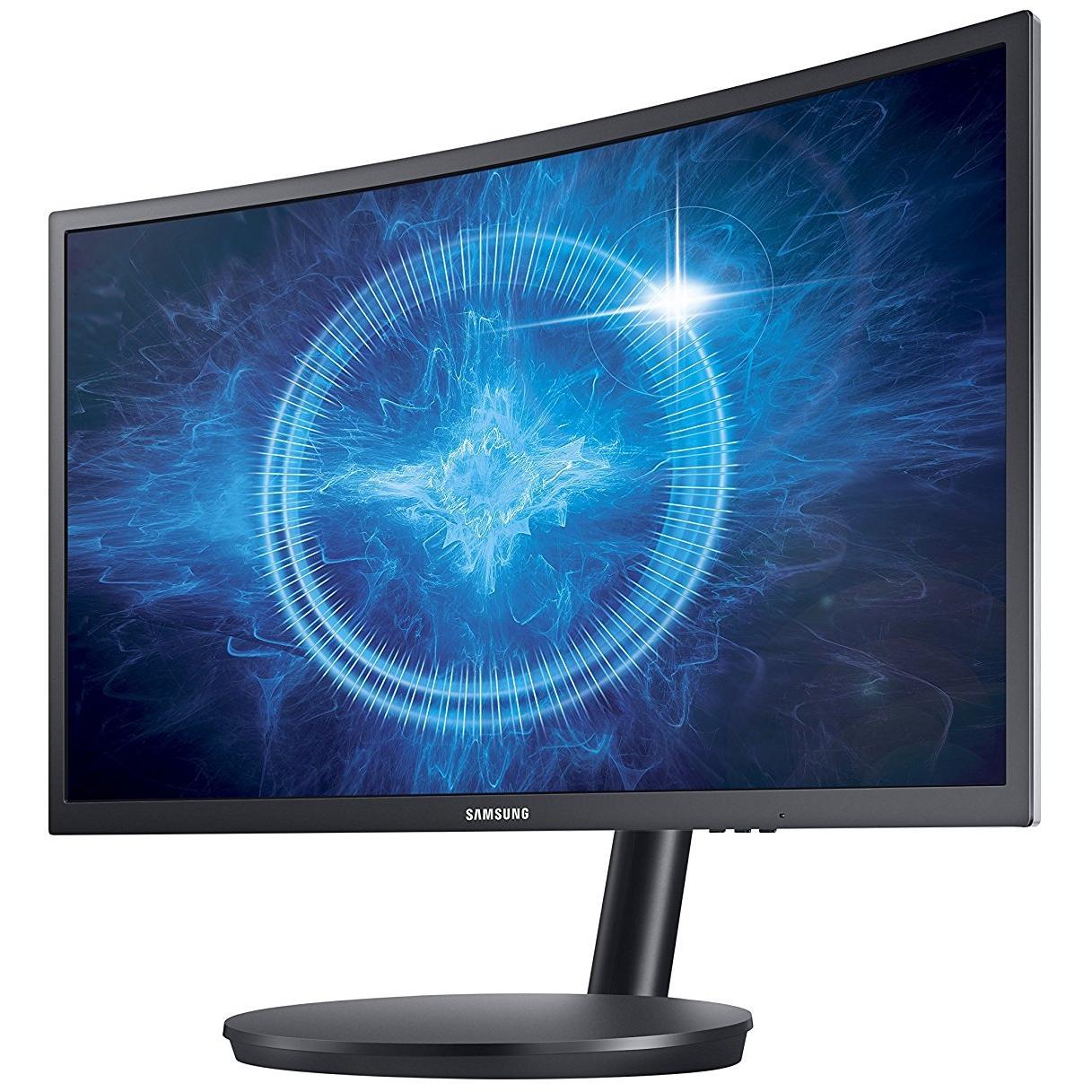


Sponsored This site contains affiliate links for which we may receive compensation. More information
Find other available options:

| Identifiers | |
|---|---|
| Model | Samsung LC27FG70FQUXEN |
| MPN | Samsung LC27FG70FQUXEN |
| Dimensions / Weight | |
| Key Features | |
|
3D Indicates whether the product has built‑in support for 3‑dimensional (3D) content or displays. A value of "Yes" means the device can render or display 3D images, videos, or games; a value of "No" means it does not have native 3D capability.
|
No |
|
AC adapter included Indicates whether the product comes with an AC power adapter included in the package. A value of "Yes" means a charger is supplied, while "No" indicates that no charger is provided and the user must obtain one separately.
|
Yes |
|
AC input frequency The frequency of the alternating current supplied to the device, expressed in hertz (Hz). It indicates the acceptable operating range for the electrical mains that powers the product.
|
50 - 60 Hz |
|
AC input voltage The alternating current voltage range that the product accepts from its power source, expressed in volts (V). It indicates the minimum and maximum supply voltages compatible with the device.
|
100 - 240 V |
|
AMD FreeSync Indicates whether a monitor or graphics card supports AMD’s Adaptive Sync technology, FreeSync. A value of "Yes" means the device is compatible; "No" means it does not support the feature.
|
Yes |
|
Annual energy consumption The total amount of electrical energy a product consumes in one year, expressed in kilowatt‑hours (kWh). This figure represents the expected yearly operating cost and allows consumers to compare the long‑term efficiency of appliances or electronics.
|
55 kWh |
|
Aspect ratio The proportion between the width and height of a display, image or video, expressed as two numbers separated by a colon (e.g., 16:9). It indicates whether content is designed for widescreen, square, or other aspect ratios.
|
16:9 |
|
Built-in camera Indicates whether the product includes a built‑in camera that can capture images or video directly, without requiring an external device. A value of "Yes" means the device has such a camera; "No" means it does not.
|
No |
| Built-in USB Hub | No |
|
Cable lock slot Indicates whether the product includes a slot for inserting a cable lock, such as a Kensington or similar security device.
|
No |
|
Cables included A list of the cable types that are supplied with the product, such as USB, HDMI, VGA, DisplayPort, LAN (RJ‑45), SATA, audio or other relevant connectors.
|
AC,DisplayPort,HDMI |
| DC-in jack | Yes |
|
Depth The linear measurement of an object from front to back or top to bottom, expressed in a physical unit such as millimeters, centimeters, inches, etc. It indicates how deep the item is and can be used for fitting, compatibility, or spatial planning.
|
91.7 mm |
|
Display The visual technology used by the product’s screen, such as LCD, LED, OLED, TFT or analog. It indicates the underlying display panel that determines image quality, color reproduction and power consumption.
|
LED |
|
Display Diagonal The measurement of a display’s diagonal, expressed in inches or centimeters. It represents the overall visual area available for content and is commonly used to compare monitors, televisions, laptops, tablets, and other electronic devices.
|
68.6 cm (27") |
|
Display number of colours The total count of distinct colours that a product’s display can reproduce. This value indicates the colour depth or gamut capability of the screen, helping users compare visual fidelity across devices.
|
16.78 million colors |
|
Display resolution The pixel dimensions of a display or image, expressed as width by height (e.g., 1920x1080). It indicates how many pixels are used to render visual content and is commonly used for monitors, TVs, smartphones, cameras, and digital images.
|
1920 x 1080 pixels |
|
DisplayPorts quantity The total count of physical or virtual display output connections available on a device, such as HDMI, DisplayPort, DVI, VGA, or USB‑C ports that support video output.
|
1 |
|
DVI port Indicates how many DVI connectors are present on the product. The value is a simple integer representing the total count of DVI ports, regardless of type or version.
|
No |
|
ECO mode Indicates whether the product offers an energy‑saving or low‑power operating mode that reduces consumption during idle or normal use. The value is typically "Yes" if the feature is available and "No" otherwise.
|
Yes |
|
Energy efficiency class The energy efficiency class indicates the relative energy performance of a product, expressed with letters ranging from A+++ (most efficient) to G (least efficient). It allows consumers to compare expected operating costs and environmental impact across similar items.
|
B |
|
External power adapter Indicates whether the product comes with an external power adapter in its packaging. A value of "Yes" means a charger is supplied; a value of "No" means no charger is included and the user must obtain one separately.
|
Yes |
|
Feet colour The colour or combination of colours that the feet of a product are available in, expressed as common names such as "Black", "Silver" or comma‑separated lists like "Black, White". It indicates the visual appearance of the feet for consumers.
|
Black |
|
Game mode Indicates whether the product supports a dedicated game mode that optimizes performance or settings for gaming applications.
|
Yes |
|
HD type The pixel dimensions of a screen’s display expressed as width by height (e.g., 1920×1080). It indicates the number of pixels that can be shown on the monitor or device, affecting image sharpness and clarity.
|
Full HD |
| HDMI ports quantity | 2 |
|
Headphone connectivity Indicates the types of headphone or earphone connections available on a product, such as wired jacks (e.g., 3.5 mm), USB‑C, Lightning, or wireless Bluetooth. The value may list one or more connection types separated by commas.
|
3.5 mm |
|
Height The vertical dimension of a product measured from its lowest to highest point. It is expressed in a physical unit such as millimetres, centimetres or inches and applies to any item where height is relevant, including books, electronics, furniture and other objects.
|
366.9 mm |
|
Height adjustment The ability of a product to change its vertical dimension, typically measured in millimetres, centimetres or inches. It indicates whether the user can raise or lower the item and, if so, by how much. This attribute applies to monitors, desks, furniture, stands and other equipment that offer adjustable height.
|
Yes |
|
LED indicators A list of the functions or statuses that an LED indicator on a device can display, such as power status, activity, link, and other operational signals.
|
Yes |
|
Maximum refresh rate The highest number of times per second that a display can update its image, expressed in hertz (Hz). It indicates the maximum refresh capability of the device and is useful for comparing visual performance across monitors, TVs, laptops, and other screen‑based products.
|
144 Hz |
|
No flickering Indicates whether the product operates without flickering, ensuring a smooth visual experience for users.
|
Yes |
|
Package depth The linear measurement from front to back or top to bottom of a product’s packaging, expressed in a physical unit such as millimeters, centimeters, inches, etc. It indicates how deep the packaged item is and can be used for fitting, compatibility, or spatial planning.
|
449 mm |
|
Package Height The vertical dimension of a product’s packaging measured from its lowest to highest point. It is expressed in a physical unit such as millimetres, centimetres or inches and helps customers assess how tall the package will be when stored or shipped.
|
335 mm |
|
Package width The horizontal measurement of a product’s packaging, expressed in a linear unit such as millimetres or inches. It indicates how wide the package is from one side to the other and helps customers assess fit for storage, shipping, or display.
|
728 mm |
|
Panel mounting interface The pair of horizontal and vertical dimensions in millimetres that a product supports for VESA mounting (e.g., "100 × 100 mm"). This value indicates the exact hole spacing required by a mounting bracket to secure the device. It is used for monitors, TVs, projectors and other display equipment that can be wall‑mounted or attached to stands.
|
75 x 75 mm |
|
Panel type The underlying display panel technology used in a visual device, such as IPS, TN, VA, OLED, AMOLED, or other variants. It indicates the type of liquid crystal arrangement or organic light‑emitting structure that determines image quality, color accuracy, viewing angles and power consumption.
|
VA |
|
Pivot The maximum rotation angle a monitor or display can achieve around its vertical axis, expressed in degrees. It indicates the range of motion available for adjusting screen orientation to improve ergonomics and viewing comfort.
|
Yes |
|
Power cable length The linear distance that a power cable covers, expressed with a unit of length such as meters, centimeters or inches. It represents the total usable length of the cable for connecting devices and is useful for determining reach and compatibility with equipment.
|
1.5 m |
|
Quick start guide Indicates whether a quick‑start guide is provided with the product. A value of "Yes" means that a brief, introductory manual or overview is included to help users get started quickly; "No" indicates that no such guide is supplied.
|
Yes |
| Screen shape | Curved |
|
Stand included Indicates whether the product comes with a stand or base included in the package. A value of "Yes" means a stand is supplied, while "No" indicates that no stand is provided and the user must obtain one separately.
|
Yes |
|
Supported Graphics Resolutions The pixel dimensions that a device can output or support, expressed as width by height (e.g., 1920x1080). It indicates the maximum resolution available for display content on the product.
|
1920 x 1080 (HD 1080) |
|
Swivel angle range The maximum angular range a device can rotate or tilt, expressed as a numeric interval in degrees (e.g., "-45 to 45°"). It indicates how far the product can pivot left/right or up/down from its neutral position.
|
-15 - 15° |
|
Swivelling Indicates whether a product, such as a monitor or other device, can rotate around its vertical axis to adjust viewing angle. A value of "Yes" means the item supports swiveling; "No" means it does not.
|
Yes |
|
Thin Client installed Indicates whether a device is configured as a thin client, meaning it relies on a remote server for processing while using only a local display interface. A value of "Yes" means the thin‑client setup is ready for use; "No" indicates that the configuration has not been applied or is not present.
|
No |
|
Tilt adjustment Indicates whether a product can be tilted or adjusted vertically, allowing the user to change its viewing angle. A value of "Yes" means the device supports tilt; "No" means it does not.
|
Yes |
|
Tilt angle range The range of angles, expressed in degrees, that a product can be tilted or adjusted vertically while maintaining acceptable performance or usability. It indicates the minimum and maximum tilt limits for devices such as monitors, stands, or other adjustable equipment.
|
-2 - 17° |
|
Tv tuner integrated Indicates whether a product includes an integrated television tuner that can receive broadcast signals directly without requiring an external receiver. The value is "Yes" or "No", representing the presence or absence of this feature.
|
No |
|
User Guide on CD-ROM Indicates whether a CD‑ROM containing the product’s user guide is supplied with the item. A value of "Yes" means that the manual is included on a physical disc, while any other value (e.g., "No") indicates that no CD‑ROM is provided.
|
Yes |
|
VESA mounting Indicates whether a product supports the VESA mounting standard, which defines the size and placement of mounting holes on displays or monitors. The value can be "Yes" or "No", or it may specify one or more VESA patterns such as "100 × 100 mm" to indicate the exact dimensions supported.
|
Yes |
|
Weight The mass of the product expressed in a standard unit such as grams or kilograms. It represents how heavy the item is and can be used for shipping calculations, handling instructions, or consumer information.
|
4.1 kg |
|
Width The horizontal measurement of a product, expressed in a linear unit such as millimetres or inches. It indicates how wide the item is from one side to the other and is used for sizing, fitting, and compatibility purposes.
|
621.2 mm |

Samsung is a South Korean multinational conglomerate company. It is the world's largest information technology company, and the world's second-largest semiconductor company. Samsung Electronics, a subsidiary of Samsung Group, is the world's largest information technology company, and the world's second-largest semiconductor company.


