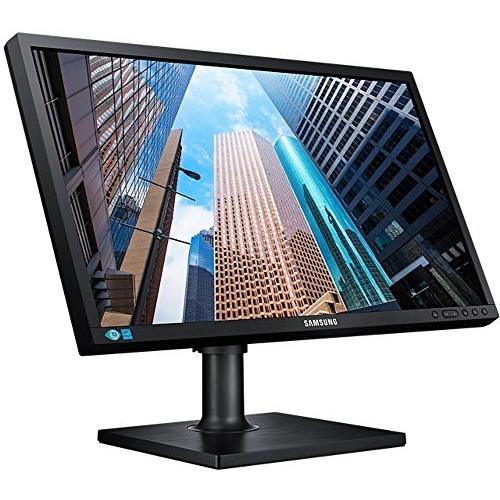
Samsung SE450 Series S24E450BL LED Computer Monitor 23.6 Inches Full HD (1080p) TN 300 cd/m2 1000:1 5 ms DVI VGA Black




Sponsored This site contains affiliate links for which we may receive compensation. More information
 clove.co.uk
Sponsored Samsung LS24E45KBL 61 cm (24") 1920 x 1080 pixels Full HD LED Black Monitor
127.78 GBP
Price updated on: 16-11-2024 23:04:26
127.78 GBP
Price updated on: 16-11-2024 23:04:26 | Identifiers | |
|---|---|
| Model | Samsung S24E450BL |
| MPN | Samsung S24E450BL |
| Dimensions / Weight | |
| Key Features | |
|
AC input frequency The frequency of the alternating current supplied to a power supply or charger, expressed in hertz (Hz). It indicates the acceptable operating range for the electrical mains that powers the device, ensuring proper functionality and safety.
|
50/60 |
|
AC input voltage The alternating current voltage range that the product accepts from its power source, expressed in volts (V). It indicates the minimum and maximum supply voltages compatible with the device.
|
100 - 240 V |
|
Adjustable display height The vertical dimension of a monitor’s screen that can be changed by the user, measured from its lowest to highest point. It is expressed in a physical unit such as millimetres, centimetres or inches and applies to any device where the display height can be adjusted.
|
Yes |
|
Aspect ratio The proportion between the width and height of a display, image or video, expressed as two numbers separated by a colon (e.g., 16:9). It indicates whether content is designed for widescreen, square, or other aspect ratios.
|
16:9 |
|
Audio (L,R) in Indicates the total number of audio input channels that a product can receive, such as left and right stereo inputs or additional surround‑sound inputs. The value is an integer representing how many separate audio input paths are available for connecting external devices.
|
1 |
|
Audio input Indicates whether the product includes a dedicated audio input port (e.g., 3.5 mm jack, RCA, optical). A value of "Yes" means an audio input is present; "No" means it is absent.
|
No |
|
Audio output The total count of physical audio connectors available on the product, such as headphone jacks, RCA outputs, or optical ports. The value is an integer indicating how many separate audio input or output points can be used to connect external devices.
|
No |
|
Backlight technology The type of backlighting used in a display panel, such as LED, WLED, CCFL or LCD. It indicates the illumination source that provides uniform light behind the screen for image rendering.
|
LED backlight |
|
Batteries included Indicates whether the product comes with batteries included in the package. A value of "Yes" means that batteries are supplied, while a value of "No" indicates that no batteries are provided and must be purchased separately.
|
Yes |
|
Bezel width The linear measurement of the outer edge or frame surrounding a display, screen, or other product component, expressed in millimetres or inches. It indicates how wide the bezel is from one side to the other and helps customers assess fit, aesthetics, and compatibility with mounting brackets or protective cases.
|
9.5 mm |
|
Bezel width bottom The linear measurement of the bottom edge of a display or device’s bezel, expressed in millimetres or inches. It indicates how wide the lower frame is from one side to the other and helps customers assess fit, compatibility with mounting brackets, and overall design aesthetics.
|
1.5 cm |
| Bluetooth | No |
|
Brand compatibility A list of brand names that the product is compatible with. Each entry represents a manufacturer whose products can be used with or alongside the item.
|
Samsung |
|
Built-in speakers Indicates whether the product includes built‑in speaker(s) that can produce sound without requiring external audio devices. A value of "Yes" means the device has one or more integrated speakers; a value of "No" means it does not.
|
Yes |
| Built-in USB Hub | No |
|
Cable lock slot Indicates whether the product includes a slot for inserting a cable lock, such as a Kensington or similar security device.
|
No |
|
Cable Lock Slot Indicates whether the product includes a slot for inserting a cable lock, such as a Kensington or similar security device.
|
No |
|
Card reader integrated Indicates whether the device includes a built‑in card reader that can read removable memory cards such as SD, microSD, MMC or similar formats.
|
Yes |
|
Certification A list of official certifications or compliance marks that the product has received from regulatory bodies, safety organizations, or industry standards groups. Each entry represents a distinct certification such as CE, FCC, RoHS, UL, or WEEE, and may include additional details like version numbers or specific test reports.
|
Energystar, TCO, EPEAT, TUV |
|
Colour The colour or combination of colours that a product is available in, expressed as common names such as "Black", "Silver" or comma‑separated lists like "Black, White". It indicates the visual appearance of the item for consumers.
|
Black, Blue, Copper, Green |
|
Colour gamut The proportion of a reference color space that a display can reproduce, expressed as a percentage. This metric indicates how closely the device’s screen matches standards such as sRGB, NTSC, DCI‑P3 or Adobe RGB, helping users compare visual fidelity across monitors and other visual devices.
|
72% |
|
Colour support The number of distinct colours that a display or image can represent, expressed as an integer value such as "16.7 million colours". This metric indicates the richness and fidelity of colour reproduction for visual media.
|
16.7 million colours |
|
Colours A colour is a visual attribute that describes the hue or shade of an object or surface. It can be a single dominant colour, a combination of colours, or a range such as "Black, White". The value may be expressed in common names (e.g., Black, Silver) or descriptive terms (e.g., One Colour, Assorted).
|
Black |
|
Compatible memory cards List of the memory card types that a device can read or write, such as MicroSD (TransFlash), SD, MMC, CompactFlash, and others. Each value represents a format that the device’s slot or reader supports for storage expansion.
|
SD |
|
Component for Specifies the type of device or system that the product is intended to be used with, such as a PC, server, notebook, surveillance system, or other electronic equipment. The value represents a single category and can be used to filter or group products by their target platform.
|
Server/workstation |
|
Computer system The overall computer system or platform that the product belongs to, such as a desktop PC, laptop, server, or embedded device. It indicates the general type of hardware architecture and intended use case for the product.
|
Yes |
| Connection Type | 1 x DVI, 1 x D-SUB |
|
Contrast The contrast ratio is the proportion between the brightest and darkest luminance a display can produce, expressed as a simple fraction such as 1000:1. It indicates how well a screen or projector can differentiate light from dark areas, affecting image clarity and color depth.
|
1,000:1 |
|
Data transfer rate The highest theoretical speed at which a device can send or receive data, expressed in bits per second (bps) or its multiples such as kbps, mbps, gbps, etc. It represents the upper bound of throughput under optimal conditions and is useful for comparing performance across devices and interfaces.
|
6 Gbit/s |
|
Depth The linear measurement of an object from front to back or top to bottom, expressed in a physical unit such as millimeters, centimeters, inches, etc. It indicates how deep the item is and can be used for fitting, compatibility, or spatial planning.
|
55.4 mm |
|
Design The visual style or aesthetic category of a product, such as "Digital signage flat panel", "Modern", "Retro", or "Sporty". It describes the overall look and feel that distinguishes the item from others in its class.
|
Digital signage flat panel |
|
Device type The general classification of a product, such as tablet, smartphone, router, or computer. It indicates the primary function or form factor that helps buyers quickly identify and compare similar items.
|
HDD |
|
Diagonal size The diagonal measurement of a display screen expressed in inches or centimeters. It indicates the overall visual area available for content and is commonly used to compare monitors, televisions, laptops, tablets, and other electronic devices.
|
23.6" |
|
Dimensions The pixel dimensions of a display or image, expressed as width by height (e.g., 1920x1080). It indicates how many pixels are used to render the visual content and is commonly used for monitors, TVs, smartphones, cameras, and digital images.
|
331 x 555 x 55 mm |
|
Display The visual technology used by the product’s screen, such as LCD, LED, OLED, TFT or analog. It indicates the underlying display panel that determines image quality, color reproduction and power consumption.
|
LED |
| Display diagonal | 59.94 cm |
|
Display Diagonal The measurement of a display’s diagonal, expressed in inches or centimeters. It represents the overall visual area available for content and is commonly used to compare monitors, televisions, laptops, tablets, and other electronic devices.
|
59.9 cm (23.6") |
|
Display number of colours The total count of distinct colours that a product’s display can reproduce. This value indicates the colour depth or gamut capability of the screen, helping users compare visual fidelity across devices.
|
16.78 million colors |
|
Display position adjustments A list of the possible mechanical adjustments that can be made to a display’s position, such as tilt, height adjustment, swivel, and pivot (rotation). It indicates which movements are available on the product so users know how they can orient or level the screen for optimal viewing.
|
Height, pivot (rotation), swivel, tilt |
|
Display resolution The pixel dimensions of a display or image, expressed as width by height (e.g., 1920x1080). It indicates how many pixels are used to render visual content and is commonly used for monitors, TVs, smartphones, cameras, and digital images.
|
1920x1080 |
|
Display screen technology The type of display panel used in a visual device, such as LED‑backlit LCD, IPS, TN, VA, or PLS. It indicates the underlying technology that determines image quality, color accuracy, viewing angles, response time and power consumption.
|
TN |
|
Display type The type of visual panel or display technology used in a product, such as LCD, LED, OLED, TFT, IPS, AMOLED, or analog. It indicates the underlying technology that determines image quality, color reproduction, power consumption and suitability for different use cases.
|
LED-backlit LCD monitor / TFT active matrix |
|
DisplayPort version The specific version of the DisplayPort standard that a product supports, such as "1.4", "2.0" or "2.1b". This value indicates the capabilities and compatibility of the DisplayPort interfaces on the device.
|
1.2 |
|
Displayports quantity The total count of physical or virtual display output connections available on a device, such as HDMI, DisplayPort, DVI, VGA, or USB‑C ports that support video output.
|
2 |
|
DVI port Indicates how many DVI connectors are present on the product. The value is a simple integer representing the total count of DVI ports, regardless of type or version.
|
Yes |
|
Dynamic contrast ratio marketing name The dynamic contrast ratio is the proportion between the maximum and minimum luminance a display can produce while operating under normal conditions, expressed as a simple fraction such as 1200:1. It reflects how well a screen can differentiate light from dark areas during typical use, influencing perceived image quality.
|
Mega Contrast |
|
ECO mode Indicates whether the product offers an energy‑saving or low‑power operating mode that reduces consumption during idle or normal use. The value is typically "Yes" if the feature is available and "No" otherwise.
|
Yes |
|
Energy efficiency class The energy efficiency class indicates the relative energy performance of a product, expressed with letters ranging from A+++ (most efficient) to G (least efficient). It allows consumers to compare expected operating costs and environmental impact across similar items.
|
B |
| Energy Star certified | Yes |
|
Ethernet LAN Indicates whether the product includes an Ethernet LAN interface for wired network connectivity, allowing data transmission over RJ‑45 or compatible cables.
|
No |
|
Flat panel mount interface The pair of horizontal and vertical dimensions, in millimetres, that define the spacing between mounting holes on the back of a display or monitor. This pattern indicates the exact VESA standard supported by the product and is used to match compatible brackets or mounts.
|
100 x 100 mm |
|
Game mode Indicates whether the product supports a dedicated game mode that optimizes performance or settings for gaming applications.
|
Yes |
|
Handheld remote control Indicates whether a handheld device can be operated from a distance using an external remote control such as infrared, Bluetooth or Wi‑Fi. A value of "Yes" means the product supports remote operation; "No" indicates it does not.
|
Yes |
|
Hard drive capacity The total storage capacity of an internal hard drive installed in the product, expressed as a numeric value with an appropriate unit such as GB, MB, or TB. This attribute helps users understand how much data can be stored on the device.
|
300 GB |
|
Hard drive interface The physical or logical interface used by a hard drive to connect with other components, such as SATA, SAS, USB, PCI Express, or M.2. It indicates the technology that enables data transfer and power delivery between the device and its host system.
|
SAS |
|
Hard drive size The physical width of a hard drive measured in inches or millimetres, typically expressed as the diagonal size of the drive’s enclosure (e.g., 2.5" or 3.5"). This measurement indicates the form factor that determines compatibility with computer bays, external enclosures, and mounting brackets.
|
2.5" |
|
Hard drive speed The speed at which a hard drive’s spindle rotates, expressed in revolutions per minute (RPM). This value indicates how quickly the drive can read and write data, affecting performance for tasks that involve frequent disk access.
|
15000 RPM |
|
HD type The pixel dimensions of a screen’s display expressed as width by height (e.g., 1920×1080). It indicates the number of pixels that can be shown on the monitor or device, affecting image sharpness and clarity.
|
Full HD |
|
HDCP Indicates whether a device supports HDCP (High‑bandwidth Digital Content Protection), allowing it to play or display protected digital content on compatible screens and audio/video equipment.
|
Yes |
|
Heat dissipation The amount of thermal energy a product can dissipate, expressed in a standard unit such as BTU per hour or watts. It indicates the cooling requirement and helps compare how much heat the device generates during operation.
|
2047.8 BTU/h |
|
Height The vertical dimension of a product measured from its lowest to highest point. It is expressed in a physical unit such as millimetres, centimetres or inches and applies to any item where height is relevant, including books, electronics, furniture and other objects.
|
330.5 mm |
|
Height adjustable Indicates whether a product’s vertical dimension can be increased or decreased by the user, typically through mechanical or electronic means. The value is "Yes" if height adjustment is possible and "No" otherwise.
|
Height Adjustable |
|
Height adjustment The ability of a product to change its vertical dimension, typically measured in millimetres, centimetres or inches. It indicates whether the user can raise or lower the item and, if so, by how much. This attribute applies to monitors, desks, furniture, stands and other equipment that offer adjustable height.
|
Yes |
|
Height with stand The overall vertical dimension of a product measured from its lowest to highest point, including any attached stand or base. It is expressed in a physical unit such as millimetres, centimetres or inches and applies to items where height is relevant, including monitors, furniture, appliances and other objects.
|
482 mm |
|
Horizontal scan range The range of frequencies, expressed in kilohertz (kHz), over which a device can process or display horizontal signals or scan lines. It indicates the minimum and maximum operating frequencies for horizontal scanning operations.
|
30 - 81 kHz |
|
Horizontal viewing angle The horizontal viewing angle is the maximum width, measured in degrees, that a user can see across a display or screen while maintaining acceptable visual quality. It represents how far left and right one can look without significant loss of clarity or distortion.
|
170 |
|
Hot-swap Indicates whether the product can have storage units inserted or removed while it is powered on and running without needing to shut down or reboot the system.
|
Yes |
|
Humidity range operating The range of relative humidity (expressed as a percentage) within which the product is designed to operate reliably. Values are given as a minimum–maximum interval such as "10 to 80%" and indicate the acceptable environmental moisture level for optimal performance.
|
10 - 80% (non-condensing) |
|
LED backlighting type The type of LED backlighting used in a display panel, such as Direct‑LED, Edge‑LED, Full‑Array or other LED configurations. It indicates how the light source is arranged behind the screen to provide illumination and uniformity.
|
Direct-LED BLU |
|
LED indicators A list of the functions or statuses that an LED indicator on a device can display, such as power status, activity, link, and other operational signals.
|
Power |
|
Market positioning A classification that indicates the target audience or use case for a product, such as Business, Gaming, Home & Office, Education, etc. It helps customers quickly identify which products are best suited to their needs.
|
Home & Office |
|
Maximum power consumption The highest electrical power that a device can draw or consume during operation, expressed in watts (W). It represents the peak energy usage of the product and is useful for estimating maximum power requirements, comparing efficiency across similar devices, and ensuring compatibility with power supplies.
|
176 W |
|
Maximum refresh rate The highest number of times per second that a display can update its image, expressed in hertz (Hz). It indicates the maximum refresh capability of the device and is useful for comparing visual performance across monitors, TVs, laptops, and other screen‑based products.
|
60 Hz |
|
Mounting kit Indicates whether a product includes a mounting kit that allows it to be securely attached to a wall, rack, or other support structure. The value is typically "Yes" if the kit is included, or "No" if it is not.
|
Yes |
|
Mounting method Indicates the physical location or system where a product is intended to be installed, such as wall, desk, ceiling, floor, rack, or freestanding. It describes how the item is fixed in place and what mounting hardware may be required.
|
Wall Mount / stand |
|
No flickering Indicates whether the product operates without flickering, ensuring a smooth visual experience for users.
|
Yes |
|
On screen display Indicates whether the product has a built‑in or integrated display that can be used to view content directly, such as on laptops, monitors, TVs, projectors, or other electronic devices.
|
Yes |
|
On/off switch Indicates whether the product includes an on/off switch that allows the user to power it on or off manually.
|
Yes |
|
OS Required A list of operating systems that the product can run on or is compatible with. Each entry represents a distinct OS version or family, such as Windows 10, macOS Catalina, or Linux Ubuntu 20.04. Users can use this attribute to verify that their device’s software environment meets the product’s requirements.
|
Windows 8.1 |
|
Package depth The linear measurement from front to back or top to bottom of a product’s packaging, expressed in a physical unit such as millimeters, centimeters, inches, etc. It indicates how deep the packaged item is and can be used for fitting, compatibility, or spatial planning.
|
406 mm |
|
Package Height The vertical dimension of a product’s packaging measured from its lowest to highest point. It is expressed in a physical unit such as millimetres, centimetres or inches and helps customers assess how tall the package will be when stored or shipped.
|
185 mm |
|
Package width The horizontal measurement of a product’s packaging, expressed in a linear unit such as millimetres or inches. It indicates how wide the package is from one side to the other and helps customers assess fit for storage, shipping, or display.
|
632 mm |
|
Picture-In-Picture Indicates whether a device can display a primary content stream while simultaneously showing another content stream in an overlay window (Picture‑in‑Picture). This feature is relevant for televisions, monitors, and computers that support simultaneous viewing of two video sources.
|
Yes |
|
Pivot The maximum rotation angle a monitor or display can achieve around its vertical axis, expressed in degrees. It indicates the range of motion available for adjusting screen orientation to improve ergonomics and viewing comfort.
|
Yes |
|
Pivot angle The maximum angular range a product can rotate or tilt around its vertical axis, expressed in degrees. It indicates how far the device can pivot from its neutral position while maintaining functionality and usability.
|
-1 - 95° |
|
Pixel pitch Represents the physical dimensions of a single pixel on a display or imaging device, expressed as width and height in a length unit (e.g., millimeters). This attribute allows comparison of the physical resolution across screens, cameras, and other pixel‑based technologies.
|
0.2715 mm |
|
Plug and play Indicates whether the product can be used immediately after installation without requiring additional configuration or drivers.
|
Yes |
| Power consumption | 130 W |
| Power consumption (off) | 0.005 W |
| Power consumption operational | 22 Watt |
|
Power Consumption Stand by The electrical power drawn by a device while it is in standby mode, expressed in watts (W). This value represents the minimal energy usage when the product is powered on but not actively performing tasks, and can be used to estimate idle consumption or compare efficiency across similar devices.
|
0.3 Watt |
|
Quick start guide Indicates whether a quick‑start guide is provided with the product. A value of "Yes" means that a brief, introductory manual or overview is included to help users get started quickly; "No" indicates that no such guide is supplied.
|
Yes |
|
Recyclable material Indicates the proportion of a product that can be recycled, expressed as a percentage of its total weight or volume. This metric helps consumers assess environmental impact and compliance with recycling standards.
|
30% |
|
Response time The time interval between a stimulus and the corresponding response of a device or system, expressed in units such as milliseconds (ms). It indicates how quickly the product reacts to input or processes data, which is critical for performance-sensitive applications like displays, gaming monitors, and interactive devices.
|
5 ms |
|
RMS rated power The root‑mean‑square (RMS) power rating of a device, expressed in watts (W). It represents the average electrical power that the product can deliver or consume under normal operating conditions.
|
20 W |
| Screen shape | Flat |
|
Sleep timer Indicates whether the product includes a sleep‑timer feature that allows users to schedule automatic start or stop actions at specified times while the device is in a low‑power or standby mode.
|
Yes |
|
Speakers Indicates the type of audio system integrated into a speaker or audio device, such as stereo, mono, or an integrated sound system.
|
No |
|
Swivel angle The maximum angular range, measured in degrees, that a product can rotate or swivel around its vertical axis. It indicates how far the device can pivot from its reference position while maintaining functionality and usability.
|
90 |
|
Swivel angle range The maximum angular range a device can rotate or tilt, expressed as a numeric interval in degrees (e.g., "-45 to 45°"). It indicates how far the product can pivot left/right or up/down from its neutral position.
|
-45 - 45° |
|
Swivelling Indicates whether a product, such as a monitor or other device, can rotate around its vertical axis to adjust viewing angle. A value of "Yes" means the item supports swiveling; "No" means it does not.
|
Yes |
|
Thin Client installed Indicates whether a device is configured as a thin client, meaning it relies on a remote server for processing while using only a local display interface. A value of "Yes" means the thin‑client setup is ready for use; "No" indicates that the configuration has not been applied or is not present.
|
No |
|
Thin client installed Indicates whether a device is configured as a thin client, meaning it relies on a remote server for processing while using only a local display interface. A value of "Yes" means the thin‑client setup is ready for use; "No" indicates that the configuration has not been applied or is not present.
|
No |
|
Tilt adjustment Indicates whether a product can be tilted or adjusted vertically, allowing the user to change its viewing angle. A value of "Yes" means the device supports tilt; "No" means it does not.
|
Yes |
|
Tilt angle The vertical angle at which a device can be tilted or adjusted, measured in degrees. It indicates how far up and down the user can move the device while maintaining acceptable performance or usability.
|
-3/+25 |
|
Touchscreen Indicates whether a device has a touchscreen interface that can detect touch input. The value is "Yes" if the device includes a functional touchscreen, and "No" otherwise.
|
No |
|
Tv tuner integrated Indicates whether a product includes a built‑in television tuner that can receive broadcast signals directly, without requiring an external receiver.
|
No |
|
TV tuner integrated Indicates whether a product includes an integrated television tuner that can receive broadcast signals directly without requiring an external receiver. The value is "Yes" or "No", representing the presence or absence of this feature.
|
No |
|
TVI port Represents how many TVI (Television Interface) connectors are present on the product. The value is a simple integer indicating the total count of TVI ports, regardless of version or configuration.
|
Yes |
|
USB port Indicates the presence and quantity of USB connectors on a product. The value is typically an integer representing how many USB ports are available, regardless of type or version.
|
No |
|
User Guide on CD-ROM Indicates whether a CD‑ROM containing the product’s user guide is supplied with the item. A value of "Yes" means that the manual is included on a physical disc, while any other value (e.g., "No") indicates that no CD‑ROM is provided.
|
Yes |
|
Vertical scan range The range of vertical scan frequencies that a display device can support, expressed in hertz (Hz). It indicates the minimum and maximum refresh rates at which the screen updates vertically, affecting visual smoothness and stability.
|
48 - 75 Hz |
|
Vertical viewing angle The maximum vertical field of view, measured in degrees, that a user can see from the top to the bottom of a display or screen while maintaining acceptable visual quality.
|
160 |
|
VESA mounting Indicates whether a product is compatible with the VESA mounting standard and, if so, specifies the supported VESA pattern(s) in millimetres (e.g., "100 × 100 mm"). The value can be "Yes", "No" or a list of one or more VESA patterns.
|
Yes |
|
VESA Mounting Indicates whether a product supports the VESA mounting standard, which defines the size and placement of mounting holes on displays or monitors. The value can be "Yes" or "No", or it may specify one or more VESA patterns such as "100 × 100 mm" to indicate the exact dimensions supported.
|
Yes |
|
Viewable size horizontal The width of the display area that a user can see without distortion, measured in a physical unit such as centimeters or inches. It represents the actual horizontal span of the screen that is visible when looking straight at it.
|
52.2 cm |
|
Viewable size vertical The maximum vertical dimension of the visible area on a display screen, expressed as a linear measurement (e.g., centimeters or inches). It indicates how tall the portion of the screen that can be seen by a user is, which helps compare monitors and other visual devices.
|
29.3 cm |
| Voltage required | AC 120/230 V |
| Warranty card | Yes |
|
Weight The mass of the product expressed in a standard unit such as grams or kilograms. It represents how heavy the item is and can be used for shipping calculations, handling instructions, or consumer information.
|
5.48 kg |
|
Wi-Fi Indicates whether the product has built‑in Wi‑Fi capability, allowing it to connect to wireless networks without requiring external adapters or dongles.
|
No |
|
Width The horizontal measurement of a product, expressed in a linear unit such as millimetres or inches. It indicates how wide the item is from one side to the other and is used for sizing, fitting, and compatibility purposes.
|
554.6 mm |

Samsung is a South Korean multinational conglomerate company. It is the world's largest information technology company, and the world's second-largest semiconductor company. Samsung Electronics, a subsidiary of Samsung Group, is the world's largest information technology company, and the world's second-largest semiconductor company.


