SHUTTLE XH170V Intel H170 Black PC/workstation barebone


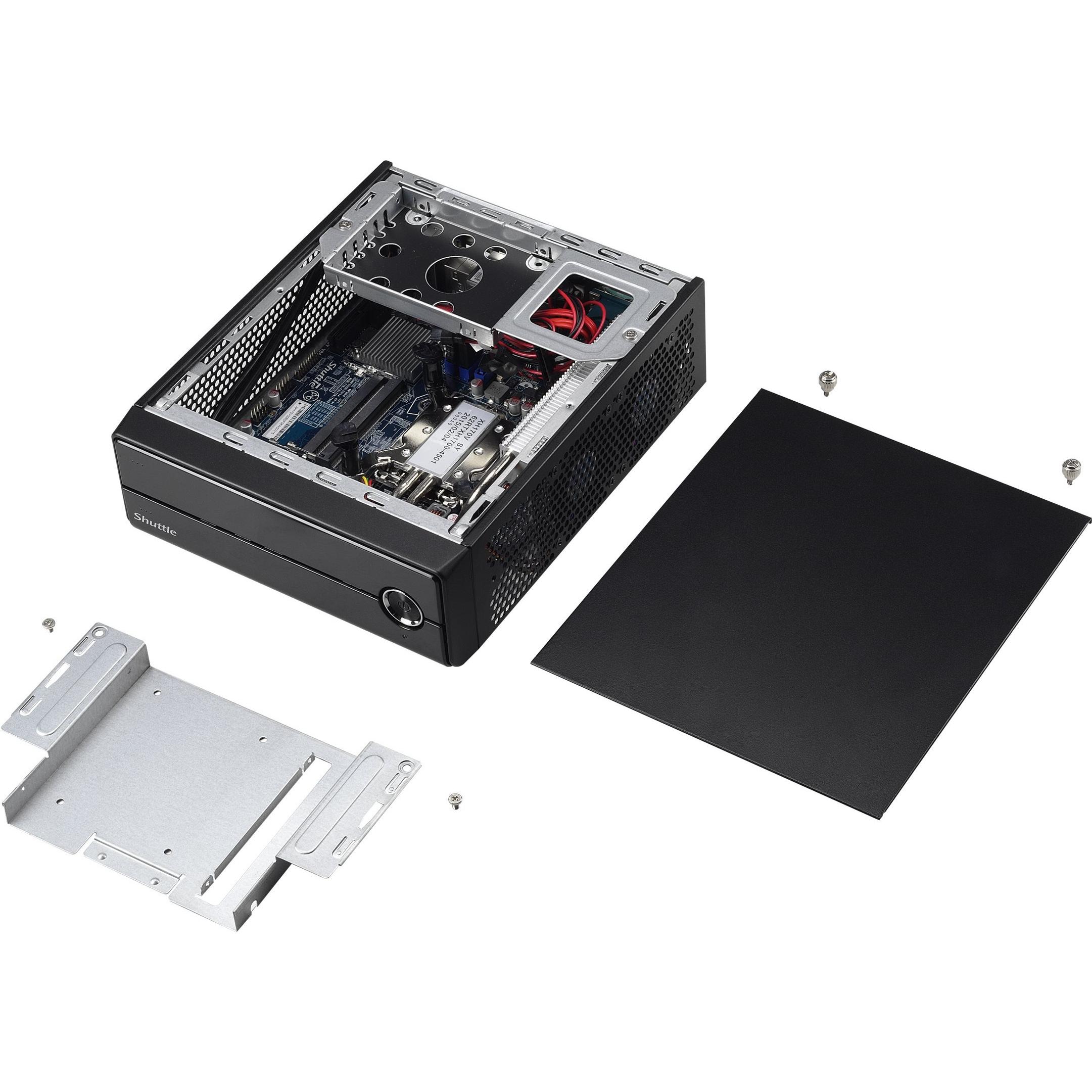


Sponsored This site contains affiliate links for which we may receive compensation. More information
Find other available options:

| Identifiers | |
|---|---|
| Model | SHUTTLE XH170V |
| MPN | SHUTTLE XH170V |
| Dimensions / Weight | |
| Key Features | |
|
AC adapter included Indicates whether the product comes with an AC power adapter included in the package. A value of "Yes" means a charger is supplied, while "No" indicates that no charger is provided and the user must obtain one separately.
|
Yes |
|
AC adapter output current The electrical current supplied by an AC power adapter to a device, expressed in amperes (A). It indicates the maximum output current that the adapter can provide under normal operating conditions and helps users verify compatibility with devices or accessories that require a specific input current.
|
4.74 A |
|
AC adapter output voltage The electrical potential difference supplied by the AC adapter to a device, expressed in volts (V). It indicates the nominal voltage that the charger outputs and is used to match the adapter with compatible equipment.
|
19 |
|
AC input frequency The frequency of the alternating current supplied to the device, expressed in hertz (Hz). It indicates the acceptable operating range for the electrical mains that powers the product.
|
50 - 60 Hz |
|
AC input voltage The alternating current voltage range that the product accepts from its power source, expressed in volts (V). It indicates the minimum and maximum supply voltages compatible with the device.
|
100 - 240 V |
|
Audio output channels Indicates the total number of independent audio channels that a product can produce or process, including sub‑channels such as those used in surround sound configurations (e.g., 5.1, 7.2). The value may be an integer or a decimal to represent fractional channel groups.
|
5.1 channels |
|
Audio system Specifies the audio system installed or supported by the product, such as Dolby Audio, SonicMaster, MaxxAudio Pro, or other proprietary audio processing technologies. The value is a free‑text string that identifies the main audio engine or brand used for sound playback and processing.
|
1280x720 |
|
BIOS type The firmware interface used by a computer system to initialize hardware and load the operating system, such as UEFI or legacy BIOS. It indicates whether the motherboard supports modern features like secure boot, fast startup, or compatibility with older operating systems.
|
UEFI AMI |
|
Built-in camera Indicates whether the product includes a built‑in camera that can capture images or video directly, without requiring an external device. A value of "Yes" means the device has such a camera; "No" means it does not.
|
No |
|
Built-in processor Indicates whether the product contains a built‑in central processing unit (CPU) that can execute instructions without requiring an external processor module. A value of "Yes" means the device has such a CPU; "No" means it does not.
|
No |
|
Cable lock slot Indicates whether the product includes a slot for inserting a cable lock, such as a Kensington or similar security device.
|
Yes |
|
Cable Lock Slot Indicates whether the product includes a slot for inserting a cable lock, such as a Kensington or similar security device.
|
Yes |
|
Cable lock slot type The specific type of cable lock interface that a device provides for securing cables, such as Kensington, Noble, IBM or other standard locking mechanisms.
|
Kensington |
|
Certification A list of official certifications or compliance marks that the product has received from regulatory bodies, safety organizations, or industry standards groups. Each entry represents a distinct certification such as CE, FCC, RoHS, UL, or WEEE, and may include additional details like version numbers or specific test reports.
|
FCC, CE, BSMI, C-Tick, RoHS, EuP |
|
Colour The colour or combination of colours that a product is available in, expressed as common names such as "Black", "Silver" or comma‑separated lists like "Black, White". It indicates the visual appearance of the item for consumers.
|
Black |
|
Compatible processor series List of processor families that the product can support, such as Intel Celeron, Intel Core i5, AMD Ryzen 3, etc. Each value represents a distinct CPU family or brand that is compatible with the hardware platform.
|
Intel® Pentium® |
|
Cooling type The method used to dissipate heat from a component or system, such as active cooling (fans or liquid loops), passive heat sinks, or no active cooling. It indicates whether the product relies on airflow, conduction, or other mechanisms to maintain safe operating temperatures.
|
Active |
| DC-in jack | Yes |
|
Depth The linear measurement of an object from front to back or top to bottom, expressed in a physical unit such as millimeters, centimeters, inches, etc. It indicates how deep the item is and can be used for fitting, compatibility, or spatial planning.
|
200 mm |
|
Displayports quantity The total count of physical or virtual display output connections available on a device, such as HDMI, DisplayPort, DVI, VGA, or USB‑C ports that support video output.
|
2 |
|
Displays Supported The maximum count of display units that a product can accommodate or operate simultaneously, such as monitors, TVs, or other visual output devices. This value indicates how many separate displays the system is designed to support in its current configuration.
|
3 |
|
Drivers included Indicates whether the product comes with drivers included in the package or available for download. A value of "Yes" means that drivers are supplied, while a value of "No" indicates they are not provided and must be obtained separately.
|
Yes |
|
ECC Indicates whether the memory module or component supports Error‑Correcting Code (ECC) for detecting and correcting single-bit errors during operation. A value of "Yes" means ECC is enabled, allowing automatic correction of data corruption; a value of "No" indicates no ECC support.
|
No |
| Energy Star certified | Yes |
|
eSATA ports quantity Represents how many eSATA connectors are physically present on the product, regardless of orientation or version. The value is a simple integer indicating the total count of eSATA ports available for connecting external storage devices.
|
1 |
|
Ethernet LAN Indicates whether the product includes an Ethernet LAN interface for wired network connectivity, allowing data transmission over RJ‑45 or compatible cables.
|
Yes |
|
Graphics adapter family The brand or family of the graphics adapter present in a device, such as Intel, AMD, NVIDIA, Apple, or other vendors. It indicates the general source of the GPU technology and helps users compare visual performance across products.
|
Intel |
|
HDMI version The specific version of the HDMI standard that a product supports, such as "2.0", "2.1" or "1.4b". This value indicates the capabilities and compatibility of the HDMI interfaces on the device.
|
1.4 |
|
Height The vertical dimension of a product measured from its lowest to highest point. It is expressed in a physical unit such as millimetres, centimetres or inches and applies to any item where height is relevant, including books, electronics, furniture and other objects.
|
72 mm |
|
LED indicators A list of the functions or statuses that an LED indicator on a device can display, such as power status, activity, link, and other operational signals.
|
HDD, Power |
|
Maximum internal memory The largest amount of internal random‑access memory that a device can support, expressed as a data size such as megabytes or gigabytes. It indicates the maximum capacity for active processes and multitasking performance.
|
16384 MB |
|
Memory channels The configuration of memory channels supported by a device, indicating how many independent memory paths the system can use for data transfer (e.g., Dual‑channel, Quad‑channel). This attribute helps users understand the potential bandwidth and performance characteristics of the memory subsystem.
|
Dual |
|
Memory slots type The form factor of the memory module that a product can accept, such as DIMM or SO‑DIMM. It indicates whether the device uses standard desktop RAM modules (DIMM) or smaller laptop‑style modules (SO‑DIMM).
|
SO-DIMM |
|
Memory voltage The electrical voltage required by the RAM modules of a device, expressed in volts (V). It indicates the operating supply voltage that the memory needs to function correctly and safely.
|
1.35 V |
|
Microphone in Indicates whether the product includes at least one built‑in microphone. A value of "Yes" means that the device has an integrated microphone, while "No" indicates it does not.
|
Yes |
|
Motherboard chipset The model of the motherboard’s chipset, indicating the family of supported processors and integrated features such as I/O interfaces, memory support, and peripheral connectivity.
|
Intel® H170 |
|
Networking features A list of the networking protocols and standards that a device can support or comply with, such as IEEE 802.11 variants for wireless, IEEE 802.3 for Ethernet, or other relevant networking specifications. The values are typically separated by commas and may include both technical identifiers and consumer‑friendly labels.
|
Gigabit LAN |
|
On-board graphics adapter The model name or number of the integrated graphics adapter built into a device, such as a laptop, desktop, or motherboard. It identifies the specific GPU variant used for rendering and video processing, allowing users to compare visual performance and compatibility across products.
|
Yes |
|
Operating relative humidity The range of relative humidity (in percentage) within which the product is designed to operate reliably. Values are expressed as a minimum–maximum interval such as "20 - 80 %" and indicate the acceptable environmental moisture level for optimal performance.
|
10 - 90 % |
|
Operating system installed The operating system that is installed on the device, indicating the software platform that manages hardware resources and provides services for applications. It can be a commercial OS such as Windows or macOS, an open‑source distribution like Linux, or a proprietary firmware used in embedded devices.
|
No |
|
Panel mounting interface The pair of horizontal and vertical dimensions in millimetres that a product supports for VESA mounting (e.g., "100 × 100 mm"). This value indicates the exact hole spacing required by a mounting bracket to secure the device. It is used for monitors, TVs, projectors and other display equipment that can be wall‑mounted or attached to stands.
|
100 x 100 mm |
|
Power cord included Indicates whether a power cord is supplied with the product. A value of "Yes" means that a power cable is included in the package, while "No" indicates it is not provided and must be purchased separately.
|
Yes |
|
Power supply The electrical power consumption or output of the product, expressed in watts (W). It indicates how much energy the device uses during operation or how much power it can deliver to connected equipment.
|
90 W |
|
Power supply type The type of electrical supply that powers the device, such as mains AC, DC, USB, battery, or a combination of these options.
|
External AC adapter |
|
Product Type Indicates the general classification or type of an item, such as "laptop", "projector", "router" or "paint". It helps users quickly identify the nature of the product and compare similar items across categories.
|
PC barebone |
|
Quick start guide Indicates whether a quick‑start guide is provided with the product. A value of "Yes" means that a brief, introductory manual or overview is included to help users get started quickly; "No" indicates that no such guide is supplied.
|
Yes |
|
RAID levels A comma‑separated list that specifies the RAID configurations supported by a storage controller or device. Each entry can be a numeric level (e.g., 0, 1, 5, 10) or a special label such as JBOD. This attribute indicates which disk arrangements the system can manage.
|
0, 1 |
|
Safety A list of safety and regulatory certifications that a product complies with, such as CE, UL, FCC, or other regional standards.
|
CB, BSMI, ETL |
|
Storage drive interface List of physical or logical interfaces that allow communication between a hard drive and other devices, such as SATA, M.2 PCIe, U.2, SAS, NVMe, or other standard connections.
|
Serial ATA III |
|
Storage drive sizes supported A list of the physical sizes and types of storage drives that a product can accommodate, such as 2.5‑inch, 3.5‑inch, or M.2. The values are typically separated by commas and may include additional descriptors like "M.2" to indicate an internal solid‑state drive interface.
|
2.5" |
|
Supported memory clock speeds The operating frequencies that a processor or memory module can run at, expressed in megahertz (MHz) or gigahertz (GHz). This attribute lists all supported clock rates, allowing users to understand the performance range of the component.
|
1333,1600 MHz |
|
Supported storage drive types A list of the types of storage drives that a product can accommodate or use, such as HDD, SSD, or hybrid configurations. Each entry indicates a distinct drive type that is supported by the device’s bays, slots, or external interfaces.
|
HDD,SSD |
|
Thermal design power The maximum amount of power, expressed in watts (W), that a processor or other electronic component is designed to dissipate as heat under typical operating conditions. It represents the thermal load the cooling system must handle and is used by manufacturers and users to assess performance, energy consumption, and suitability for specific environments.
|
65 W |
|
USB 2.0 ports quantity Represents the count of external USB 2.0 (high‑speed) connectors available on a device. The value is an integer indicating how many USB 2.0 ports can be used for data transfer or power delivery from the outside of the product, regardless of internal placement or version.
|
4 |
|
VESA mounting Indicates whether a product is compatible with the VESA mounting standard and, if so, specifies the supported VESA pattern(s) in millimetres (e.g., "100 × 100 mm"). The value can be "Yes", "No" or a list of one or more VESA patterns.
|
Yes |
|
VESA Mounting Indicates whether a product supports the VESA mounting standard, which defines the size and placement of mounting holes on displays or monitors. The value can be "Yes" or "No", or it may specify one or more VESA patterns such as "100 × 100 mm" to indicate the exact dimensions supported.
|
Yes |
|
Weight The mass of the product expressed in a standard unit such as grams or kilograms. It represents how heavy the item is and can be used for shipping calculations, handling instructions, or consumer information.
|
2.2 kg |
|
Wi-Fi Indicates whether the product has built‑in Wi‑Fi capability, allowing it to connect to wireless networks without requiring external adapters or dongles.
|
No |
|
Width The horizontal measurement of a product, expressed in a linear unit such as millimetres or inches. It indicates how wide the item is from one side to the other and is used for sizing, fitting, and compatibility purposes.
|
240 mm |
SHUTTLE
Shuttle is a brand that specializes in making small form factor PCs and mini PCs. The company is known for its high-quality, reliable products, and its focus on customer satisfaction. Shuttle's mini PCs are popular among consumers and businesses for their small size and low price.
Shuttle is a brand that specializes in making small form factor PCs and mini PCs. The company is known for its high-quality, reliable products, and its focus on customer satisfaction. Shuttle's mini PCs are popular among consumers and businesses for their small size and low price.


