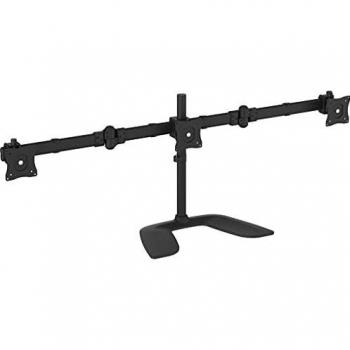
StarTech.com Triple-Display TV Wall Mount - Menu Board Mount - Landscape - For 40" to 50" VESA Mount Displays - 5 Tilt Settings


Sponsored This site contains affiliate links for which we may receive compensation. More information
Find other available options:

| Identifiers | |
|---|---|
| MPN | STARTECH.COM FPWMNB |
| Dimensions / Weight | |
| Key Features | |
|
Certification A list of official certifications or compliance marks that the product has received from regulatory bodies, safety organizations, or industry standards groups. Each entry represents a distinct certification such as CE, FCC, RoHS, UL, or WEEE, and may include additional details like version numbers or specific test reports.
|
REACH |
|
Colour The colour or combination of colours that a product is available in, expressed as common names such as "Black", "Silver" or comma‑separated lists like "Black, White". It indicates the visual appearance of the item for consumers.
|
Black |
|
Displays Supported The maximum count of display units that a product can accommodate or operate simultaneously, such as monitors, TVs, or other visual output devices. This value indicates how many separate displays the system is designed to support in its current configuration.
|
3 |
|
Housing material Indica el material o la combinación de materiales con los que está fabricado el componente más importante de un producto, como metal, plástico, vidrio u otros compuestos. Este atributo ayuda a comprender la durabilidad, peso y estética del artículo.
|
Steel |
|
Maximum screen size compatibility The largest diagonal measurement of a display that the product can accommodate, expressed in units such as inches or centimeters. It indicates the maximum screen size that will fit within the device’s enclosure or mounting area.
|
50.0" |
|
Maximum VESA mount The largest VESA mounting pattern that a product supports, expressed as two horizontal and vertical dimensions in millimetres (for example, "100 × 100 mm"). This value indicates the exact hole spacing required for a compatible wall or desk mount.
|
600x400 |
|
Minimum screen size compatibility The smallest diagonal measurement of a display that a mounting product can securely support, expressed in inches or centimeters. This value helps buyers determine whether a particular monitor, TV, or other flat‑panel device will fit the mount.
|
40.0" |
|
Minimum VESA mount Specifies the smallest VESA mounting pattern that a product supports, expressed as two numeric values in millimetres (e.g., "75 × 75 mm"). The value indicates the minimum hole spacing required for a wall or desk mount to securely attach the device.
|
200x200 |
|
Number of anchors included The total count of anchor points or mounting brackets that are supplied with the product. It indicates how many separate anchors are available for securing the item to a surface, wall, or other structure.
|
18 |
|
Number of spacers included The total count of individual spacer components that are packaged with the product. A spacer is a small, often cylindrical or rectangular piece used to fill gaps, adjust spacing, or provide support in assemblies. The value is an integer indicating how many such pieces are supplied, regardless of size or material.
|
48 |
|
Number of washers included The total count of individual washers that are part of the product package or assembly. It indicates how many separate washer components are provided, allowing users to understand the quantity of washers available for installation or replacement.
|
30 |
|
Panel mounting interface The pair of horizontal and vertical dimensions in millimetres that a product supports for VESA mounting (e.g., "100 × 100 mm"). This value indicates the exact hole spacing required by a mounting bracket to secure the device. It is used for monitors, TVs, projectors and other display equipment that can be wall‑mounted or attached to stands.
|
200x2003 |
|
Suitable for Indicates the types of products, users or environments for which the item is intended or compatible. The value can be a single category such as "Gaming" or a specific product type like "Computer case".
|
Public display |
|
Tilt angle range The minimum and maximum angles, expressed in degrees, that a monitor can be tilted or adjusted vertically while maintaining acceptable performance or usability. It indicates the tilt limits for displays such as monitors, stands, or other adjustable equipment.
|
-20 - 0° |
STARTECH.COM
Startech.com is a brand that specializes in computer and electronic accessories. They offer a wide range of products, including adapters, cables, storage solutions, and more.
Startech.com is a brand that specializes in computer and electronic accessories. They offer a wide range of products, including adapters, cables, storage solutions, and more.