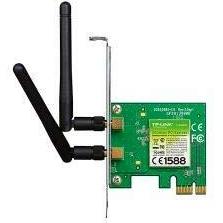
TP-LINK TL-WN881ND Wireless Network Card with PCIe Interface
Sponsored This site contains affiliate links for which we may receive compensation. More information
 ICPC UK
Sponsored TP-LINK TL-WN881ND 300Mbps Wireless N PCI Express Adapter
11.09 GBP
Price updated on: 23-03-2026 14:24:16
11.09 GBP
Price updated on: 23-03-2026 14:24:16  gotraka.com
Sponsored TP-Link 300Mbps Wireless N PCI Express WiFi Adapter with low profile bracket
11.88 GBP
Price updated on: 14-11-2025 05:04:28
11.88 GBP
Price updated on: 14-11-2025 05:04:28  LaptopHub
Sponsored TP-Link TL-WN881ND network card Internal WLAN 300 Mbit/s
104.18 GBP
Price updated on: 01-02-2026 17:31:48
104.18 GBP
Price updated on: 01-02-2026 17:31:48 | Identifiers | |
|---|---|
| MPN | TP-LINK TL-WN881ND V2 |
| Dimensions / Weight | |
| Key Features | |
|
Bands A comma‑separated list of the radio frequency bands that a device can receive or transmit, such as 2.4 GHz, 5 GHz, LTE Band 3, or 5G NR n78. The values are free text and may include band names, numeric frequencies, or both.
|
Single Band |
|
Dimensions The pixel dimensions of a display or image, expressed as width by height (e.g., 1920x1080). It indicates how many pixels are used to render the visual content and is commonly used for monitors, TVs, smartphones, cameras, and digital images.
|
120.8 x 115.2 x 21.5 mm |
|
Directivity The spatial pattern of signal transmission or reception for a device, indicating whether it emits or receives signals uniformly in all directions (omni‑directional) or preferentially in a specific direction (directional). This attribute helps users understand antenna coverage and signal propagation characteristics.
|
Omni-directional |
| Dual band | No |
|
Flow control Indicates the type of Ethernet flow‑control mechanism supported by a network device, such as IEEE 802.3x or other proprietary variants. The value describes whether and how the device can pause or manage data traffic to prevent congestion.
|
802.3x |
|
Frequency The operating frequency of a device or component, expressed in hertz (Hz). It represents the number of cycles per second that the product’s internal circuits or wireless radios can run and is useful for comparing performance across similar products.
|
2.4GHz/5GHz |
|
Gain level The amount of signal amplification provided by an antenna or radio component, expressed in decibels relative to an isotropic radiator (dBi). This value indicates how effectively the device concentrates radio energy in a particular direction and is used to compare performance across similar components.
|
2 dBi |
|
LED A list of the operational states that an LED indicator on a device can display, such as power status, activity, link, or other functional signals. Each entry represents a distinct status that the LED may show when the device is in use.
|
"10 Gbps Link/Act, 5 / 2.5 / 1 Gbps and 100 Mbps Link/Act" |
|
Management A list of the network interfaces and protocols that a device can use for configuration, monitoring and remote management, such as web‑based GUI (HTTP/HTTPS), command‑line interface (CLI) via Telnet or SSH, SNMP, or other standard protocols. Each entry represents one supported method, allowing users to understand how they can access the device remotely.
|
Wireless configurationconnection managementconnection profile setup |
|
Refresh rate The number of times per second that a display updates its image, expressed in hertz (Hz). It indicates the smoothness and responsiveness of motion on the screen; higher rates generally provide a more fluid visual experience.
|
60Hz 2Ms Response Time |
|
Wireless standards A comma‑separated list of the wireless networking protocols and frequency bands that a device can connect to, such as IEEE 802.11a, IEEE 802.11b, IEEE 802.11g, Wi‑Fi 4 (802.11n), Wi‑Fi 5 (802.11ac) or Wi‑Fi 6 (802.11ax). The values may include both the technical name and a consumer‑friendly label, and they represent all standards that the product claims to support.
|
IEEE 802.11b IEEE 802.11g IEEE 802.11n |

TP-Link is a brand of networking products that was founded in 1996. The company is headquartered in China, and manufactures a wide range of networking products, including routers, switches, and adapters. TP-Link has a large global presence, and is one of the most popular networking brands in the world.


