VP2768‑EliteDisplay




Sponsored This site contains affiliate links for which we may receive compensation. More information
Find other available options:

| Identifiers | |
|---|---|
| Model | Viewsonic VP2768-4K |
| MPN | Viewsonic VP2768-4K |
| Dimensions / Weight | |
| Key Features | |
|
AC input frequency The frequency of the alternating current supplied to a power supply or charger, expressed in hertz (Hz). It indicates the acceptable operating range for the electrical mains that powers the device, ensuring proper functionality and safety.
|
50-60 |
|
AC power in Indicates whether the product requires an AC mains power supply. A value of "Yes" means the device can be powered from a standard electrical outlet, while "No" indicates it does not use AC mains power (e.g., battery‑powered or USB‑only devices).
|
Yes |
|
AMD FreeSync Indicates whether a monitor or graphics card supports AMD’s Adaptive Sync technology, FreeSync. A value of "Yes" means the device is compatible; "No" means it does not support the feature.
|
No |
|
Backlight type The illumination source used behind a display panel, such as LED, WLED, CCFL or LCD. It determines the brightness uniformity, power consumption and color performance of the screen.
|
W-LED |
| Built-in USB Hub | Yes |
|
Cable lock slot type Specifies the type of interface or mechanism used to secure a cable in its port, such as Kensington, Noble, IBM, or other standard lock slots. This attribute helps users identify compatibility and security features of the device.
|
Kensington |
|
Cables included A list of the cable types that are supplied with the product, such as USB, HDMI, VGA, DisplayPort, LAN (RJ‑45), SATA, audio or other relevant connectors.
|
AC, USB |
|
Certification A list of official certifications or compliance marks that the product has received from regulatory bodies, safety organizations, or industry standards groups. Each entry represents a distinct certification such as CE, FCC, RoHS, UL, or WEEE, and may include additional details like version numbers or specific test reports.
|
cTUVus, FCC-B, Mexico CoC, Mexico Energy |
|
Colour The colour or combination of colours that a product is available in, expressed as common names such as "Black", "Silver" or comma‑separated lists like "Black, White". It indicates the visual appearance of the item for consumers.
|
Black |
|
Contrast ratio The contrast ratio is the proportion between the brightest and darkest luminance a display can produce, expressed as a simple ratio such as 1000:1. It indicates how well a screen can differentiate light from dark areas, affecting image clarity and color depth.
|
1300:1 |
|
Display resolution The pixel dimensions of a display or image, expressed as width by height (e.g., 1920x1080). It indicates how many pixels are used to render visual content and is commonly used for monitors, TVs, smartphones, cameras, and digital images.
|
3840x2160 |
|
Display technology The type of display panel used in a visual device, such as LED‑backlit LCD, IPS, TN, VA, OLED, or AMOLED. It indicates the underlying technology that determines image quality, color accuracy, viewing angles, response time and power consumption.
|
LED |
|
Displayports quantity The total count of physical or virtual display output connections available on a device, such as HDMI, DisplayPort, DVI, VGA, or USB‑C ports that support video output.
|
1 |
|
EPEAT Compliance The level of a product’s compliance with the EPEAT (Electronic Product Environmental Assessment Tool) program, indicating how well it meets environmental and sustainability criteria. Typical levels are "Gold", "Silver" or "Bronze".
|
Gold |
|
HD type The pixel dimensions of a product’s screen, expressed as width by height (e.g., 1920x1080). It indicates the total number of pixels that compose the display and is used to assess image sharpness and clarity across devices such as monitors, TVs, laptops, and cameras.
|
4096x2160 |
|
HDMI A list of the HDMI ports available on the product, each entry indicating the number of ports and their specific HDMI version or additional features (e.g., "2 x HDMI 2.0b", "1 x HDMI 1.4 with CEC"). This attribute helps users understand both the quantity and capabilities of the HDMI connections.
|
2 |
|
Horizontal scan range The range of frequencies, expressed in kilohertz (kHz), over which a device can process or display horizontal signals or scan lines. It indicates the minimum and maximum operating frequencies for horizontal scanning operations.
|
15 - 136 kHz |
|
Market positioning A classification that indicates the target audience or use case for a product, such as Business, Gaming, Home & Office, Education, etc. It helps customers quickly identify which products are best suited to their needs.
|
Home & office |
|
Maximum power consumption The highest electrical power that a device can draw or consume during operation, expressed in watts (W). It represents the peak energy usage of the product and is useful for estimating maximum power requirements, comparing efficiency across similar devices, and ensuring compatibility with power supplies.
|
48 W |
|
Native aspect ratio The proportion between the width and height of a screen or image, expressed as two numbers separated by a colon (e.g., 16:9). It indicates whether content is designed for widescreen, square, or other aspect ratios and helps users match devices to their media formats.
|
16:9 |
|
Non-operating altitude The altitude interval (in meters) at which a product or component ceases to function correctly due to environmental factors such as reduced atmospheric pressure, temperature changes, or other elevation‑related effects. The value is expressed as a minimum–maximum range and applies to any device that has documented limits for operation above or below certain heights.
|
0 - 480000" (0 - 12192 m) |
| Nvidia g-sync | No |
|
Operating altitude The range of altitudes (in meters) at which a product or component can operate reliably without performance degradation due to changes in atmospheric pressure, temperature, or other altitude‑related effects.
|
0 - 196811" (0 - 4999 m) |
|
Operating relative humidity The range of relative humidity (in percentage) within which the product is designed to operate reliably. Values are expressed as a minimum–maximum interval such as "20 - 80 %" and indicate the acceptable environmental moisture level for optimal performance.
|
20 - 90 % |
|
Panel type The specific technology used to construct the display panel, such as IPS, TN, VA, OLED, or LCD. It indicates how pixels are controlled and affects image quality, color accuracy, viewing angles, and power consumption.
|
IPS |
|
PC Audio out Indicates whether the product provides an audio output connection that can be used with a PC or similar device. The value is "Yes" if such an output port (e.g., 3.5 mm jack, RCA, optical) is present and "No" otherwise.
|
Yes |
|
Pivot The maximum rotation angle a monitor or display can achieve around its vertical axis, expressed in degrees. It indicates the range of motion available for adjusting screen orientation to improve ergonomics and viewing comfort.
|
Yes |
| Power consumption | 46 W |
| Power consumption (StandBy) | 0.5 W |
|
Response time The time interval between a stimulus and the corresponding response of a device or system, expressed in units such as milliseconds (ms). It indicates how quickly the product reacts to input or processes data, which is critical for performance-sensitive applications like displays, gaming monitors, and interactive devices.
|
14 ms |
| Response time (fast) | 7 ms |
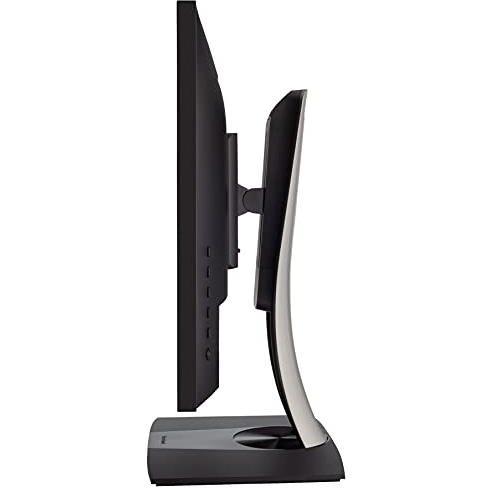
| Screen shape | Flat |
| Specification | No |
|
Storage relative humidity The range of relative humidity (expressed as a percentage) within which the storage device is designed to operate reliably. Values are given as a minimum–maximum interval such as "10 - 90 %" and indicate the acceptable environmental moisture level for optimal performance.
|
5 - 90 % |
|
Supported Graphics Resolutions The pixel dimensions that a device can output or support, expressed as width by height (e.g., 1920x1080). It indicates the maximum resolution available for display content on the product.
|
640x480 |
|
USB Hub Version The specific USB standard version supported by the hub, expressed as a generation and revision (e.g., "3.2 Gen 1" or "3.0"). This indicates the maximum data transfer rate and compatibility with connected devices.
|
USB 3.0 (3.1 Gen 1) |
|
USB Type-A The standard USB Type‑A connector is the rectangular plug used on many devices for data transfer and power delivery. It defines the physical shape, pin layout, and electrical characteristics that allow a device to communicate with or charge from another USB port.
|
4 |
|
USB upstream port type The total number of USB connectors available on the product, regardless of type or version. This value is a simple integer that indicates how many USB ports the device provides for connecting peripherals such as keyboards, mice, storage devices, and other accessories.
|
USB Type-B |
|
Vertical scan range The range of vertical scan frequencies that a display device can support, expressed in hertz (Hz). It indicates the minimum and maximum refresh rates at which the screen updates vertically, affecting visual smoothness and stability.
|
24 - 75 Hz |
|
VESA mounting interfaces Indicates the dimensions of VESA mounting patterns supported by the product, expressed as pairs of horizontal and vertical measurements in millimetres (e.g., "100×100 mm"). The value may be a single pattern or a comma‑separated list of multiple compatible sizes.
|
100x100 |
|
Weight with stand The total mass of a product including any attached stand or base, expressed in a standard unit such as grams or kilograms. This measurement is useful for shipping calculations, handling instructions, and consumer information.
|
15.2 lbs (6.9 kg) |

Viewsonic is a brand of computer monitors, projectors, and other electronics. It was founded in 1987 and is now a subsidiary of TPV Technology.