WD Elements SE USB 3.0 Portable HDD 500GB Black
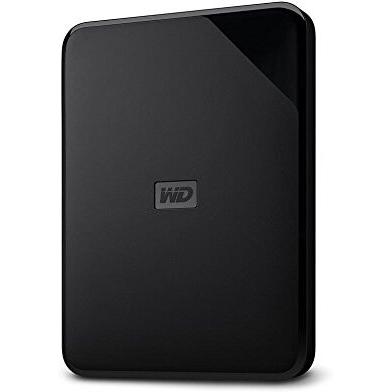


Sponsored This site contains affiliate links for which we may receive compensation. More information
 Quzo
Quzo
Sponsored Elementsportable Specedit 500Gb
57.07 GBP
Price updated on: 01-10-2024 13:17:08
57.07 GBP
Price updated on: 01-10-2024 13:17:08 | Identifiers | |
|---|---|
| Model | Western Digital 1413575 |
| MPN | Western Digital WDBEPK5000ABK-WESN |
| Dimensions / Weight | |
| Key Features | |
|
Bundled backup software Indicates whether the product includes backup software that is pre‑installed or bundled with it, such as utilities for creating backups, restoring data, or managing backup schedules.
|
No |
|
Case colour The colour or combination of colours that a product’s outer shell or enclosure is available in, expressed as common names such as "Black", "Silver" or comma‑separated lists like "Black, White". It indicates the visual appearance of the case for consumers.
|
Black |
|
Disk Capacity The total amount of digital storage that a disk drive—whether internal or external—can hold, expressed as a numeric value with an appropriate unit such as GB, MB, or TB. This attribute helps users understand how much data can be stored on the device and compare different drives.
|
500 GB |
|
Disk form factor The physical size or shape of a storage disk, indicating the dimensions and mounting format used in computers and other devices. Common values include standard sizes such as "3.5" in., "2.5" in., and form‑factor codes like "M.2 2280" or "mSATA". This attribute helps users identify which drives are compatible with a given enclosure, motherboard, or system.
|
2.5 |
|
Drive interface The physical or logical interface used by a hard drive to connect with other components, such as SATA, SAS, USB, or PCI Express. It indicates the technology that enables data transfer and power delivery between the device and its host system.
|
USB 3.0 |
|
E-sata Indicates whether the product includes an E‑SATA interface for external storage devices. A value of "Yes" means the device has a dedicated E‑SATA port, while "No" indicates it does not.
|
No |
|
Enclosure Type The form or mounting style of a hardware component, such as internal, portable, desktop, rack‑mountable, or external. It indicates how the device is physically housed and where it can be installed.
|
External |
|
FireWire 400 Indicates whether the product has any FireWire (IEEE 1394) ports available for connecting compatible devices, specifically at the 400 Mbps speed.
|
No |
|
FireWire 800 Indicates whether the product has any FireWire (IEEE 1394) ports available for connecting compatible devices.
|
No |
|
Form factor Specifies the physical configuration or design of a product, such as ATX, Micro‑ATX, Mini‑ITX, tower, case with cover, etc. It describes how the device is built and what mounting or expansion options it supports.
|
Desktop |
|
Network ready Indicates whether the product can connect to a network, either wired or wireless, and is capable of transmitting and receiving data over that connection.
|
No |
|
Power source The type of electrical supply that powers the device, such as mains electricity, batteries, USB power, or a combination of these options.
|
USB Powered |
|
RJ45 The total count of RJ45 Ethernet connectors available on the product. A value of "No" indicates that the device has no RJ45 port, while numeric values represent the number of ports present.
|
No |
|
Solid state drive The total amount of data that can be stored on a solid‑state drive (SSD) installed in the product, expressed as a numeric value with an appropriate unit such as GB, MB, or TB. This attribute indicates how much information the device can hold and helps users compare storage options across products.
|
No |
|
Thunderbolt The total count of Thunderbolt interfaces available on the product, indicating how many separate Thunderbolt connections it supports.
|
No |
|
USB 2.0 The total number of USB 2.0 (high‑speed) ports available on the device. This count includes all external and internal connectors that support the USB 2.0 standard, regardless of whether they are used for data transfer or power delivery.
|
No |
|
USB 2.0 / USB3.0 Indicates whether the product is compatible with both USB 2.0 and USB 3.0 interfaces, allowing it to connect to devices that use either standard.
|
No |
|
USB 3.0 Represents the count of available USB 3.0 ports on a product. The value is an integer indicating how many individual USB 3.0 connectors are present, regardless of their orientation or function (e.g., charging, data transfer). This attribute helps users compare connectivity options across devices.
|
Yes |
|
Warranty The length of time for which the manufacturer guarantees that the product will be free from defects in materials and workmanship, typically expressed in years or months.
|
1 Year |
|
WiFi Indicates whether the product supports wireless networking and, if so, which Wi‑Fi standards are available (e.g., 802.11b/g/n/ac/ax). The value is a free‑text description of the supported protocols and any additional features such as dual‑band or hotspot mode.
|
No |

Western Digital is a brand of computer storage products and services. It was founded in 1970 and is headquartered in Irvine, California. The company produces a wide range of storage products, including hard drives, solid state drives, and storage systems.


