ViewSonic - ViewSonic ELITE Gaming XG251G




Sponsored This site contains affiliate links for which we may receive compensation. More information
 Adorama.com
Sponsored ViewSonic XG251G 24.5" 16:9 Full HD 360Hz IPS LED HDR Gaming Monitor
649.00 USD
Price updated on: 01-01-2025 16:06:37
649.00 USD
Price updated on: 01-01-2025 16:06:37 | Identifiers | |
|---|---|
| MPN | Viewsonic XG251G |
| Dimensions / Weight | |
| Key Features | |
|
AC input voltage The range of alternating current voltage that the product accepts from its power source, expressed in volts (V). It indicates the minimum and maximum supply voltages compatible with the device across different regions.
|
100 |
|
Adobe rgb coverage The proportion of the Adobe RGB color space that a display or device can reproduce, expressed as a percentage. Values close to 100 % indicate that the screen can render almost all colors defined by the Adobe RGB standard, providing accurate and vibrant visual output for images, videos, and design work.
|
99% |
|
Anti-glare Indicates whether a product’s display or surface has an anti‑glare coating applied. The value is typically a descriptive text such as "Anti-Glare", "No", or a hardness rating like "3H". It helps users assess the level of glare reduction and durability of the coating.
|
Anti-glare |
|
Anti-glare screen Indicates whether the display panel has an anti‑glare coating or treatment that reduces reflections and improves visibility in bright lighting conditions.
|
Yes |
|
Aspect ratio The proportion between the width and height of a display, image or video, expressed as two numbers separated by a colon (e.g., 16:9). It indicates whether content is designed for widescreen, square, or other aspect ratios.
|
16:9 |
|
Audio features A free‑text description of the speaker system installed in the product, including the number of speakers and their individual power ratings (e.g., "2 x 2W speakers", "3 x 5W speakers"). The value may combine quantity, wattage, and optional descriptors such as "built‑in" or "external".
|
2 x 2W speakers |
|
Brightness The amount of light emitted by a display or projector, expressed in lumens (cd/m² for luminance). It indicates how bright the screen will appear under typical viewing conditions.
|
400 Lumens |
|
Cable lock slot type Specifies the type of interface or mechanism used to secure a cable in its port, such as Kensington, Noble, IBM, or other standard lock slots. This attribute helps users identify compatibility and security features of the device.
|
Kensington |
|
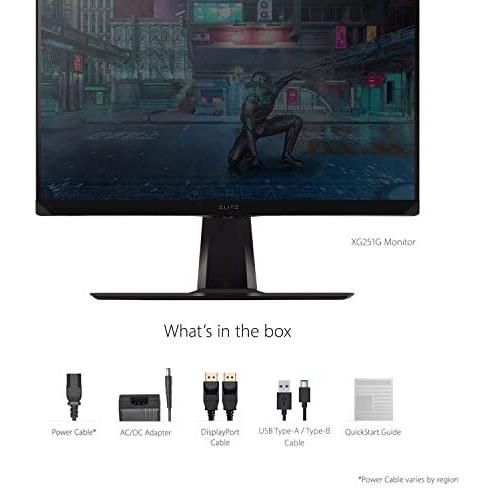
Cables included A list of the cable types that are supplied with the product, such as USB, HDMI, VGA, DisplayPort, LAN (RJ‑45), SATA, audio or other relevant connectors.
|
DisplayPort, USB Type-A to USB Type-B |
|
Case colour The colour or combination of colours that a product’s outer shell or enclosure is available in, expressed as common names such as "Black", "Silver" or comma‑separated lists like "Black, White". It indicates the visual appearance of the case for consumers.
|
Black |
|
Colours A colour is a visual attribute that describes the hue or shade of an object or surface. It can be a single dominant colour, a combination of colours, or a range such as "Black, White". The value may be expressed in common names (e.g., Black, Silver) or descriptive terms (e.g., One Colour, Assorted).
|
16.7 million |
|
Contrast ratio The contrast ratio is the proportion between the brightest and darkest luminance a display can produce, expressed as a simple ratio such as 1000:1. It indicates how well a screen can differentiate light from dark areas, affecting image clarity and color depth.
|
000:1 |
|
Depth without stand The linear measurement of an object from front to back or top to bottom, expressed in a physical unit such as millimeters, centimeters, inches, etc. It indicates how deep the item is and can be used for fitting, compatibility, or spatial planning.
|
6.7 cm |
|
Disk form factor The physical size or shape of a storage disk, indicating the dimensions and mounting format used in computers and other devices. Common values include standard sizes such as "3.5" in., "2.5" in., and form‑factor codes like "M.2 2280" or "mSATA". This attribute helps users identify which drives are compatible with a given enclosure, motherboard, or system.
|
3 |
|
Display resolution The pixel dimensions of a display or image, expressed as width by height (e.g., 1920x1080). It indicates how many pixels are used to render visual content and is commonly used for monitors, TVs, smartphones, cameras, and digital images.
|
1920x1080 |
|
Display technology The type of display panel used in a visual device, such as LED‑backlit LCD, IPS, TN, VA, OLED, or AMOLED. It indicates the underlying technology that determines image quality, color accuracy, viewing angles, response time and power consumption.
|
LED |
|
Display type The type of visual panel or display technology used in a product, such as LCD, LED, OLED, TFT, IPS, AMOLED, or analog. It indicates the underlying technology that determines image quality, color reproduction, power consumption and suitability for different use cases.
|
360Hz Refresh RateG-SYNCVESA DisplayHDR 400 |
|
Displayports quantity The total count of physical or virtual display output connections available on a device, such as HDMI, DisplayPort, DVI, VGA, or USB‑C ports that support video output.
|
1 |
|
Electrical Power Consumption Standby The electrical power drawn by a device while it is in standby mode, expressed in watts (W). It represents the minimal energy usage when the product is powered on but not actively performing tasks, and can be used to estimate idle consumption or compare efficiency across similar products.
|
0.5 W |
|
Form factor Specifies the physical configuration or design of a product, such as ATX, Micro‑ATX, Mini‑ITX, tower, case with cover, etc. It describes how the device is built and what mounting or expansion options it supports.
|
Monitor |
|
Harmonized System HS code The Harmonized System (HS) code is a standardized numerical identifier used internationally to classify traded goods. It consists of up to six digits, where each pair of digits represents progressively more specific product categories. The HS code facilitates customs duties, trade statistics, and regulatory compliance by providing a common language for describing products across borders.
|
85285210 |
|
HDMI A list of the HDMI ports available on the product, each entry indicating the number of ports and their specific HDMI version or additional features (e.g., "2 x HDMI 2.0b", "1 x HDMI 1.4 with CEC"). This attribute helps users understand both the quantity and capabilities of the HDMI connections.
|
2 |
|
Headphone connectivity Indicates the types of headphone or earphone connections available on a product, such as wired jacks (e.g., 3.5 mm), USB‑C, Lightning, or wireless Bluetooth. The value may list one or more connection types separated by commas.
|
3.5 mm |
|
Headphone ports Represents how many headphone or earphone connectors are physically present on the product. The value is a simple integer indicating the total count of headphone ports, regardless of type (e.g., 3.5 mm jack, USB‑C, Lightning) or whether they support audio output only or also input.
|
1 x 3.5 mm Jack |
|
Height without stand The vertical dimension of a product measured from its lowest to highest point, excluding any attached stand or base. It is expressed in a physical unit such as millimetres, centimetres or inches and applies to any item where height is relevant, including books, electronics, furniture and other objects.
|
35.5 cm |
|
Horizontal scan range The range of frequencies, expressed in kilohertz (kHz), over which a device can process or display horizontal signals or scan lines. It indicates the minimum and maximum operating frequencies for horizontal scanning operations.
|
30 |
|
Market positioning A classification that indicates the target audience or use case for a product, such as Business, Gaming, Home & Office, Education, etc. It helps customers quickly identify which products are best suited to their needs.
|
Gaming |
|
NTSC coverage (typical) The percentage of the National Television System Committee (NTSC) color spectrum that a display or video device can reproduce, relative to the full NTSC standard. Values close to 100 % indicate that the product can render almost all colors defined by NTSC, providing accurate and vibrant visual output.
|
78% |
|
Operating relative humidity The range of relative humidity (in percentage) within which the product is designed to operate reliably. Values are expressed as a minimum–maximum interval such as "20 - 80 %" and indicate the acceptable environmental moisture level for optimal performance.
|
20 - 90 % |
|
Panel mounting interface The pair of horizontal and vertical dimensions in millimetres that a product supports for VESA mounting (e.g., "100 × 100 mm"). This value indicates the exact hole spacing required by a mounting bracket to secure the device. It is used for monitors, TVs, projectors and other display equipment that can be wall‑mounted or attached to stands.
|
100x100 |
|
Panel technology The type of display panel used in a visual device, such as IPS, TN, VA, OLED, or other technologies that define how pixels are produced and how the screen responds to light and touch. It indicates the underlying technology that affects contrast, color accuracy, viewing angles, response time, and power consumption.
|
IPS |
|
Pivot angle The maximum angular range a product can rotate or tilt around its vertical axis, expressed in degrees. It indicates how far the device can pivot from its neutral position while maintaining functionality and usability.
|
90 |
|
Pixel pitch Represents the physical dimensions of a single pixel on a display or imaging device, expressed as width and height in a length unit (e.g., millimeters). This attribute allows comparison of the physical resolution across screens, cameras, and other pixel‑based technologies.
|
0.283 mm |
|
Power adaptor type The classification of the power adaptor used with a device, indicating whether it is external or internal, its electrical interface (AC, DC, USB‑Charging, etc.), and any specific form such as integrated or travel adapters. This attribute helps buyers understand how the device receives power and what kind of connector or cable is required.
|
External |
|
Power source The type of electrical supply that powers the device, such as mains electricity, batteries, USB power, or a combination of these options.
|
Mains Powered |
|
Refresh rate The number of times per second that a display updates its image, expressed in hertz (Hz). It indicates the smoothness and responsiveness of motion on the screen; higher rates generally provide a more fluid visual experience.
|
360 Hz |
|
RMS rated power The root‑mean‑square (RMS) power rating of a device, expressed in watts (W). It represents the average electrical power that the product can deliver or consume under normal operating conditions.
|
4 W |
| Screen shape | Flat |
|
Screen size The diagonal measurement of a display screen expressed in units such as inches or centimeters. It indicates the overall visual area available for content and is commonly used to compare monitors, televisions, laptops, tablets, and other electronic devices.
|
25 in |
|
Screen technology The display panel type used in a visual device, such as IPS, TN, VA, OLED, or other technologies that define how pixels are produced and how the screen responds to light and touch. It indicates the underlying technology that affects contrast, color accuracy, viewing angles, response time, and power consumption.
|
IPS Panel |
|
Swivel angle range The maximum angular range a device can rotate or tilt, expressed as a numeric interval in degrees (e.g., "-45 to 45°"). It indicates how far the product can pivot left/right or up/down from its neutral position.
|
-60 - 60° |
|
Swivel range The maximum angular range, measured in degrees, that a product can rotate or swivel around its vertical axis. It indicates how far the device can pivot from its neutral position while maintaining functionality and usability.
|
-30 ~ +30 ° |
|
Tilt angle range The minimum and maximum angles, expressed in degrees, that a monitor can be tilted or adjusted vertically while maintaining acceptable performance or usability. It indicates the tilt limits for displays such as monitors, stands, or other adjustable equipment.
|
-5 - 20° |
|
USB Hub Version The specific USB standard version supported by the hub, expressed as a generation and revision (e.g., "3.2 Gen 1" or "3.0"). This indicates the maximum data transfer rate and compatibility with connected devices.
|
3.2 Gen |
|
USB upstream port type The total number of USB connectors available on the product, regardless of type or version. This value is a simple integer that indicates how many USB ports the device provides for connecting peripherals such as keyboards, mice, storage devices, and other accessories.
|
USB Type-B |
|
Vertical scan range The range of vertical scan frequencies that a display device can support, expressed in hertz (Hz). It indicates the minimum and maximum refresh rates at which the screen updates vertically, affecting visual smoothness and stability.
|
48 - 360 Hz |
|
Viewable screen size The diagonal measurement of a display screen that can be seen by the user, expressed in units such as inches or centimeters. It indicates the overall visual area available for content and is commonly used to compare monitors, televisions, laptops, tablets, and other electronic devices.
|
24.5" |
|
Weight with stand The total mass of a product including any attached stand or base, expressed in a standard unit such as grams or kilograms. This measurement is useful for shipping calculations, handling instructions, and consumer information.
|
6.1 kg |
|
Weight without stand The mass of a product measured from its lowest to highest point, excluding any attached stand or base. It is expressed in a standard unit such as grams or kilograms and can be used for shipping calculations, handling instructions, or consumer information.
|
3.6 kg |
|
Width without stand The horizontal measurement of a product excluding any attached stand or base, expressed in a linear unit such as millimetres or inches. It indicates how wide the item is from one side to the other and is used for sizing, fitting, and compatibility purposes.
|
55.8 cm |

Viewsonic is a brand of computer monitors, projectors, and other electronics. It was founded in 1987 and is now a subsidiary of TPV Technology.


