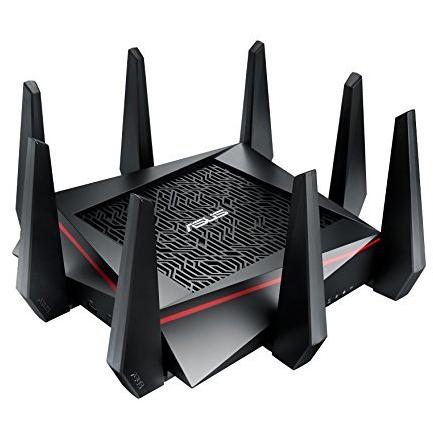
ASUS RT-AC5300 Tri-band Wireless Router


Sponsored This site contains affiliate links for which we may receive compensation. More information
Find other available options:

| Identifiers | |
|---|---|
| Model | ASUS RT-AC5300 |
| MPN | ASUS RT-AC5300 |
| Dimensions / Weight | |
| Key Features | |
|
AC input frequency The frequency of the alternating current supplied to the device, expressed in hertz (Hz). It indicates the acceptable operating range for the electrical mains that powers the product.
|
50 - 60 Hz |
|
AC input voltage The alternating current voltage range that the product accepts from its power source, expressed in volts (V). It indicates the minimum and maximum supply voltages compatible with the device.
|
110 - 240 V |
|
Cables included A list of the cable types that are supplied with the product, such as USB, HDMI, VGA, DisplayPort, LAN (RJ‑45), SATA, audio or other relevant connectors.
|
AC,LAN (RJ-45) |
|
Cabling technology The type of cable or connector technology used by the product, such as Ethernet standards (e.g., 10/100Base‑T, 1000BASE‑T, 10GBase‑T) or other networking cable types. It indicates the physical medium and protocol supported for data transmission.
|
10/100/1000Base-T(X) |
|
Colour The colour or combination of colours that a product is available in, expressed as common names such as "Black", "Silver" or comma‑separated lists like "Black, White". It indicates the visual appearance of the item for consumers.
|
Black |
| DC-in jack | Yes |
|
Depth The linear measurement of an object from front to back or top to bottom, expressed in a physical unit such as millimeters, centimeters, inches, etc. It indicates how deep the item is and can be used for fitting, compatibility, or spatial planning.
|
245 mm |
|
Ethernet LAN Indicates whether the product includes an Ethernet LAN interface for wired network connectivity, allowing data transmission over RJ‑45 or compatible cables.
|
Yes |
|
Ethernet LAN interface type Indica el tipo o estándar de la conexión Ethernet que posee un producto, como Gigabit Ethernet, 10 GbE, 2.5 GbE, Fast Ethernet, etc. Los valores suelen ser textos descriptivos sin unidades numéricas y pueden incluir varias opciones separadas por comas cuando el dispositivo soporta más de una velocidad.
|
Gigabit Ethernet |
|
Ethernet LAN ports Represents the total count of Ethernet LAN (RJ‑45) interfaces available on a product. The value is an integer indicating how many physical Ethernet ports are present, regardless of speed or generation.
|
4 |
|
Ethernet WAN Indicates whether the device has an Ethernet port on its WAN side, allowing connection to a wired network for internet access or other external networks.
|
Yes |
|
Firewall Indicates whether the device includes an integrated firewall that filters and protects network traffic.
|
Yes |
|
Flash memory The total amount of internal flash memory available in a device, expressed as a data size (e.g., megabytes or gigabytes). This attribute indicates how much data can be stored on the device’s built‑in flash storage.
|
128 MB |
|
Height The vertical dimension of a product measured from its lowest to highest point. It is expressed in a physical unit such as millimetres, centimetres or inches and applies to any item where height is relevant, including books, electronics, furniture and other objects.
|
65 mm |
|
Input current The electrical current that a device draws from its power source, expressed in amperes (A). It indicates how much current the product consumes during normal operation and helps determine compatibility with power supplies or USB ports.
|
3.42 A |
|
Internal memory The total amount of internal memory available in a device, expressed as a data size such as megabytes (MB) or gigabytes (GB). It indicates how much information the component can hold for active processes and affects multitasking performance.
|
512 MB |
|
Maximum WLAN data transfer rate The highest theoretical speed at which a device can send or receive data over a wireless network, expressed in megabits per second (Mbps). It represents the peak throughput under optimal conditions and is useful for comparing performance across routers, access points, and other Wi‑Fi equipment.
|
600 Mbit/s |
|
Networking standards A list of the networking protocols and standards that a device can support or comply with, such as IEEE 802.11 variants for wireless, IEEE 802.3 for Ethernet, or other relevant networking specifications. The values are typically separated by commas and may include both technical identifiers and consumer‑friendly labels.
|
IEEE 802.11a,IEEE 802.11ac,IEEE 802.11b,IEEE 802.11g,IEEE 802.11n,IEEE 802.1x |
|
Quality of Service support Indicates whether a product supports Quality of Service (QoS) features, which allow prioritization and management of network traffic to ensure optimal performance for critical applications.
|
Yes |
|
Reset button Indicates whether the device has a physical reset button that restores factory settings or original configuration when pressed.
|
Yes |
|
Security algorithms Una lista de los algoritmos criptográficos y protocolos de seguridad que el producto soporta, como cifrado (AES, WEP), autenticación (WPA2-PSK, EAP-TLS) o protocolos de red (HTTPS, SSH). Cada elemento describe un algoritmo individual; la lista puede contener varios valores separados por comas.
|
64-bit WEP,128-bit WEP,WPA-PSK,WPA2-PSK,WPS |
|
Top Wi-Fi standard A list of the wireless networking protocols and frequency bands that a device can connect to, such as IEEE 802.11a, IEEE 802.11b, IEEE 802.11g, Wi‑Fi 4 (802.11n), Wi‑Fi 5 (802.11ac) or Wi‑Fi 6 (802.11ax). The values are typically separated by commas and may include both the technical name and a consumer‑friendly label.
|
5 ( |
|
Universal Plug and Play UPnP Indicates whether the product can automatically discover and communicate with other devices on the network using Universal Plug and Play (UPnP) protocols, enabling seamless configuration and media sharing without manual setup.
|
Yes |
|
USB 2.0 ports quantity Represents the count of external USB 2.0 (high‑speed) connectors available on a device. The value is an integer indicating how many USB 2.0 ports can be used for data transfer or power delivery from the outside of the product, regardless of internal placement or version.
|
1 |
|
USB port Indicates the presence and quantity of USB connectors on a product. The value is typically an integer representing how many USB ports are available, regardless of type or version.
|
Yes |
|
USB Ports Represents how many USB connectors are available on the product. The value is a simple integer indicating the total count of USB ports, regardless of type or version.
|
2 |
|
USB version The specific version of the USB standard that a product supports, expressed as a generation number and optional descriptive suffix (e.g., "3.2 Gen 1" or simply "3.0"). This attribute indicates the data‑transfer capabilities and compatibility with USB devices.
|
2.0/3.0 (3.1 Gen 1) |
|
USB Version The generation and version of the USB standard supported by a product, expressed as a numeric revision followed optionally by descriptive suffixes such as "Gen 1" or "Gen 2". This attribute indicates the maximum data transfer rate and compatibility with USB devices.
|
2.0/3.2 Gen 1 (3.1 Gen 1) |
|
Weight The mass of the product expressed in a standard unit such as grams or kilograms. It represents how heavy the item is and can be used for shipping calculations, handling instructions, or consumer information.
|
1.81 kg |
|
Wi-Fi band A textual description of the Wi‑Fi frequency bands supported by a device, such as "Dual-band (2.4 GHz / 5 GHz)" or "Tri‑band (2.4 GHz / 5 GHz / 5 GHz)". The value indicates which radio frequencies are available for wireless communication and helps users understand the device’s connectivity capabilities.
|
Tri-band (2.4 GHz / 5 GHz / 5 GHz) |
|
Wi-Fi standards A list of the wireless networking protocols and frequency bands that a device can connect to, such as 802.11a, 802.11b, 802.11g, Wi‑Fi 4 (802.11n), Wi‑Fi 5 (802.11ac) or Wi‑Fi 6 (802.11ax). The values are typically separated by commas and may include both the technical name and a consumer‑friendly label.
|
802.11a,Wi-Fi 5 (802.11ac),802.11b,802.11g,Wi-Fi 4 (802.11n) |
|
WLAN data transfer rates supported The highest theoretical speed at which a device can send or receive data over its wireless network interface, expressed in megabits per second (Mbps), kilobits per second (Kbps) or gigabits per second (Gbps). It represents the peak throughput achievable under optimal conditions and allows users to compare the performance of different Wi‑Fi devices.
|
1734,2167,1,2,5.5,6,9,11,12,18,24,36,48,54,600 Mbit/s |
|
WPS push button Indicates whether the device includes a dedicated WPS (Wi‑Fi Protected Setup) push button that allows users to quickly establish secure wireless connections without entering passwords. A value of "Yes" means the button is present and functional; "No" indicates it is absent.
|
Yes |
|
XDSL connection Indicates whether the device supports an XDSL (Digital Subscriber Line) internet connection. A value of "Yes" means the device can be configured to use XDSL (e.g., ADSL, ADSL2+, VDSL) for broadband access; a value of "No" means it does not support XDSL connectivity.
|
No |

Asus is a Taiwanese electronics company that produces a wide range of products, including laptops, desktops, mobile phones, tablets, and servers. Asus is best known for its laptops, which are often praised for their quality, features, and design.


