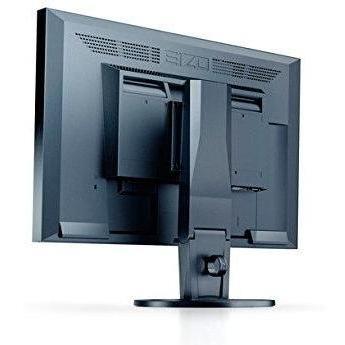
Eizo FlexScan 22-WFS3-BK Full HD Display




Sponsored This site contains affiliate links for which we may receive compensation. More information
Find other available options:

| Identifiers | |
|---|---|
| MPN | Eizo 4995047043966 |
| Model | Eizo EV2216WFS3-BK |
| Dimensions / Weight | |
| Key Features | |
|
3D Indicates whether the product has built‑in support for 3‑dimensional (3D) content or displays. A value of "Yes" means the device can render or display 3D images, videos, or games; a value of "No" means it does not have native 3D capability.
|
No |
|
AC input frequency The frequency of the alternating current supplied to a power supply or charger, expressed in hertz (Hz). It indicates the acceptable operating range for the electrical mains that powers the device, ensuring proper functionality and safety.
|
50/60 |
|
AC input voltage The range of alternating current voltage that the product accepts from its power source, expressed in volts (V). It indicates the minimum and maximum supply voltages compatible with the device across different regions.
|
100 - 120 |
|
AC power in Indicates whether the product requires an AC mains power supply. A value of "Yes" means the device can be powered from a standard electrical outlet, while "No" indicates it does not use AC mains power (e.g., battery‑powered or USB‑only devices).
|
Yes |
|
AMD FreeSync Indicates whether a monitor or graphics card supports AMD’s Adaptive Sync technology, FreeSync. A value of "Yes" means the device is compatible; "No" means it does not support the feature.
|
No |
|
Aspect ratio The proportion between the width and height of a display, image or video, expressed as two numbers separated by a colon (e.g., 16:9). It indicates whether content is designed for widescreen, square, or other aspect ratios.
|
16:10 |
|
Audio input Indicates whether the product includes a dedicated audio input port (e.g., 3.5 mm jack, RCA, optical). A value of "Yes" means an audio input is present; "No" means it is absent.
|
Yes |
| Bluetooth | No |
|
Built-in camera Indicates whether the product includes a built‑in camera that can capture images or video directly, without requiring an external device. A value of "Yes" means the device has such a camera; "No" means it does not.
|
No |
|
Built-in speakers Indicates whether the product includes built‑in speaker(s) that can produce sound without requiring external audio devices. A value of "Yes" means the device has one or more integrated speakers; a value of "No" means it does not.
|
Warm Balance |
|
Built-in subwoofer Indicates whether the product includes a built‑in subwoofer that can deliver low‑frequency audio without requiring an external speaker system. A value of "Yes" means the device has such a component; a value of "No" means it does not.
|
No |
| Built-in USB Hub | Yes |
|
Cable Lock Slot Indicates whether the product includes a slot for inserting a cable lock, such as a Kensington or similar security device.
|
No |
|
Card reader integrated Indicates whether the device includes a built‑in card reader that can read removable memory cards such as SD, microSD, MMC or similar formats.
|
No |
|
Colour The colour or combination of colours that a product is available in, expressed as common names such as "Black", "Silver" or comma‑separated lists like "Black, White". It indicates the visual appearance of the item for consumers.
|
Black |
|
Contrast ratio The contrast ratio is the proportion between the brightest and darkest luminance a display can produce, expressed as a simple ratio such as 1000:1. It indicates how well a screen can differentiate light from dark areas, affecting image clarity and color depth.
|
1000:1 |
|
Depth The linear measurement of an object from front to back or top to bottom, expressed in a physical unit such as millimeters, centimeters, inches, etc. It indicates how deep the item is and can be used for fitting, compatibility, or spatial planning.
|
54 mm |
|
Digital horizontal frequency The horizontal digital frequency indicates the range of frequencies, expressed in kilohertz (kHz), over which a device can process or transmit horizontal digital signals. It is represented as a minimum–maximum interval and helps users understand the signal bandwidth supported by the product.
|
31 - 68 kHz |
|
Digital vertical frequency The range of frequencies, in hertz (Hz), at which a display device can refresh its image vertically when operating in digital mode. It indicates the minimum and maximum vertical scan rates supported, helping users assess visual smoothness and compatibility with various content sources.
|
59 - 61 Hz |
| Display | LED |
| Display diagonal | 55.9 cm (22") |
|
Display number of colours The total count of distinct colours that a display can render, typically expressed as a numeric value (e.g., 16.78 million). This attribute indicates the colour depth and richness of the visual output; higher numbers generally mean more accurate and vibrant images.
|
16.78 million colours |
|
Display resolution The pixel dimensions of a display or image, expressed as width by height (e.g., 1920x1080). It indicates how many pixels are used to render visual content and is commonly used for monitors, TVs, smartphones, cameras, and digital images.
|
1680 x 1050 pixels |
|
Display sRGB Indicates whether the display supports the standard sRGB color space, which defines a common range of colors for accurate and consistent visual output across devices.
|
Yes |
|
Display technology The type of display panel used in a visual device, such as LED‑backlit LCD, IPS, TN, VA, OLED, or AMOLED. It indicates the underlying technology that determines image quality, color accuracy, viewing angles, response time and power consumption.
|
TN+Film |
|
Displayports quantity The total count of physical or virtual display output connections available on a device, such as HDMI, DisplayPort, DVI, VGA, or USB‑C ports that support video output.
|
1 |
|
Energy efficiency class The energy efficiency class indicates the relative energy performance of a product, expressed with letters ranging from A+++ (most efficient) to G (least efficient). It allows consumers to compare expected operating costs and environmental impact across similar items.
|
Unspecified |
| Energy Star certified | Yes |
|
Ethernet LAN Indicates whether the product includes an Ethernet LAN interface for wired network connectivity, allowing data transmission over RJ‑45 or compatible cables.
|
No |
|
HD type The pixel dimensions of a product’s screen, expressed as width by height (e.g., 1920x1080). It indicates the total number of pixels that compose the display and is used to assess image sharpness and clarity across devices such as monitors, TVs, laptops, and cameras.
|
Full HD |
|
HDCP Indicates whether a device supports HDCP (High‑bandwidth Digital Content Protection), allowing it to play or display protected digital content on compatible screens and audio/video equipment.
|
Yes |
|
Headphone connectivity Indicates the types of headphone or earphone connections available on a product, such as wired jacks (e.g., 3.5 mm), USB‑C, Lightning, or wireless Bluetooth. The value may list one or more connection types separated by commas.
|
3.5 mm |
|
Height The vertical dimension of a product measured from its lowest to highest point. It is expressed in a physical unit such as millimetres, centimetres or inches and applies to any item where height is relevant, including books, electronics, furniture and other objects.
|
327 mm |
|
Height adjustment The ability of a product to change its vertical dimension, typically measured in millimetres, centimetres or inches. It indicates whether the user can raise or lower the item and, if so, by how much. This attribute applies to monitors, desks, furniture, stands and other equipment that offer adjustable height.
|
Yes |
|
LED indicators A list of the functions or statuses that an LED indicator on a device can display, such as power status, activity, link, and other operational signals.
|
Power |
|
Manual Indicates whether a user manual—physical or digital—is provided with the product. A value of "Yes" means that a manual is included, while a value of "No" indicates that no manual is supplied.
|
Yes |
|
Market positioning A classification that indicates the target audience or use case for a product, such as Business, Gaming, Home & Office, Education, etc. It helps customers quickly identify which products are best suited to their needs.
|
Home & office |
|
Maximum power consumption The highest electrical power that a device can draw or consume during operation, expressed in watts (W). It represents the peak energy usage of the product and is useful for estimating maximum power requirements, comparing efficiency across similar devices, and ensuring compatibility with power supplies.
|
39 W |
|
Number of OSD languages The total number of distinct languages that can be displayed on the screen‑on‑display (OSD) interface of a device, such as a monitor or TV. It indicates how many language options are available for menu navigation, subtitles, and other on‑screen text, allowing users to choose their preferred language when interacting with the product.
|
9 |
| Nvidia g-sync | No |
|
On screen display Indicates whether the product has a built‑in or integrated display that can be used to view content directly, such as on laptops, monitors, TVs, projectors, or other electronic devices.
|
Yes |
|
On/off switch Indicates whether the product includes an on/off switch that allows the user to power it on or off manually.
|
Yes |
|
OSD Languages A list of natural languages that can be displayed on the screen‑on‑display (OSD) interface of a device, such as a monitor or TV. Each entry represents a language option available for menu navigation, subtitles, and other on‑screen text.
|
German, English, Spanish, French, Italian, Swedish |
|
Panel type The specific technology used to construct the display panel, such as IPS, TN, VA, OLED, or LCD. It indicates how pixels are controlled and affects image quality, color accuracy, viewing angles, and power consumption.
|
TN |
|
Picture-In-Picture Indicates whether a device can display a primary content stream while simultaneously showing another content stream in an overlay window (Picture‑in‑Picture). This feature is relevant for televisions, monitors, and computers that support simultaneous viewing of two video sources.
|
No |
|
Pivot The maximum rotation angle a monitor or display can achieve around its vertical axis, expressed in degrees. It indicates the range of motion available for adjusting screen orientation to improve ergonomics and viewing comfort.
|
Yes |
|
Pixel pitch Represents the physical dimensions of a single pixel on a display or imaging device, expressed as width and height in a length unit (e.g., millimeters). This attribute allows comparison of the physical resolution across screens, cameras, and other pixel‑based technologies.
|
0.282 x 0.282 mm |
|
Plug and play Indicates whether the product can be used immediately after installation without requiring additional configuration or drivers.
|
Yes |
| Power consumption | 12 W |
| Power consumption (StandBy) | 0.3 W |
| Power LED | Yes |
|
Quick start guide Indicates whether a quick‑start guide is provided with the product. A value of "Yes" means that a brief, introductory manual or overview is included to help users get started quickly; "No" indicates that no such guide is supplied.
|
Yes |
|
Response time The time interval between a stimulus and the corresponding response of a device or system, expressed in units such as milliseconds (ms). It indicates how quickly the product reacts to input or processes data, which is critical for performance-sensitive applications like displays, gaming monitors, and interactive devices.
|
5 ms |
| Screen shape | Flat |
|
Separate H/V sync Indicates whether the product supports separate horizontal and vertical synchronization signals, allowing independent control of timing for each scan line.
|
Yes |
|
Supported Graphics Resolutions The pixel dimensions that a device can output or support, expressed as width by height (e.g., 1920x1080). It indicates the maximum resolution available for display content on the product.
|
720 x 400,1024 x 768 (XGA),1280 x 1024 (SXGA),1680 x 1050 (WSXGA+),640 x 480 (VGA),800 x 600 (SVGA) |
|
Swivelling Indicates whether a product, such as a monitor or other device, can rotate around its vertical axis to adjust viewing angle. A value of "Yes" means the item supports swiveling; "No" means it does not.
|
Yes |
|
Thin client installed Indicates whether a device is configured as a thin client, meaning it relies on a remote server for processing while using only a local display interface. A value of "Yes" means the thin‑client setup is ready for use; "No" indicates that the configuration has not been applied or is not present.
|
No |
|
Tilt adjustment Indicates whether a product can be tilted or adjusted vertically, allowing the user to change its viewing angle. A value of "Yes" means the device supports tilt; "No" means it does not.
|
Yes |
|
TV tuner integrated Indicates whether a product includes an integrated television tuner that can receive broadcast signals directly without requiring an external receiver. The value is "Yes" or "No", representing the presence or absence of this feature.
|
No |
|
TVI port Represents how many TVI (Television Interface) connectors are present on the product. The value is a simple integer indicating the total count of TVI ports, regardless of version or configuration.
|
Y |
|
USB Hub Version The specific USB standard version supported by the hub, expressed as a generation and revision (e.g., "3.2 Gen 1" or "3.0"). This indicates the maximum data transfer rate and compatibility with connected devices.
|
USB 2.0 |
|
USB Type-A The standard USB Type‑A connector is the rectangular plug used on many devices for data transfer and power delivery. It defines the physical shape, pin layout, and electrical characteristics that allow a device to communicate with or charge from another USB port.
|
2 |
|
USB upstream port type The total number of USB connectors available on the product, regardless of type or version. This value is a simple integer that indicates how many USB ports the device provides for connecting peripherals such as keyboards, mice, storage devices, and other accessories.
|
USB Type-B |
|
Vertical scan range The range of vertical scan frequencies that a display device can support, expressed in hertz (Hz). It indicates the minimum and maximum refresh rates at which the screen updates vertically, affecting visual smoothness and stability.
|
55 - 61 Hz |
|
VESA Mounting Indicates whether a product supports the VESA mounting standard, which defines the size and placement of mounting holes on displays or monitors. The value can be "Yes" or "No", or it may specify one or more VESA patterns such as "100 × 100 mm" to indicate the exact dimensions supported.
|
Yes |
|
VESA mounting interfaces Indicates the dimensions of VESA mounting patterns supported by the product, expressed as pairs of horizontal and vertical measurements in millimetres (e.g., "100×100 mm"). The value may be a single pattern or a comma‑separated list of multiple compatible sizes.
|
100 x 100 mm |
|
Viewable size diagonal The overall visual area of a monitor’s display measured along its diagonal, expressed in inches or centimeters. It indicates how large the screen appears to the user and is commonly used to compare monitors, televisions, laptops, tablets, and other electronic devices.
|
55.8 cm |
|
Viewable size horizontal The width of the display area that a user can see without distortion, measured in a physical unit such as centimeters or inches. It represents the actual horizontal span of the screen that is visible when looking straight at it.
|
47.4 cm |
|
Viewable size vertical The maximum vertical dimension of the visible area on a display screen, expressed as a linear measurement (e.g., centimeters or inches). It indicates how tall the portion of the screen that can be seen by a user is, which helps compare monitors and other visual devices.
|
29.6 cm |
|
Weight The mass of the product expressed in a standard unit such as grams or kilograms. It represents how heavy the item is and can be used for shipping calculations, handling instructions, or consumer information.
|
3.3 kg |
|
Weight with stand The total mass of a product including any attached stand or base, expressed in a standard unit such as grams or kilograms. This measurement is useful for shipping calculations, handling instructions, and consumer information.
|
5.6 kg |
|
Wi-Fi Indicates whether the product has built‑in Wi‑Fi capability, allowing it to connect to wireless networks without requiring external adapters or dongles.
|
No |
|
Width The horizontal measurement of a product, expressed in a linear unit such as millimetres or inches. It indicates how wide the item is from one side to the other and is used for sizing, fitting, and compatibility purposes.
|
500 mm |
Eizo


