Iiyama 19" LCD Touchscreen



Sponsored This site contains affiliate links for which we may receive compensation. More information
 Back to the Office
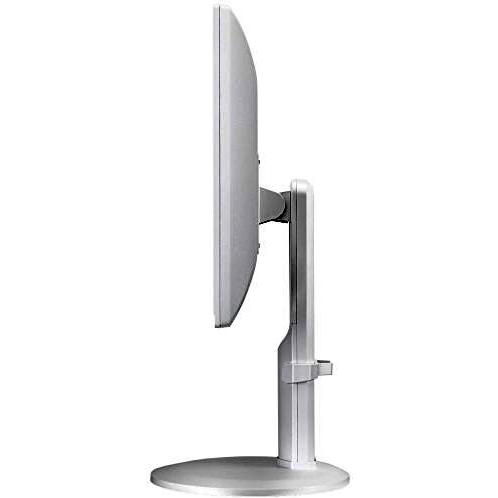
Sponsored iiyama ProLite B1980SD-W1 LED display 48.3 cm (19") 1280 x 1024 pixels White
157.99 GBP
Price updated on: 29-10-2025 14:07:03
157.99 GBP
Price updated on: 29-10-2025 14:07:03 | Identifiers | |
|---|---|
| MPN | DeLOCK 42492 |
| Dimensions / Weight | |
| Key Features | |
| 3D technology | N |
|
AC power in Indicates whether the product requires an AC mains power supply. A value of "Yes" means the device can be powered from a standard electrical outlet, while "No" indicates it does not use AC mains power (e.g., battery‑powered or USB‑only devices).
|
Yes |
|
AMD FreeSync Indicates whether a monitor or graphics card supports AMD’s Adaptive Sync technology, FreeSync. A value of "Yes" means the device is compatible; "No" means it does not support the feature.
|
No |
|
Cable lock slot type Specifies the type of interface or mechanism used to secure a cable in its port, such as Kensington, Noble, IBM, or other standard lock slots. This attribute helps users identify compatibility and security features of the device.
|
Kensington |
|
Cables included A list of the cable types that are supplied with the product, such as USB, HDMI, VGA, DisplayPort, LAN (RJ‑45), SATA, audio or other relevant connectors.
|
AC,Audio (3.5mm),DVI,VGA |
|
Colour The colour or combination of colours that a product is available in, expressed as common names such as "Black", "Silver" or comma‑separated lists like "Black, White". It indicates the visual appearance of the item for consumers.
|
White |
| Display | LED |
|
Display brightness The amount of light emitted per unit area from a display surface, measured in candela per square meter (cd/m²). It indicates how bright the screen will appear under typical viewing conditions and allows users to compare brightness levels across devices.
|
250 cd/m² |
| Display diagonal | 19.0" |
|
Display number of colours The total count of distinct colours that a display can render, typically expressed as a numeric value (e.g., 16.78 million). This attribute indicates the colour depth and richness of the visual output; higher numbers generally mean more accurate and vibrant images.
|
16.78 million colors |
|
Display resolution The pixel dimensions of a display or image, expressed as width by height (e.g., 1920x1080). It indicates how many pixels are used to render visual content and is commonly used for monitors, TVs, smartphones, cameras, and digital images.
|
1280x1024 |
|
Display surface The visual appearance or texture of a product’s display surface, such as matte, glossy, or satin. It indicates how light reflects off the screen and can affect glare, visibility, and aesthetic preference for users.
|
Matt |
|
Display viewable area The maximum width and height of a display that can be viewed or used at one time, expressed as two dimensions separated by an ‘x’ (e.g., 527.04 x 296.46 mm). It indicates the usable visual space on the screen for content or interaction.
|
301.05 x 376.32 mm |
|
DVI-D ports Represents how many DVI‑D connectors are present on the product. The value is a simple integer indicating the total count of DVI‑D ports, regardless of version or configuration.
|
1 |
|
Energy rating The energy rating indicates the relative efficiency of an appliance or electronic device, expressed with letters ranging from A+++ (most efficient) to G (least efficient). This classification allows consumers to compare expected operating costs and environmental impact across similar products.
|
E |
|
EPEAT Compliance The level of a product’s compliance with the EPEAT (Electronic Product Environmental Assessment Tool) program, indicating how well it meets environmental and sustainability criteria. Typical levels are "Gold", "Silver" or "Bronze".
|
Silver |
|
Height adjustment The ability of a product to change its vertical dimension, typically measured in millimetres, centimetres or inches. It indicates whether the user can raise or lower the item and, if so, by how much. This attribute applies to monitors, desks, furniture, stands and other equipment that offer adjustable height.
|
13 cm |
|
Horizontal scan range The range of frequencies, expressed in kilohertz (kHz), over which a device can process or display horizontal signals or scan lines. It indicates the minimum and maximum operating frequencies for horizontal scanning operations.
|
24 - 80 kHz |
|
Market positioning A classification that indicates the target audience or use case for a product, such as Business, Gaming, Home & Office, Education, etc. It helps customers quickly identify which products are best suited to their needs.
|
Business |
|
Native aspect ratio The proportion between the width and height of a screen or image, expressed as two numbers separated by a colon (e.g., 16:9). It indicates whether content is designed for widescreen, square, or other aspect ratios and helps users match devices to their media formats.
|
5:4 |
|
Number of OSD languages The total number of distinct languages that can be displayed on the screen‑on‑display (OSD) interface of a device, such as a monitor or TV. It indicates how many language options are available for menu navigation, subtitles, and other on‑screen text, allowing users to choose their preferred language when interacting with the product.
|
9 |
|
Number of speakers The total count of individual speaker units included in the product. It indicates how many separate speakers are present, whether built‑in or external, and helps users compare audio capabilities across models.
|
2 |
|
Operating relative humidity The range of relative humidity (in percentage) within which the product is designed to operate reliably. Values are expressed as a minimum–maximum interval such as "20 - 80 %" and indicate the acceptable environmental moisture level for optimal performance.
|
10 - 80 % |
|
Operating temperature The range of temperatures in which a product can safely operate without risk of damage or performance degradation. Values are expressed in degrees Celsius (°C) and may represent a single temperature, a minimum–maximum interval, or an average operating point.
|
5 - 35 °C |
|
OSD Languages A list of natural languages that can be displayed on the screen‑on‑display (OSD) interface of a device, such as a monitor or TV. Each entry represents a language option available for menu navigation, subtitles, and other on‑screen text.
|
Traditional Chinese, German, English, Spanish, French, Italian, Japanese, Polish, Russian |
|
Panel mounting interface The pair of horizontal and vertical dimensions in millimetres that a product supports for VESA mounting (e.g., "100 × 100 mm"). This value indicates the exact hole spacing required by a mounting bracket to secure the device. It is used for monitors, TVs, projectors and other display equipment that can be wall‑mounted or attached to stands.
|
100 x 100 mm |
|
Panel type The specific technology used to construct the display panel, such as IPS, TN, VA, OLED, or LCD. It indicates how pixels are controlled and affects image quality, color accuracy, viewing angles, and power consumption.
|
TN |
|
Pivot angle The maximum angular range a product can rotate or tilt around its vertical axis, expressed in degrees. It indicates how far the device can pivot from its neutral position while maintaining functionality and usability.
|
0 - 90° |
|
Pixel pitch Represents the physical dimensions of a single pixel on a display or imaging device, expressed as width and height in a length unit (e.g., millimeters). This attribute allows comparison of the physical resolution across screens, cameras, and other pixel‑based technologies.
|
0.294 x 0.294 mm |
|
Placement supported A list of the positions or mounting options where a product can be installed, such as indoor, outdoor, wall, desk, floor, ceiling, or universal. Each value represents a distinct placement scenario that the device supports.
|
Horizontal |
| Power consumption | 16 W |
| Power consumption (StandBy) | 0.5 W |
| Screen shape | Flat |
|
Storage relative humidity The range of relative humidity (expressed as a percentage) within which the storage device is designed to operate reliably. Values are given as a minimum–maximum interval such as "10 - 90 %" and indicate the acceptable environmental moisture level for optimal performance.
|
5 - 85 % |
|
Storage temperature The range of temperatures in which a device can safely operate without risk of damage or performance degradation. Values are expressed in degrees Celsius (°C) and may represent a single temperature, a minimum–maximum interval, or an average operating point.
|
-20 - 60 °C |
|
Swivel angle range The maximum angular range a device can rotate or tilt, expressed as a numeric interval in degrees (e.g., "-45 to 45°"). It indicates how far the product can pivot left/right or up/down from its neutral position.
|
-160 - 160° |
|
Tilt angle range The minimum and maximum angles, expressed in degrees, that a monitor can be tilted or adjusted vertically while maintaining acceptable performance or usability. It indicates the tilt limits for displays such as monitors, stands, or other adjustable equipment.
|
-5 - 22° |
|
Vertical scan range The range of vertical scan frequencies that a display device can support, expressed in hertz (Hz). It indicates the minimum and maximum refresh rates at which the screen updates vertically, affecting visual smoothness and stability.
|
56 - 75 Hz |
|
Viewable size horizontal The width of the display area that a user can see without distortion, measured in a physical unit such as centimeters or inches. It represents the actual horizontal span of the screen that is visible when looking straight at it.
|
37.6 cm |
|
Viewable size vertical The maximum vertical dimension of the visible area on a display screen, expressed as a linear measurement (e.g., centimeters or inches). It indicates how tall the portion of the screen that can be seen by a user is, which helps compare monitors and other visual devices.
|
30.1 cm |
|
Viewing angle horizontal The horizontal viewing angle is the maximum width, measured in degrees, that a user can see across a display or screen while maintaining acceptable visual quality. It indicates how far left and right one can look without significant loss of clarity or distortion.
|
170° |
|
Viewing angle vertical The maximum vertical field of view, measured in degrees, that a user can see from the top to the bottom of a display or screen while maintaining acceptable visual quality. It indicates how far up and down one can look without significant loss of clarity or distortion.
|
160° |
|
Volume control Indica el mecanismo o método con que se opera la función de ajuste de volumen en un producto, como botones físicos, controles giratorios, táctiles, digitales o combinaciones de estos. Los valores comunes incluyen "Tocar", "Botones", "Giratorio", "Control en línea" y otras variantes similares.
|
Digital |

DeLOCK is a brand that specializes in computer and electronic accessories. They offer a wide range of products, including cables, adapters, and storage solutions. Their products are high quality and affordable, making them a popular choice for consumers.


