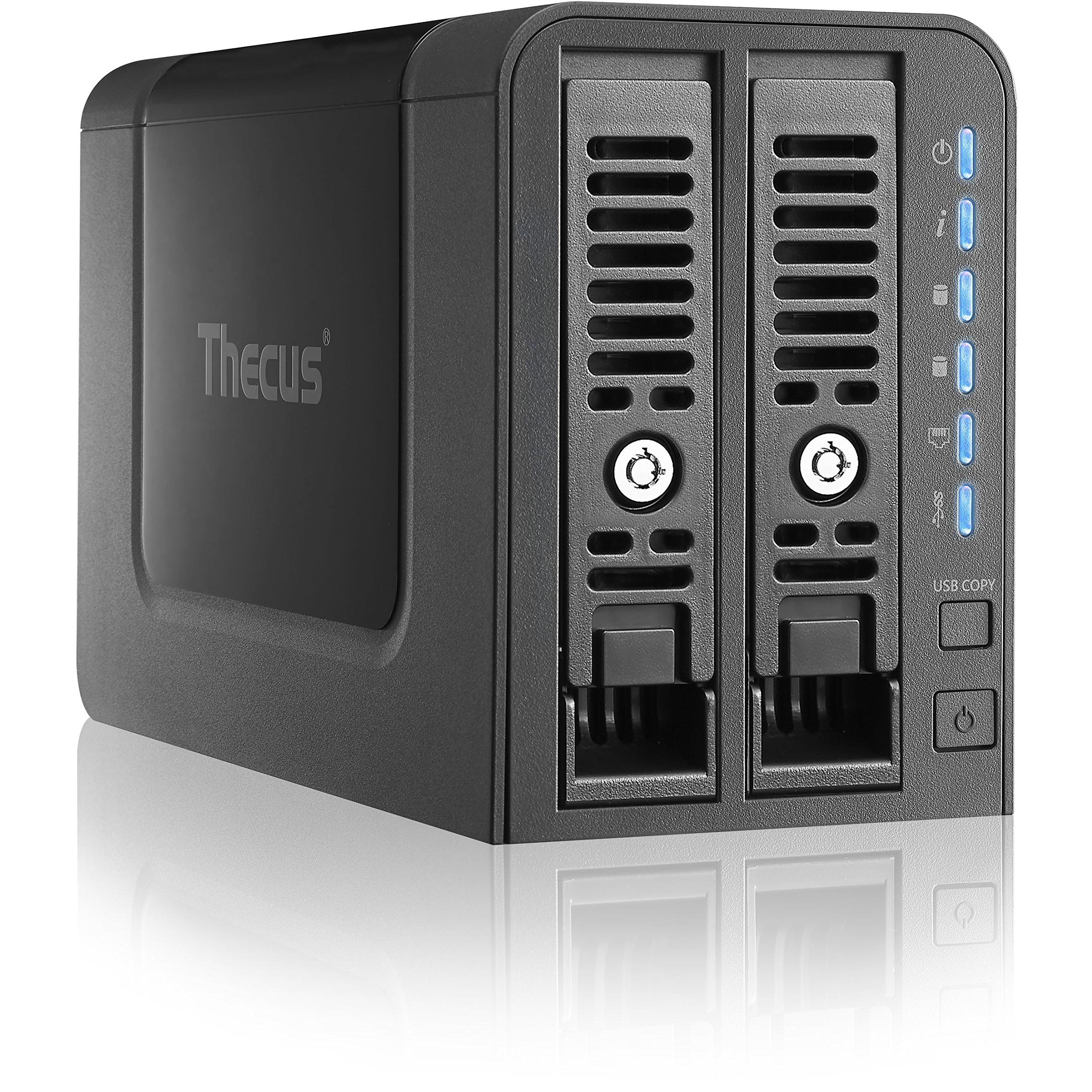
Thecus N2350 2-Bay NAS Server with 1GB RAM


Sponsored This site contains affiliate links for which we may receive compensation. More information
Find other available options:

| Identifiers | |
|---|---|
| Model | Thecus N2350 |
| MPN | Thecus N2350 |
| Dimensions / Weight | |
| Key Features | |
| Backup features | Cloud,iSCSI LUN |
|
Backup function Indicates whether a device has the capability to create backups of its data or settings, allowing restoration in case of loss, failure, or interruption.
|
Yes |
|
Built-in FTP server Indicates whether the product includes a built‑in FTP server that allows file transfer and management over the network without requiring an external device.
|
Yes |
| Built-in iTunes server | Yes |
|
Certification A list of official certifications or compliance marks that the product has received from regulatory bodies, safety organizations, or industry standards groups. Each entry represents a distinct certification such as CE, FCC, RoHS, UL, or WEEE, and may include additional details like version numbers or specific test reports.
|
CE/FCC/C-Tick/VCCI/BSMI, WEEE |
|
Chassis type The physical form factor of a computer chassis, indicating its size and layout such as Tower, Desktop, Mini‑PC, or rack units (e.g., 1U, 2U). This attribute helps users identify the footprint, mounting options, and compatibility with other hardware.
|
Tower |
|
Colour The colour or combination of colours that a product is available in, expressed as common names such as "Black", "Silver" or comma‑separated lists like "Black, White". It indicates the visual appearance of the item for consumers.
|
Black |
|
Cooling type The method or mechanism used to dissipate heat from a component such as a processor, graphics card, or other electronic part. It indicates whether the device relies on active cooling (fans or liquid pumps), passive heat sinks, or hybrid solutions, and helps users assess thermal performance and noise levels.
|
Active |
|
Depth The linear measurement of an object from front to back or top to bottom, expressed in a physical unit such as millimeters, centimeters, inches, etc. It indicates how deep the item is and can be used for fitting, compatibility, or spatial planning.
|
8.54" (217 mm) |
|
Device class A free‑text label that identifies the general category or type of a device, such as "NAS", "Server", "Router", "Storage Enclosure" or any other descriptive class used by manufacturers to classify their products. The value is intended to help users quickly understand the primary function or form factor of the item.
|
Home & Home Office |
|
Ethernet LAN Indicates whether the product includes an Ethernet LAN interface for wired network connectivity, allowing data transmission over RJ‑45 or compatible cables.
|
Yes |
|
Ethernet LAN data rates Maximum theoretical speed at which a device can send or receive data over its Ethernet LAN interface, expressed in megabits per second (Mbps) or gigabits per second (Gbps). It represents the upper bound of throughput under optimal conditions and is useful for comparing network performance between devices with wired connectivity.
|
100,1000 Mbit/s |
|
Ethernet LAN ports Represents the total count of Ethernet LAN (RJ‑45) interfaces available on a product. The value is an integer indicating how many physical Ethernet ports are present, regardless of speed or generation.
|
1 |
|
Flash memory The total amount of internal flash memory available in a device, expressed as a data size (e.g., megabytes or gigabytes). This attribute indicates how much data can be stored on the device’s built‑in flash storage and is useful for comparing storage capacity across products.
|
512 MB |
|
Height The vertical dimension of a product measured from its lowest to highest point. It is expressed in a physical unit such as millimetres, centimetres or inches and applies to any item where height is relevant, including books, electronics, furniture and other objects.
|
5.31" (135 mm) |
|
Hot spare Indicates whether the device includes an active backup unit (hot spare) that can automatically replace a failed drive without service interruption.
|
Yes |
|
Hot-swap drive bays Indicates whether the product’s drive bays support hot‑swap, meaning drives can be inserted or removed while the device is powered on without shutting down or rebooting.
|
Yes |
| Installed storage drive type | No |
|
Internal memory type The type of memory physically installed inside a device, such as DDR4 SDRAM, LPDDR3, or other RAM variants. It indicates the architecture and generation of the internal memory modules that the product uses or supports.
|
DDR4 |
| iSCSI support | Yes |
|
LED indicators A list of the functions or statuses that an LED indicator on a device can display, such as power status, activity, link, and other operational signals.
|
HDD,LAN,Power,System,USB |
|
Linux operating systems supported List of Linux operating systems that the product can run or support, including specific versions and architectures when relevant. Each value represents a distinct Linux distribution or kernel version supported by the hardware or software.
|
Yes |
|
Mac Compatibility Indicates whether a product is compatible with Apple Mac computers or macOS operating systems. The value can be "Yes" if the device supports Macs, or "No" if it does not.
|
Yes |
|
Multilingual support Indicates whether a product supports multiple languages for its user interface, documentation or help resources. A value of "Yes" means the device offers language options beyond the default; "No" indicates it is limited to a single language.
|
Yes |
| Noise Level | 20 dB |
|
On/off switch Indicates whether the product includes an on/off switch that allows the user to power it on or off manually.
|
Yes |
|
Operating relative humidity The range of relative humidity (in percentage) within which the product is designed to operate reliably. Values are expressed as a minimum–maximum interval such as "20 - 80 %" and indicate the acceptable environmental moisture level for optimal performance.
|
0 - 80% |
|
Operating system installed The operating system that is installed on the device, indicating the software platform that manages hardware resources and provides services for applications. It can be a commercial OS such as Windows or macOS, an open‑source distribution like Linux, or a proprietary firmware used in embedded devices.
|
ThecusOS |
|
Operating system version The specific version of the operating system that a product supports or runs, expressed as a numeric revision (e.g., 10, 11) or a descriptive name (e.g., Nougat). This attribute helps users determine compatibility with software and updates.
|
7.0 |
|
Power management Indicates whether the device supports power‑management features such as automatic sleep, wake‑on‑LAN, or energy‑saving modes. A value of "Yes" means the product can enter low‑power states or be remotely controlled to conserve energy; "No" indicates it lacks these capabilities.
|
Yes |
|
Power supply location The physical position where the power supply unit is installed or mounted within a device, such as top, bottom, rear, side, front, or built‑in. This attribute helps users understand where to find the power source and plan cable routing or ventilation.
|
External |
|
Power supply unit PSU capacity The electrical power rating of a power supply unit (PSU), expressed in watts (W). It indicates the maximum output power that the PSU can deliver to connected components, helping users assess compatibility and energy requirements for their system.
|
40 W |
|
Processor cores The total number of physical processing units in a single central processing unit (CPU). This value indicates how many independent tasks the CPU can handle simultaneously, influencing multitasking and parallel performance.
|
2 |
|
Processor family The processor family identifies the group or series of CPU models that share a common architecture, design, and performance characteristics. It helps users compare processors across brands and generations by indicating the underlying technology used in the chip.
|
Marvell Armada 385 |
|
RAID levels A comma‑separated list that specifies the RAID configurations supported by a storage controller or device. Each entry can be a numeric level (e.g., 0, 1, 5, 10) or a special label such as JBOD. This attribute indicates which disk arrangements the system can manage.
|
0,1,JBOD |
|
RAID Support A comma‑separated list of RAID levels that a storage device or controller can support, such as 0, 1, 5, 10, JBOD, and other proprietary configurations. Each value represents a distinct RAID mode the system is capable of creating or managing.
|
Yes |
|
Reset button Indicates whether the device has a physical reset button that restores factory settings or original configuration when pressed.
|
Yes |
|
RoHS compliance Indicates whether the product is manufactured in accordance with the RoHS (Restriction of Hazardous Substances) directive, which limits the use of certain hazardous materials in electrical and electronic equipment.
|
Yes |
|
Security algorithms A list of cryptographic and authentication methods that a device can use for secure communication or data protection. Each entry represents a distinct algorithm or protocol, such as encryption ciphers (e.g., AES, WEP), authentication mechanisms (e.g., RADIUS, WPA‑PSK), or network security protocols (e.g., HTTPS, SSL/TLS). The values are typically separated by commas and may include both technical identifiers and consumer‑friendly labels.
|
SNMP,SSH |
|
SMART support Indicates whether the product supports Intel Smart Response Technology (or equivalent), a feature that uses flash memory as a cache to accelerate disk access and improve overall system performance.
|
Yes |
|
Storage drive interface List of physical or logical interfaces that allow a storage drive to connect with other components, such as SATA, M.2 PCIe, U.2, SAS, NVMe or other standard connections.
|
Serial ATA II,Serial ATA III |
|
Storage drive size The physical width of a storage drive measured in inches or millimetres, typically expressed as the diagonal size of the drive’s enclosure (e.g., 2.5" or 3.5"). This measurement indicates the form factor that determines compatibility with computer bays, external enclosures, and mounting brackets.
|
2.5/3.5" |
|
Storage drives installed The total count of individual storage devices (hard disk drives or solid‑state drives) that are physically present in the product. It indicates how many separate drives are installed, regardless of capacity or interface type.
|
No |
|
Supported network protocols A list of network communication protocols that a device can use or support, such as TCP/IP, HTTP, HTTPS, FTP, DHCP, DNS, and various wireless standards. Each protocol is represented by its standard name and may be separated by commas or slashes in the source data.
|
TCP/IP/AppleTalk, SMB/CIFS, HTTP/HTTPS, FTP, NFS v4, AFP, IPV6, IPV4 |
|
Supported storage drive types A list of the types of storage drives that a product can use, such as HDD or SSD. Each entry indicates a distinct drive type supported by the device, allowing users to understand which internal or external storage media are compatible.
|
HDD,SSD |
|
System log Indicates whether the product includes a system log feature that records events, errors, or status updates for troubleshooting and monitoring purposes. The value is a simple yes/no answer.
|
Yes |
|
Type The general category or style of the product, such as laptop, printer cartridge, or cooling fan. It helps buyers quickly identify the nature of the item and compare similar products.
|
NAS |
|
USB port Indicates the presence and quantity of USB connectors on a product. The value is typically an integer representing how many USB ports are available, regardless of type or version.
|
Yes |
|
Wake-on-LAN ready Indicates whether the device can be powered on remotely via Wake‑on‑LAN, allowing a network administrator or user to start it from sleep or off state using a network packet.
|
Yes |
|
Web-based management Indicates whether the product can be configured and monitored through a web interface accessible via a browser, allowing remote administration over a local or internet connection.
|
Yes |
|
Wi-Fi Indicates whether the product has built‑in Wi‑Fi capability, allowing it to connect to wireless networks without requiring external adapters or dongles.
|
No |
|
Width The horizontal measurement of a product, expressed in a linear unit such as millimetres or inches. It indicates how wide the item is from one side to the other and is used for sizing, fitting, and compatibility purposes.
|
3.82" (97 mm) |
Thecus