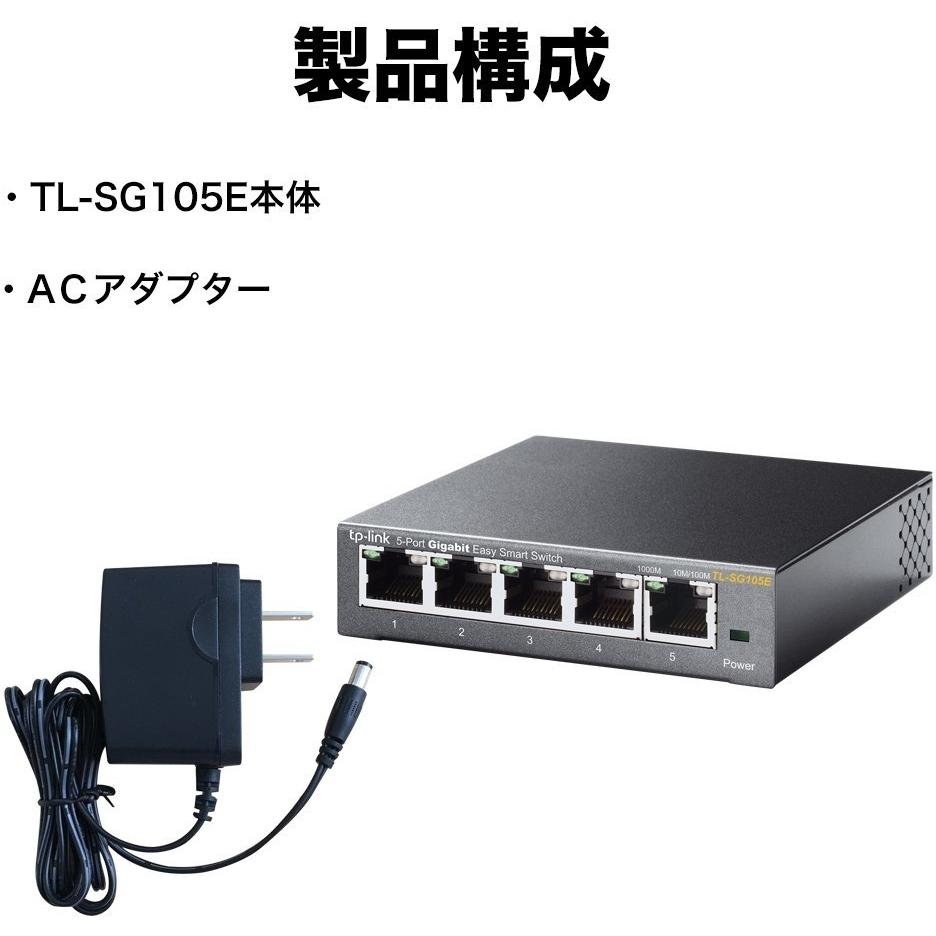
TL-SG105E 5-Port Gigabit Easy Smart Switch



Sponsored This site contains affiliate links for which we may receive compensation. More information
Find other available options:

| Identifiers | |
|---|---|
| MPN | TP-LINK 2781095 |
| Model | TP-LINK TL-SG105E |
| Dimensions / Weight | |
| Key Features | |
|
10g support Indicates whether the product supports 10 Gigabit Ethernet (10 GbE) connectivity, either through dedicated 10 GbE ports or via SFP+ modules that enable 10 GbE operation.
|
No |
|
AC input frequency The frequency of the alternating current supplied to the device, expressed in hertz (Hz). It indicates the acceptable operating range for the electrical mains that powers the product.
|
50 Hz |
|
AC input voltage The alternating current voltage range that the product accepts from its power source, expressed in volts (V). It indicates the minimum and maximum supply voltages compatible with the device.
|
220 V |
|
Auto MDI/MDI-X Indicates whether the device can automatically detect and configure MDI or MDI‑X connections for network cables, simplifying cable management and reducing manual setup.
|
Yes |
|
Basic switching RJ-45 Ethernet ports quantity Indicates the total count of physical RJ‑45 Ethernet connectors available on a device for wired network connectivity. The value is an integer representing how many separate ports can be used to connect Ethernet cables.
|
5 |
|
Cables included A list of the cable types that are supplied with the product, such as USB, HDMI, VGA, DisplayPort, LAN (RJ‑45), SATA, audio or other relevant connectors.
|
AC |
|
Certification A list of official certifications or compliance marks that the product has received from regulatory bodies, safety organizations, or industry standards groups. Each entry represents a distinct certification such as CE, FCC, RoHS, UL, or WEEE, and may include additional details like version numbers or specific test reports.
|
FCC, CE, RoHS |
|
Compatible operating systems List of operating systems that the product can run or support, including specific versions and architectures when relevant. Each value represents a distinct OS that is compatible with the hardware or software.
|
Microsoft Windows XP, Vista Windows 7, Windows 8, MAC OS, NetWare, UNIX / Linux |
|
Copper ethernet cabling technology A comma‑separated list of the copper Ethernet standards supported by a device, such as 10BASE‑T, 100BASE‑TX, or 1000BASE‑T. Each entry indicates a specific speed and physical specification that the product can transmit over its RJ‑45 ports.
|
1000BASE-T,100BASE-TX,10BASE-T |
|
Depth The linear measurement of an object from front to back or top to bottom, expressed in a physical unit such as millimeters, centimeters, inches, etc. It indicates how deep the item is and can be used for fitting, compatibility, or spatial planning.
|
98 mm |
|
Flow control support Indicates whether a device includes hardware or firmware that can manage the flow of data on its interfaces, such as enabling or disabling automatic pause frames, handling congestion, or providing other traffic‑control mechanisms. A value of "Yes" means the feature is present and can be configured; "No" indicates it is not available.
|
Yes |
|
Heat dissipation The amount of thermal energy a product can dissipate, expressed in a standard unit such as BTU per hour or watts. It indicates the cooling requirement and helps compare how much heat the device generates during operation.
|
9.62 BTU/h |
|
Height The vertical dimension of a product measured from its lowest to highest point. It is expressed in a physical unit such as millimetres, centimetres or inches and applies to any item where height is relevant, including books, electronics, furniture and other objects.
|
25 mm |
| IGMP snooping | Yes |
|
Input current The electrical current that a device draws from its power source, expressed in amperes (A). It indicates how much current the product consumes during normal operation and helps determine compatibility with power supplies or USB ports.
|
0.6 A |
|
Jumbo frames The largest Ethernet frame size (in bytes) that the device can transmit or receive without fragmentation. This value determines the maximum payload that can be sent in a single network packet, which can improve throughput for high‑bandwidth applications.
|
16000 |
| Jumbo frames support | Yes |
|
LED indicators A list of the functions or statuses that an LED indicator on a device can display, such as power status, activity, link, and other operational signals.
|
Yes |
|
Link aggregation Indicates whether the device can combine multiple network connections into a single logical link to increase bandwidth or provide redundancy.
|
Yes |
|
MAC address table The total count of unique MAC addresses that the device can store in its forwarding table. This value indicates how many devices can be simultaneously connected before the switch must start discarding or aging out older entries.
|
8192 entries |
|
Networking standards A list of the networking protocols and standards that a device can support or comply with, such as IEEE 802.11 variants for wireless, IEEE 802.3 for Ethernet, or other relevant networking specifications. The values are typically separated by commas and may include both technical identifiers and consumer‑friendly labels.
|
IEEE 802.1p,IEEE 802.1Q,IEEE 802.3,IEEE 802.3ab,IEEE 802.3u,IEEE 802.3x |
|
Package type The form of packaging used for a product, such as box, blister pack, bag, or pallet. It indicates how the item is contained and protected during shipping and storage.
|
Box |
|
Packet buffer memory The amount of temporary storage that a device allocates in its internal memory for buffering data before processing or forwarding it. Expressed as a digital capacity (e.g., kilobytes, megabytes), this value indicates how much information the hardware can hold at once and influences performance when handling high‑throughput or bursty traffic.
|
1 MB |
|
Port mirroring Indicates whether the device supports port mirroring, a feature that allows one or more ports to copy traffic from another port for monitoring or analysis purposes.
|
Yes |
| Power supply included | Yes |
|
Quick start guide Indicates whether a quick‑start guide is provided with the product. A value of "Yes" means that a brief, introductory manual or overview is included to help users get started quickly; "No" indicates that no such guide is supplied.
|
Yes |
|
Rack mount kit Indicates whether the product is a rack mounting kit and, if applicable, its compatibility with standard rack systems. The value can be "Yes" or "No", or it may include a measurement such as "1U" or "2U" to specify the height occupied by the kit when installed in a rack.
|
Yes |
|
Store-and-forward Indicates whether the device can temporarily store data packets before forwarding them, allowing traffic management even when the destination is not immediately available. A positive value means the device can buffer and later deliver packets reliably.
|
Yes |
|
Switch layer The network layer(s) that a device can operate at, expressed as a string such as "L2", "L3" or combinations like "L2/L3". This attribute indicates the protocol stack level supported by the hardware or firmware.
|
L2 |
|
Throughput The maximum rate at which a device can process or transmit data, expressed in megabits per second (Mpps). It indicates the capacity of network equipment such as switches, routers, or hubs to handle traffic without bottlenecks.
|
7.4 Mpps |
|
User guide The mass of the product expressed in a standard unit such as grams or kilograms. It represents how heavy the item is and can be used for shipping, handling, or user information purposes.
|
Yes |
|
VLAN support Indicates whether the device can configure and manage Virtual LANs (VLANs) for network segmentation and traffic isolation. A value of "Yes" means the product supports VLAN tagging, creation, and management; a value of "No" indicates it does not provide this capability.
|
Yes |
|
Web-based management Indicates whether the product can be configured and monitored through a web interface accessible via a browser, allowing remote administration over a local or internet connection.
|
Yes |
|
Width The horizontal measurement of a product, expressed in a linear unit such as millimetres or inches. It indicates how wide the item is from one side to the other and is used for sizing, fitting, and compatibility purposes.
|
100 mm |

TP-Link is a brand of networking products that was founded in 1996. The company is headquartered in China, and manufactures a wide range of networking products, including routers, switches, and adapters. TP-Link has a large global presence, and is one of the most popular networking brands in the world.


