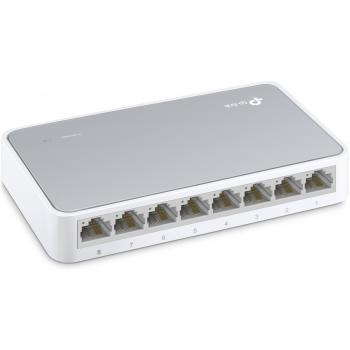
TP-LINK TL-SF1008D Unmanaged Fast Ethernet (10/100) White


Sponsored This site contains affiliate links for which we may receive compensation. More information
 Back to the Office
Sponsored TP-Link 8-Port 10/100Mbps Desktop Network Switch
18.99 GBP
Price updated on: 28-08-2026 15:46:31
18.99 GBP
Price updated on: 28-08-2026 15:46:31 | Identifiers | |
|---|---|
| MPN | TP-LINK TL-SF1008D V10 |
| Model | TP-LINK TL-SF1008D V10(UK) |
| Dimensions / Weight | |
| Key Features | |
|
10g support Indicates whether the product supports 10 Gigabit Ethernet (10 GbE) connectivity, either through dedicated 10 GbE ports or via SFP+ modules that enable 10 GbE operation.
|
No |
|
3D Indicates whether the product has built‑in support for 3‑dimensional (3D) content or displays. A value of "Yes" means the device can render or display 3D images, videos, or games; a value of "No" means it does not have native 3D capability.
|
Yes |
|
AC adapter included Indicates whether the product comes with an AC power adapter included in the package. A value of "Yes" means a charger is supplied, while "No" indicates that no charger is provided and the user must obtain one separately.
|
Yes |
|
AC input frequency The frequency of the alternating current supplied to a power supply or charger, expressed in hertz (Hz). It indicates the acceptable operating range for the electrical mains that powers the device, ensuring proper functionality and safety.
|
50 |
|
AC input voltage The range of alternating current voltage that the product accepts from its power source, expressed in volts (V). It indicates the minimum and maximum supply voltages compatible with the device across different regions.
|
220 |
|
AC power in Indicates whether the product requires an AC mains power supply. A value of "Yes" means the device can be powered from a standard electrical outlet, while "No" indicates it does not use AC mains power (e.g., battery‑powered or USB‑only devices).
|
Yes |
|
Access Control List ACL Indicates whether the product supports an Access Control List (ACL) feature, allowing administrators to define rules that permit or deny network traffic based on criteria such as IP address, port number, or protocol.
|
Yes |
|
Aperture range The minimum and maximum f‑number (aperture value) that a camera lens or optical system can achieve, expressed as a numeric range (e.g., "F1.4-F16") or a single value when only one aperture is available. It indicates the zoom and light‑gathering capability of the lens.
|
1.51 - 1.99 |
|
Audio L/R out Indicates the total count of left‑and‑right (L/R) audio output ports available on a product, such as headphone jacks or speaker connectors that provide stereo sound. The value is an integer representing how many separate L/R pairs can be used to connect external audio devices.
|
1 |
|
Authentication A list of authentication mechanisms that a network device can use to verify users or devices, such as Guest VLAN, Port-based authentication, MAC-based authentication, Web-based authentication, Captive Portal, and Auto VLAN. The values are comma‑separated strings representing each supported method.
|
MAC-based authentication, Port-based authentication, Web-based authentication |
|
Auto MDI/MDI-X Indicates whether the device can automatically detect and configure MDI or MDI‑X connections for network cables, simplifying cable management and reducing manual setup.
|
Yes |
|
Auto-negotiation Indicates whether the device automatically negotiates link parameters such as speed, duplex mode and flow control with a connected partner, ensuring optimal communication settings without manual configuration.
|
Yes |
|
Basic switching RJ-45 Ethernet ports quantity Indicates the total count of physical RJ‑45 Ethernet connectors available on a device for wired network connectivity. The value is an integer representing how many separate ports can be used to connect Ethernet cables.
|
8 |
|
Batteries included Indicates whether the product comes with batteries included in the package. A value of "Yes" means that batteries are supplied, while a value of "No" indicates that no batteries are provided and must be purchased separately.
|
Yes |
|
BPDU protection Indicates whether the network device supports BPDU (Bridge Protocol Data Unit) protection, a feature that prevents bridge loops by filtering or blocking BPDUs during operation.
|
Yes |
|
Built-in display Indicates whether the product includes a built‑in screen or display unit that can be used directly for viewing content, such as an integrated monitor on a laptop or a built-in display on appliances. A value of "Yes" means the device has such a display; a value of "No" means it does not.
|
Yes |
|
Built-in speakers Indicates whether the product includes built‑in speaker(s) that can produce sound without requiring external audio devices. A value of "Yes" means the device has one or more integrated speakers; a value of "No" means it does not.
|
Yes |
|
Bulb power The electrical power rating of a light bulb or lamp, expressed in watts (W). It indicates the amount of energy the bulb consumes during operation or the maximum output it can deliver to connected equipment.
|
200 W |
|
Cable Lock Slot Indicates whether the product includes a slot for inserting a cable lock, such as a Kensington or similar security device.
|
Yes |
|
Cable lock slot type Specifies the type of interface or mechanism used to secure a cable in its port, such as Kensington, Noble, IBM, or other standard lock slots. This attribute helps users identify compatibility and security features of the device.
|
Kensington |
|
Cables included A list of the cable types that are supplied with the product, such as USB, HDMI, VGA, DisplayPort, LAN (RJ‑45), SATA, audio or other relevant connectors.
|
AC |
|
Card reader integrated Indicates whether the device includes a built‑in card reader that can read removable memory cards such as SD, microSD, MMC or similar formats.
|
No |
|
Case colour The colour or combination of colours that a product’s outer shell or enclosure is available in, expressed as common names such as "Black", "Silver" or comma‑separated lists like "Black, White". It indicates the visual appearance of the case for consumers.
|
Grey |
|
Certification A list of official certifications or compliance marks that the product has received from regulatory bodies, safety organizations, or industry standards groups. Each entry represents a distinct certification such as CE, FCC, RoHS, UL, or WEEE, and may include additional details like version numbers or specific test reports.
|
FCC, CE, RoHs |
|
Console port Represents how many console ports are physically present on the product. The value is a simple integer indicating the total count of console connectors, regardless of type or version.
|
RJ-45 |
|
Contrast ratio The contrast ratio is the proportion between the brightest and darkest luminance a display can produce, expressed as a simple ratio such as 1000:1. It indicates how well a screen can differentiate light from dark areas, affecting image clarity and color depth.
|
60000:1 |
|
Copper ethernet cabling technology A comma‑separated list of the copper Ethernet standards supported by a device, such as 10BASE‑T, 100BASE‑TX, or 1000BASE‑T. Each entry indicates a specific speed and physical specification that the product can transmit over its RJ‑45 ports.
|
10BASE-T,100BASE-TX |
|
Depth The linear measurement of an object from front to back or top to bottom, expressed in a physical unit such as millimeters, centimeters, inches, etc. It indicates how deep the item is and can be used for fitting, compatibility, or spatial planning.
|
7.9 cm |
|
DHCP client Indicates whether the device supports the DHCP client function, meaning it can automatically request an IP address and related network settings from a DHCP server.
|
Yes |
| Display | LCD |
| Display diagonal | 1.55 cm (0.61") |
|
Edition A brief statement indicating the edition or version of a product, such as "Reprint", "New Edition", or a numeric edition number like "2nd edition". It identifies which specific release of the item is being referenced.
|
Unmanaged Switch |
|
Ethernet LAN Indicates whether the product includes an Ethernet LAN interface for wired network connectivity, allowing data transmission over RJ‑45 or compatible cables.
|
No |
|
Flash memory The total amount of internal flash memory available in a device, expressed as a data size (e.g., megabytes or gigabytes). This attribute indicates how much data can be stored on the device’s built‑in flash storage and is useful for comparing storage capacity across products.
|
128 MB |
|
Flow control support Indicates whether a device includes hardware or firmware that can manage the flow of data on its interfaces, such as enabling or disabling automatic pause frames, handling congestion, or providing other traffic‑control mechanisms. A value of "Yes" means the feature is present and can be configured; "No" indicates it is not available.
|
Yes |
|
Focal length range The minimum and maximum focal lengths that a camera lens or optical system can cover, expressed in millimetres (mm). It indicates the zoom capability of the device and helps users understand the field‑of‑view range available.
|
18.2 - 29.2 mm |
|
Focus Specifies the focusing behavior of a camera or imaging device, indicating whether it uses automatic focus, manual focus, or a combination such as auto‑manual. The value is expressed as a free‑text string that describes the mode in use.
|
Manual |
|
Form factor Specifies the physical configuration or design of a product, such as ATX, Micro‑ATX, Mini‑ITX, tower, case with cover, etc. It describes how the device is built and what mounting or expansion options it supports.
|
Desktop |
|
Full duplex Indicates whether a device can transmit and receive data simultaneously on two channels, allowing bidirectional communication without delay. A value of "Yes" means the device supports full‑duplex operation; a value of "No" indicates it operates only in half‑duplex mode.
|
Yes |
|
Full HD Indicates whether the product is capable of displaying or transmitting video at Full HD resolution (1920 × 1080 pixels). A value of "Yes" means that Full HD functionality is supported, while a value of "No" indicates it is not available.
|
Yes |
|
Handheld remote control Indicates whether a handheld device can be operated from a distance using an external remote control such as infrared, Bluetooth or Wi‑Fi. A value of "Yes" means the product supports remote operation; "No" indicates it does not.
|
Yes |
|
HDMI A list of the HDMI ports available on the product, each entry indicating the number of ports and their specific HDMI version or additional features (e.g., "2 x HDMI 2.0b", "1 x HDMI 1.4 with CEC"). This attribute helps users understand both the quantity and capabilities of the HDMI connections.
|
2 |
|
Heat dissipation The amount of thermal energy a product can dissipate, expressed in a standard unit such as BTU per hour or watts. It indicates the cooling requirement and helps compare how much heat the device generates during operation.
|
22 BTU/h |
|
Height The vertical dimension of a product measured from its lowest to highest point. It is expressed in a physical unit such as millimetres, centimetres or inches and applies to any item where height is relevant, including books, electronics, furniture and other objects.
|
2.25 cm |
| IGMP snooping | Yes |
|
In stock Indicates whether the product is a wire‑cut item (custom cut to size) or a stock item (pre‑cut to standard dimensions). This attribute helps buyers understand the manufacturing process and potential customization options.
|
Y |
|
Input current The electrical current drawn by a device when powered, expressed in amperes (A). It indicates how much current the product consumes from its power source during normal operation and can be used to assess compatibility with power supplies or USB ports.
|
0.9 |
|
Internal memory The total amount of internal memory available in a device, expressed as a data size such as megabytes (MB) or gigabytes (GB). It indicates how much information the component can hold for active processes and affects multitasking performance.
|
512 MB |
|
IP routing Indicates whether the product can perform IP routing, forwarding packets between networks based on destination addresses.
|
Yes |
|
Jumbo frames The largest Ethernet frame size in bytes that the device can transmit or receive without fragmentation. This value determines the maximum payload that can be sent in a single network packet, which can improve throughput for high‑bandwidth applications.
|
10000 |
| Jumbo frames support | Yes |
|
Lamp type The classification or technology of a lamp, such as LED, halogen, incandescent, laser, or other variants. The value is a textual label that identifies the light source used by the product and does not include units or numeric quantities.
|
UHE |
|
LED indicators A list of the functions or statuses that an LED indicator on a device can display, such as power status, activity, link, and other operational signals.
|
Yes |
|
LED Status Indicators A list of the operational states that an LED indicator on a device can display, such as power status, activity, link, or other functional signals. Each entry represents a distinct status that the LED may show when the device is in use.
|
Power, Ethernet Ports 1-8 |
|
Link aggregation Indicates whether the device can combine multiple network connections into a single logical link to increase bandwidth or provide redundancy.
|
Yes |
|
Loop protection Indicates whether the device includes loop protection to prevent network loops that can cause broadcast storms and disrupt traffic.
|
Yes |
|
MAC address table The total count of unique MAC addresses that the device can store in its forwarding table. This value indicates how many devices can be simultaneously connected before the switch must start discarding or aging out older entries.
|
1000 entries |
|
Manual Indicates whether a user manual—physical or digital—is provided with the product. A value of "Yes" means that a manual is included, while a value of "No" indicates that no manual is supplied.
|
Yes |
|
Maximum power consumption The highest electrical power that a device can draw or consume during operation, expressed in watts (W). It represents the peak energy usage of the product and is useful for estimating maximum power requirements, comparing efficiency across similar devices, and ensuring compatibility with power supplies.
|
2.05W W |
| MIB support | Yes |
|
Miracast Indicates whether the product is capable of using Miracast, a wireless display standard that allows mirroring or streaming video and audio from a compatible device to the product without cables.
|
Yes |
|
Mobile High-Definition Link Indicates whether the product can transmit or receive high‑definition (HD) video signals over a mobile network connection. A value of "Yes" means the device supports HD content via cellular data, while "No" indicates that this capability is not available.
|
Yes |
|
Multicast support Indicates whether the device can send or receive IP multicast traffic, allowing it to participate in group communications such as streaming media, IPTV, and certain network protocols that rely on multicast distribution.
|
Yes |
|
Native aspect ratio The proportion between the width and height of a screen or image, expressed as two numbers separated by a colon (e.g., 16:9). It indicates whether content is designed for widescreen, square, or other aspect ratios and helps users match devices to their media formats.
|
16:9 |
|
Network Protocols A comma‑separated list of network protocols that a device can use or support, such as TCP/IP, HTTP, HTTPS, FTP, DHCP, DNS, and various other communication standards. The values are typically presented in plain text and may include both technical identifiers and consumer‑friendly names.
|
IEEE 802.3 IEEE 802.3u IEEE 802.3x |
| Noise Level | 37 dB |
|
Noise level economic mode The sound intensity produced by a product while operating in its economic or low‑power mode, expressed in decibels (dB). This value indicates how quiet the device is during energy‑saving operation and helps users assess suitability for quiet environments.
|
27 dB |
|
Number of colours The total count of distinct colours that a display can render, typically expressed in millions or billions. This figure reflects the colour depth and determines how smoothly gradients and subtle hues are reproduced on the screen.
|
1.073 billion colours |
|
Operating altitude The range of altitudes (in meters) at which a product or component can operate reliably without performance degradation due to changes in atmospheric pressure, temperature, or other altitude‑related effects.
|
0 - 3048 m |
| Operating humidity | 10 to 90 % |
|
Output current The electrical current drawn by a device from its power source, expressed in amperes (A). It indicates how much current the product consumes during normal operation and helps determine compatibility with power supplies or USB ports.
|
0.6 A |
|
Output voltage The electrical potential difference that a device delivers to its load, expressed in volts (V). It indicates the nominal voltage supplied by the product’s power output and is useful for matching it with compatible accessories or systems.
|
9 |
|
Package type The form of packaging used for a product, such as box, blister pack, bag, or pallet. It indicates how the item is contained and protected during shipping and storage.
|
Box |
|
Plug and play Indicates whether the product can be used immediately after installation without requiring additional configuration or drivers.
|
Yes |
|
Plug type The electrical plug configuration that the product uses for connection to a power source, such as UK G, EU Schuko, NEMA 5‑15P, or no plug. It indicates whether the appliance can be directly plugged into a standard outlet or requires a special adapter or wiring.
|
Type G (UK) |
|
Port mirroring Indicates whether the device supports port mirroring, a feature that allows one or more ports to copy traffic from another port for monitoring or analysis purposes.
|
Yes |
|
Power adaptor type The classification of the power adaptor used with a device, indicating whether it is external or internal, its electrical interface (AC, DC, USB‑Charging, etc.), and any specific form such as integrated or travel adapters. This attribute helps buyers understand how the device receives power and what kind of connector or cable is required.
|
External |
|
Power connector The type of connector used to supply power to the device, such as AC‑in jack, DC‑in jack, USB Type‑C, SATA Power, or PCIe power connectors. It indicates the physical interface that delivers electrical energy to the product.
|
DC-in jack |
| Power consumption (StandBy) | 0.2 W |
|
Power consumption economy mode The electrical power drawn by a device while operating in its economy or energy‑saving mode, expressed in watts (W). This value indicates the typical energy usage when the product is set to reduce consumption during normal operation.
|
227 W |
| Power over Ethernet PoE | No |
|
Power supply The electrical power consumption or output of the product, expressed in watts (W). It indicates how much energy the device uses during operation or how much power it can deliver to connected equipment.
|
External Power Supply (Included) |
|
Projection technology The optical method used by a projector to create an image, such as DLP, LCD, LED or 3LCD. It indicates the underlying light‑processing system that determines brightness, color accuracy and overall visual performance.
|
3LCD |
|
Projector brightness The amount of light emitted by a projector, expressed in ANSI lumens. It indicates how bright the projected image will appear under typical viewing conditions and allows users to compare brightness levels across different projectors.
|
2500 ANSI lumens |
|
Projector brightness economic mode The amount of light emitted by a projector when operating in its low‑power or energy‑saving mode, expressed in lumens (cd/m² for luminance). This value indicates how bright the screen will appear under typical viewing conditions while conserving energy.
|
1650 ANSI lumens |
|
Projector native resolution The pixel dimensions that a projector can output, expressed as width by height (e.g., 1920x1080). It indicates the native resolution of the projected image and is used to determine compatibility with source content and display quality.
|
1080p (1920x1080) |
|
Quality of Service support Indicates whether a product supports Quality of Service (QoS) features, which allow prioritization and management of network traffic to ensure optimal performance for critical applications.
|
Yes |
|
Quick start guide Indicates whether a quick‑start guide is provided with the product. A value of "Yes" means that a brief, introductory manual or overview is included to help users get started quickly; "No" indicates that no such guide is supplied.
|
Yes |
|
Rack mounting Indicates whether a product is designed to be mounted in a rack system. The value can be "Yes" or "No", or it may specify the height occupied by the device using rack units (U) such as "1U", "2U", or a numeric measurement with unit, e.g., "61.25 mm".
|
No |
|
RMS rated power The root‑mean‑square (RMS) power rating of a device, expressed in watts (W). It represents the average electrical power that the product can deliver or consume under normal operating conditions.
|
10 W |
|
Security algorithms A list of cryptographic and authentication methods that a device can use for secure communication or data protection. Each entry represents a distinct algorithm or protocol, such as encryption ciphers (e.g., AES, WEP), authentication mechanisms (e.g., RADIUS, WPA‑PSK), or network security protocols (e.g., HTTPS, SSL/TLS). The values are typically separated by commas and may include both technical identifiers and consumer‑friendly labels.
|
SNMP,SSH,SSL/TLS |
|
Service life of lamp The total operating hours a lamp can provide before it needs replacement, expressed in units of time such as hours or days.
|
4500 h |
|
Service life of lamp economic mode The total operating hours a lamp can provide before it needs replacement when operated in an energy‑saving or low‑power mode, expressed in units of time such as hours.
|
7500 h |
|
Smart TV Indicates whether the product is a smart television that can connect to the internet and run applications or streaming services.
|
No |
|
Spanning tree protocol Indicates whether the device implements the Spanning Tree Protocol (STP), a network protocol that prevents loops in Ethernet topologies by dynamically blocking and forwarding paths to maintain a loop‑free logical topology.
|
Yes |
|
Storage relative humidity The range of relative humidity (expressed as a percentage) within which the storage device is designed to operate reliably. Values are given as a minimum–maximum interval such as "10 - 90 %" and indicate the acceptable environmental moisture level for optimal performance.
|
5 - 95% |
|
Store and forward Indicates whether the device can temporarily store data packets before forwarding them, allowing traffic management even when the destination is not immediately available. A positive value means the device can buffer and later deliver packets reliably.
|
Yes |
|
Supported network protocols A list of network communication protocols that a device can use or support, such as TCP/IP, HTTP, HTTPS, FTP, DHCP, DNS, and various wireless standards. Each protocol is represented by its standard name and may be separated by commas or slashes in the source data.
|
CSMA/CD, TCP/IP |
|
Switch type The classification of a network switch based on its management capabilities, such as Managed or Unmanaged. This attribute indicates whether the device can be configured and monitored remotely (Managed) or operates with fixed settings without remote configuration (Unmanaged). It helps users choose a switch that matches their networking expertise and control requirements.
|
Unmanaged |
|
Switching capacity The maximum data transfer rate that the device can handle, expressed as a numeric value with an appropriate unit such as Gbit/s or Mbit/s. This attribute indicates how quickly data can be transmitted through the device and helps users compare networking performance across products.
|
1.6 Gbit/s |
|
Throughput The maximum rate at which a device can process or transmit data, expressed in megabits per second (Mpps). It indicates the capacity of network equipment such as switches, routers, or hubs to handle traffic without bottlenecks.
|
2.68 Mpps |
|
Throw ratio The proportion between the distance from a projector to its screen and the width of the projected image, expressed as a simple ratio such as 2:1 or 1.5:1. It indicates how far the projector must be placed to achieve a desired screen size and is useful for planning installation space.
|
1.33 - 2.16:1 |
|
Total Network Ports The total count of all network interface connectors present on the product, including Ethernet RJ‑45 ports, SFP/SFP+ modules, QSFP, and any other wired networking interfaces. The value is a simple integer indicating how many separate network connections can be used simultaneously.
|
8 x 10/100 (Fast Ethernet) RJ-45 |
|
TVI port Represents how many TVI (Television Interface) connectors are present on the product. The value is a simple integer indicating the total count of TVI ports, regardless of version or configuration.
|
No |
|
VLAN support Indicates whether the device can configure and manage Virtual LANs (VLANs) for network segmentation and traffic isolation. A value of "Yes" means the product supports VLAN tagging, creation, and management; a value of "No" indicates it does not provide this capability.
|
Yes |
| Warranty card | Yes |
|
Web-based management Indicates whether the product can be configured and monitored through a web interface accessible via a browser, allowing remote administration over a local or internet connection.
|
Yes |
|
Weight The mass of the product expressed in a standard unit such as grams or kilograms. It represents how heavy the item is and can be used for shipping calculations, handling instructions, or consumer information.
|
3.5 kg |
|
Wi-Fi Indicates whether the product has built‑in Wi‑Fi capability, allowing it to connect to wireless networks without requiring external adapters or dongles.
|
Yes |
|
Wi-Fi standards A list of the wireless networking protocols and frequency bands that a device can connect to, such as 802.11a, 802.11b, 802.11g, Wi‑Fi 4 (802.11n), Wi‑Fi 5 (802.11ac) or Wi‑Fi 6 (802.11ax). The values are typically separated by commas and may include both the technical name and a consumer‑friendly label.
|
IEEE 802.11b,IEEE 802.11g,IEEE 802.11n |
|
Width The horizontal measurement of a product, expressed in a linear unit such as millimetres or inches. It indicates how wide the item is from one side to the other and is used for sizing, fitting, and compatibility purposes.
|
13.45 cm |
|
Zoom capability Indicates whether the product supports any form of optical or digital zoom, allowing the image or field of view to be magnified beyond its native resolution.
|
Yes |
|
Zoom ratio The proportion between the distance from a projector to its screen and the width of the projected image, expressed as a simple ratio such as 2:1 or 1.5:1. It indicates how far the projector must be placed to achieve a desired screen size and is useful for planning installation space.
|
1.6:1 |

TP-Link is a brand of networking products that was founded in 1996. The company is headquartered in China, and manufactures a wide range of networking products, including routers, switches, and adapters. TP-Link has a large global presence, and is one of the most popular networking brands in the world.